
Kondo helped make the LinkedIn power-inbox category easy to understand.
The promise is simple: make LinkedIn DMs feel more like a serious inbox. Faster triage. Better shortcuts. Split inboxes. Snooze. Snippets. Less scrolling. Fewer missed follow-ups.
For many users, that is exactly the problem. But it is no longer the whole buying decision.
If LinkedIn has become your second email inbox, Kondo is easy to understand. It takes the part of LinkedIn that feels slow and chaotic and adds a power-user layer on top.
The more useful question is: does Kondo still give you the best complete workflow, now that alternatives combine inbox speed with CRM structure?
Disclosure: Narrow publishes this review. It was updated on August 25, 2026 to reflect Narrow's current full inbox client. Competitor products change; verify must-have features during a trial.
The Short Version
Kondo is worth considering if you want its particular inbox model, shortcuts, snippets, and snooze workflow.
It is strongest for:
- creators with high DM volume
- founders who need to process many conversations quickly
- recruiters managing lots of candidate replies
- operators who want keyboard shortcuts and faster triage
- anyone who wants a Superhuman-style workflow for LinkedIn messages
Kondo may be less ideal if you want inbox speed and deeper CRM structure in one workspace.
If you need stages, lead tracking, candidate pipelines, relationship labels, Sales Navigator inbox support, or a clear view of what needs action next, a LinkedIn CRM may fit better.
That distinction matters.
That used to imply a two-tool choice: an inbox tool to process messages or a CRM to manage relationships. It no longer does. Narrow now combines both.

The smoothest LinkedIn inbox with CRM built in.
Process LinkedIn and Sales Navigator DMs, reply faster, and move every important relationship forward.
Kondo Pricing and Common Trade-offs
Kondo's published annual pricing currently starts at $28 per user/month for Basic. The Business plan is $36 per user/month and adds the Sales Navigator inbox, CRM integrations, analytics, and MCP. The Enterprise plan is $52 per user/month and adds unlimited sync destinations, SAML SSO, and VIP support. Kondo lists a 14-day money-back guarantee rather than a standard free trial.
Pricing changes, so verify the live Kondo pricing page before buying.
People researching Kondo complaints should separate product defects from normal category trade-offs. The useful questions to test during purchase are:
- Does an inbox-first workflow give you enough pipeline visibility?
- Do you need the Business tier for Sales Navigator or CRM integrations?
- Does the interface remain smooth with your real inbox volume and browser setup?
- Can you manage leads, candidates, or investors without maintaining a second CRM?
These are workflow-fit questions, not reasons to dismiss Kondo. Test Kondo and Narrow with the same real inbox and choose the one that feels more stable, responsive, and complete for your day.
What Kondo Does Well
Kondo is built around a real pain: LinkedIn's native inbox is too flat for serious work.
Every thread sits in the same message list. A hot prospect can sit next to a spam pitch. A candidate reply can sit next to a casual networking note. The inbox rewards recency, not importance.
Kondo improves that experience in a few practical ways.
1. Faster inbox processing
The core value is speed.
If you open LinkedIn and think, "I need to get through this pile," Kondo makes sense. The product is designed for people who want to move quickly through messages without constantly reaching for the mouse.
That is useful when your inbox volume is high enough that LinkedIn's default UI becomes the bottleneck.
2. Split inboxes and labels
LinkedIn does not give you proper inbox categories.
Kondo lets users organize messages into cleaner views so important conversations do not have to sit in the same place as every other DM.
That is a major improvement over the native inbox.
For people who mainly need triage, labels and split inboxes can be enough.
3. Snooze and follow-up recovery
One of the most useful inbox features is snooze.
If someone says "circle back next month," the thread should come back when it matters. It should not depend on memory, a calendar note, or scrolling through old messages.
Kondo handles this well for inbox-style follow-ups.
4. Snippets and shortcuts
If you send similar replies often, snippets save time.
Recruiters, creators, founders, and sales reps all repeat certain message patterns. A good snippet system reduces copy-paste work without forcing full automation.
That is a good fit for people who want to stay human-led but faster.
Where Kondo Can Feel Limited Today
Kondo's inbox focus is useful. The trade-off is easier to see now that a full inbox can also include native pipeline, connection, and Sales Navigator workflows.
1. Inbox zero is not the same as pipeline visibility
Clearing messages quickly does not always tell you where a relationship stands.
For example:
- Which leads are waiting on a proposal?
- Which candidates need a second follow-up?
- Which investors replied but have not booked a meeting?
- Which partners are warm but not active yet?
- Which Sales Navigator conversations need attention?
Those are CRM questions, not just inbox questions.
If your workflow depends on stages, an inbox-first tool may not give you enough structure.
2. Relationship types can blur together
LinkedIn is rarely one workflow.
For founders, it is customers, investors, candidates, advisors, partners, and creators.
For recruiters, it is sourced candidates, active candidates, referrals, hiring managers, and old relationships.
For salespeople, it is cold prospects, warm leads, partners, customers, and accounts already in motion.
If you need to manage these groups differently, you may want a tool that treats LinkedIn as a relationship system instead of only an inbox.
3. Sales Navigator matters for serious outbound
Many serious LinkedIn users work across both LinkedIn and Sales Navigator.
Sales Nav is often where prospecting starts. LinkedIn DMs are often where the relationship continues. If those conversations live in separate places, the workflow gets messy fast.
If Sales Navigator inbox management is important to you, make that a core buying criterion.
Kondo vs Narrow
The old comparison said Kondo was for speed and Narrow was for relationship management. Narrow's current product makes that framing obsolete.
Kondo is designed around:
- clear a busy inbox
- move through DMs quickly
- use snippets and shortcuts
- snooze threads for later
- make LinkedIn feel more like a power inbox
Narrow now handles that inbox loop too, while also letting you:
- move quickly through a dedicated list inbox with keyboard actions
- read and reply from the same workspace
- use snippets, search, labels, archive, status, and reminders without context switching
- track LinkedIn leads by stage
- manage candidates, investors, prospects, and partners separately
- add labels and follow-up reminders to important threads
- use Kanban-style pipelines for relationship workflows
- manage LinkedIn and Sales Navigator conversations from one workspace
- screen low-signal messages so real opportunities are easier to see
- search and filter a dedicated connections workspace
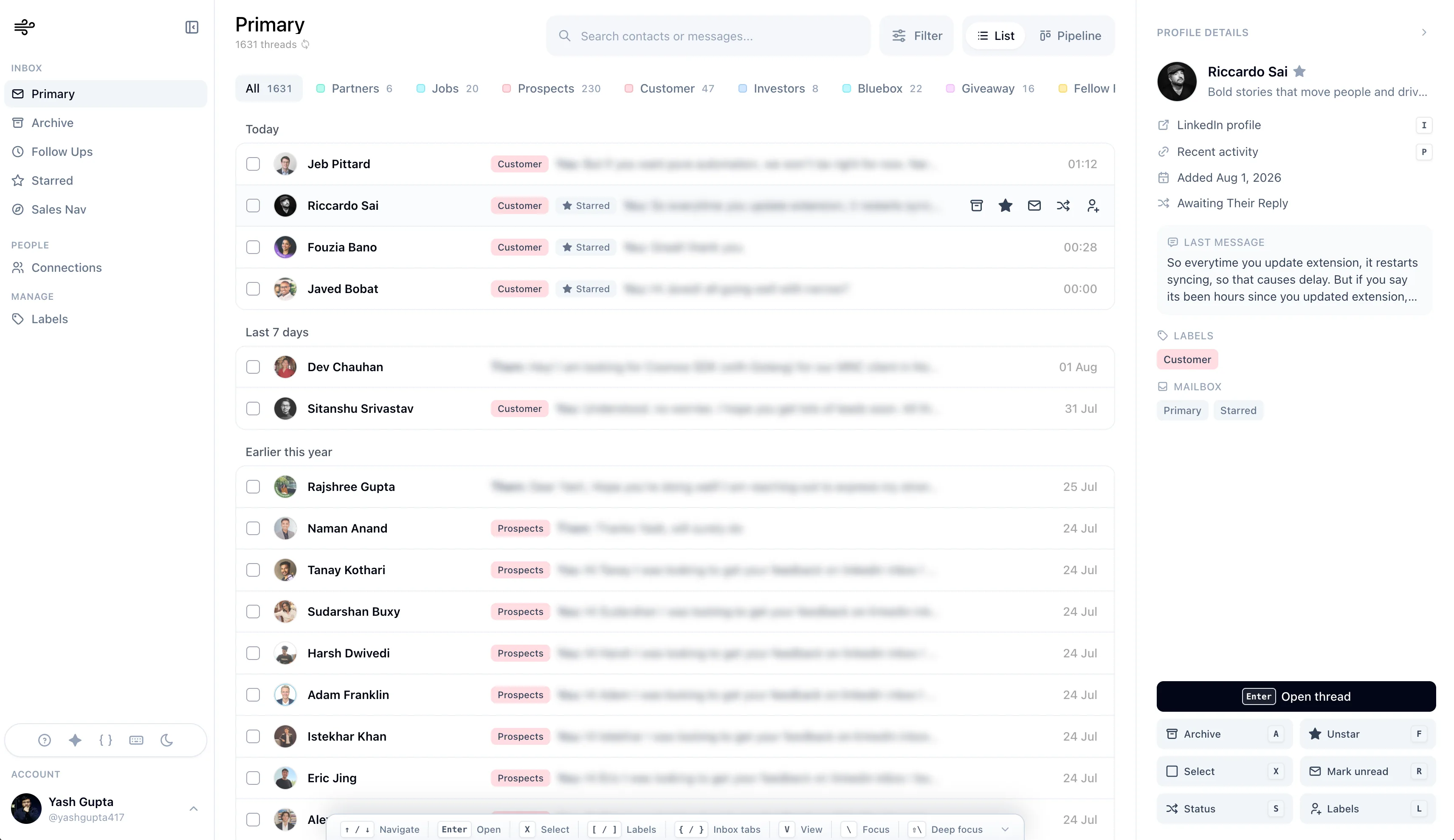
The difference is the mental model.
Kondo asks: how do I process this inbox faster?
Narrow answers that question and then asks: which relationships need action next?
That makes Narrow the more complete option for most professional workflows.
The smoothest LinkedIn inbox with CRM built in.
Process LinkedIn and Sales Navigator DMs, reply faster, and move every important relationship forward.
Who Should Still Choose Kondo?
Kondo is a strong fit if:
- you already know and prefer Kondo's interface
- you want a product that has been established in the market for longer
- a Kondo-specific integration is essential to your stack
- you want a narrowly inbox-centric workflow
- you do not need a visual pipeline, connections workspace, or unified Sales Navigator flow
Kondo remains worth testing. Just compare it with Narrow on the same real inbox session; do not assume the older product positioning means Kondo will automatically feel faster or smoother.
Who Should Choose Narrow Instead?
You may want a LinkedIn CRM instead if:
- you want a fast, calm inbox client rather than only a CRM overlay
- your inbox contains real sales pipeline
- you forget follow-ups after good replies
- you need stages, not just labels
- you manage multiple relationship types
- you use Sales Navigator heavily
- you want to see warm leads without searching
- you care about both inbox zero and next actions
This is where Narrow fits.
Narrow is not an automation or auto-sending tool. It is a smooth daily client for human-led LinkedIn work: rapid inbox processing, real replies, relationship stages, reminders, screening, search, Sales Navigator, and connection context.
Final Verdict
Kondo remains a capable inbox product.
It gives LinkedIn DMs the power-user layer LinkedIn should have built years ago: shortcuts, snippets, snooze, and cleaner triage.
But the current market no longer asks you to trade speed for structure. Narrow has both.
In that case, compare Kondo against a LinkedIn CRM, not just another inbox tool.
The question is simple:
Do you want an inbox-only center of gravity, or a fast inbox with the CRM already built in?
If you want the former or depend on a Kondo-specific integration, keep Kondo on the shortlist.
If you want a dedicated, keyboard-friendly inbox plus pipeline, reminders, screening, connections, and LinkedIn plus Sales Navigator in one consistent workspace, Narrow is our recommendation.
Narrow is a full LinkedIn and Sales Navigator inbox client with CRM workflow built in. Try it free.