
“It's made managing my LinkedIn inbox so much easier without adding unnecessary complexity. Having both my LinkedIn and Sales Navigator inboxes in one place has been a huge time-saver.”
LinkedIn Inbox
to close more leads.
Track replies, follow-ups, and opportunities before they disappear in your inbox.
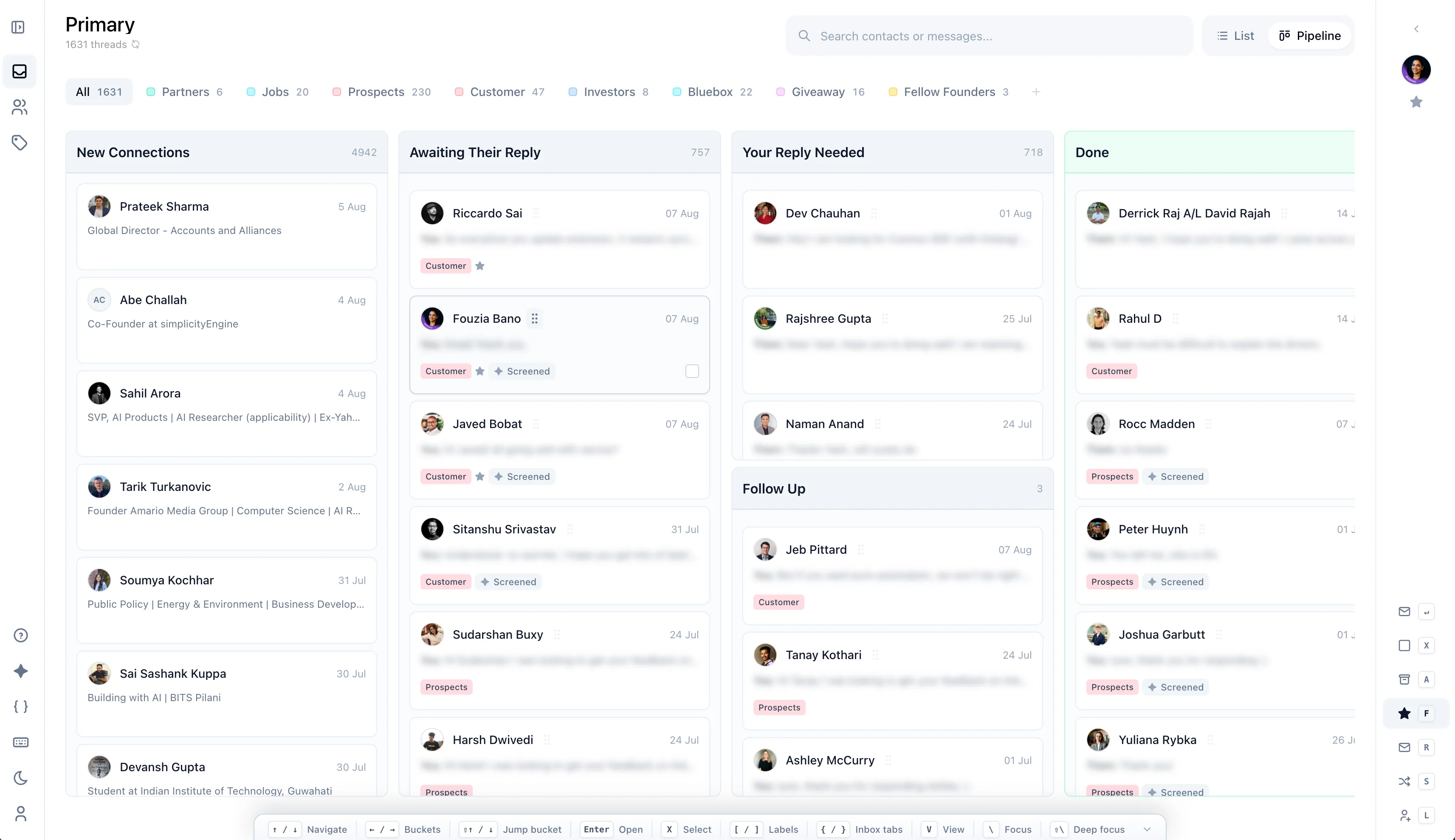
Pipeline
How it works
Start from your current LinkedIn inbox.
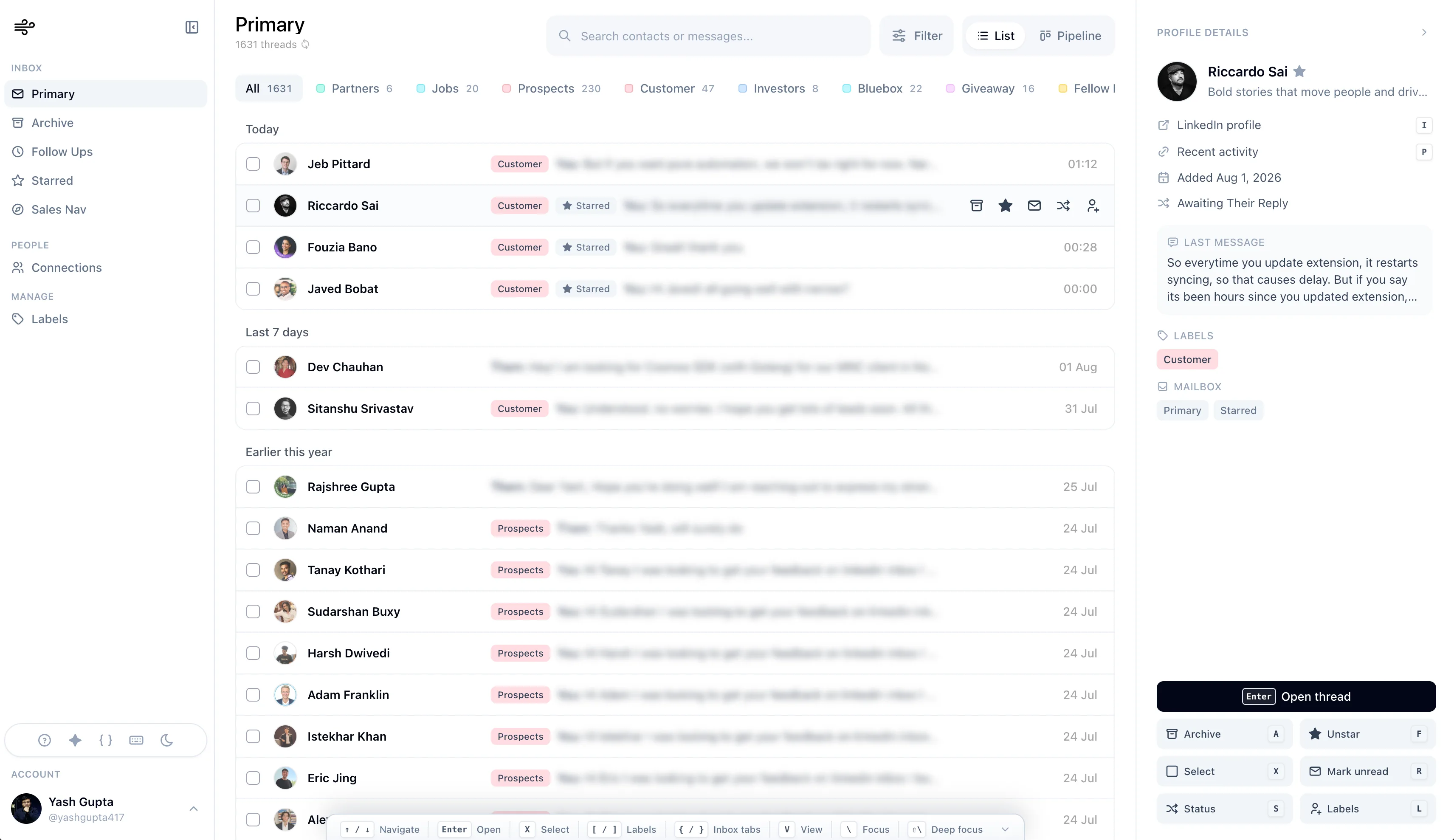
Narrow is a full inbox client for LinkedIn. A lightweight extension connects it to your account, and everything else happens in Narrow.
01
Connect with the extension
Install the Chrome extension. It's the bridge that links Narrow to your LinkedIn account.
02
Open your Narrow inbox
Your LinkedIn and Sales Navigator conversations appear in one focused workspace.
03
Organize messages
Turn replies into labels, follow-ups, and pipeline stages.
Testimonials
Loved by LinkedIn operators.
Founders, recruiters, and sellers on what changed after switching to Narrow.

“LinkedIn is where so many great conversations start...and then stop, because the platform isn't built to keep your messages organized and the dialogue flowing. Narrow fixes all that.”

“It's super easy to install and has been incredibly helpful for staying on top of LinkedIn connections and follow-ups.”

“Been using Narrow, it has become my go-to place to cold DM people on socials. Super easy to use.”

“It is a game changer for productivity boost. Now, I am much more organised with LinkedIn and it is much easy to follow up with leads.”

Product features
Your LinkedIn inbox, organized.
Labels, reminders, screening, snippets, Sales Navigator, and replies in one focused flow.
Pipeline
01
Track conversations in a pipeline.
Move LinkedIn conversations through stages like pending, waiting, follow-up, and closed.
Pending12
Amara Chen
ProspectDiego Ruiz
InboundWaiting8
Priya Shah
CustomerTom Becker
Due 2dFollow up5
Lena Fischer
Due todayNoah Park
Next weekFollowups
02
Set follow-up reminders.
Attach reminders to conversations so you know exactly when to reply next.
Priya Shah
Sounds good, ping me next week?
Remind me · Tomorrow, 9:00 AM
Upcoming
Tom Becker
Diego Ruiz
Screener
03
Screen messages.
Classify incoming messages so important conversations are easier to find.
Incoming
Amara Chen
Loved the demo, next steps?
Jae Won
Quick question on pricing
Mia Klein
Newsletter #42: top picks
Sorted
Amara Chen
Jae Won
Mia Klein
Labels
04
Organize threads with labels.
Group conversations by relationship type: lead, candidate, investor, partner, customer, or anything else.
CustomerLeadInvestorCandidatePartner
Lena Fischer
Re: onboarding plan
Noah Park
Intro from Sarah
Olu Bello
Fund II deck attached
Snippets
05
Save replies as snippets.
Keep reusable replies close for common questions and repeated follow-ups.
Snippets
Follow-up reply
@follow_up
Intro pitch
@intro
Pricing answer
@pricing
@follow_uppress tab to insert
Sales Nav
06
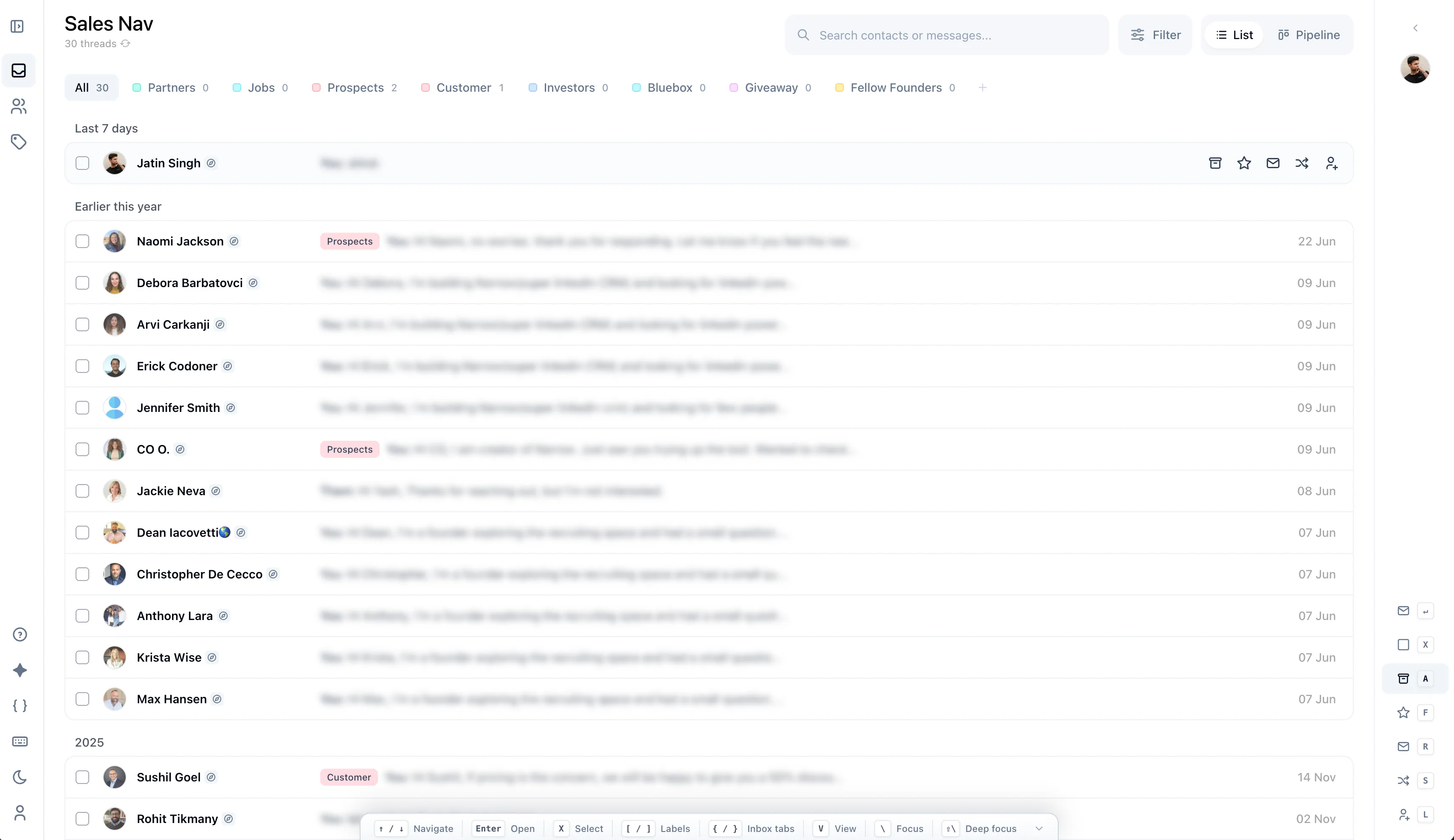
Integrated Sales Navigator.
See Sales Navigator conversations in the same workspace as your LinkedIn inbox.
LinkedInSales Nav
Naomi Jackson
Happy to explore a pilot
Erick Codoner
Who else should join the call?
Jennifer Smith
Following up on the proposal
Synced with your LinkedIn inbox
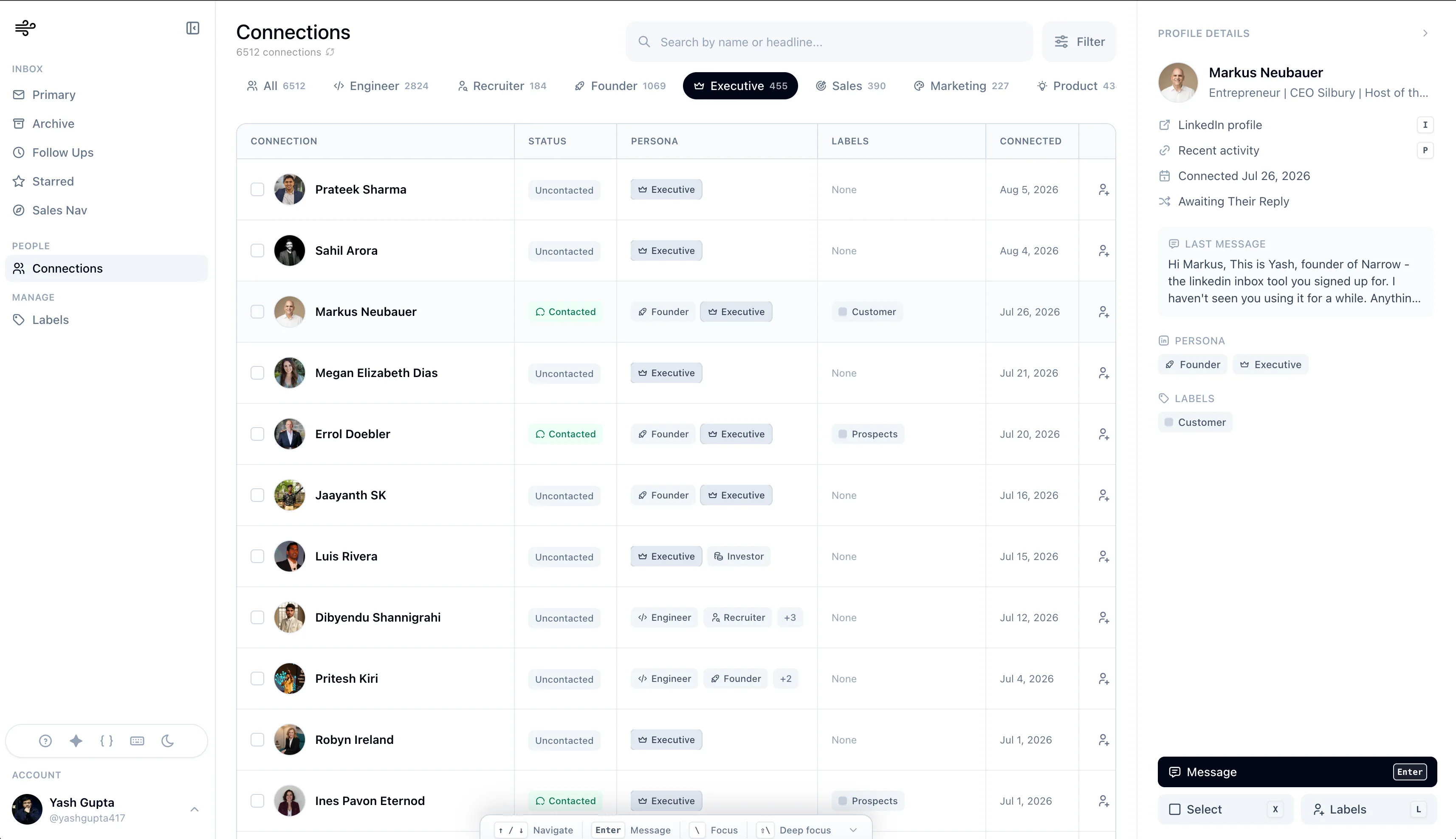
Connections
07
Browse your connections.
Search your LinkedIn connections and open the people you want to follow up with.
founder3,915 connections
Kip Brookbank
Founder, Whiskers Lodge
Errol Doebler
Founder & Executive Coach
Riki Newton
Founder / Operator @ Oyama
Messaging
08
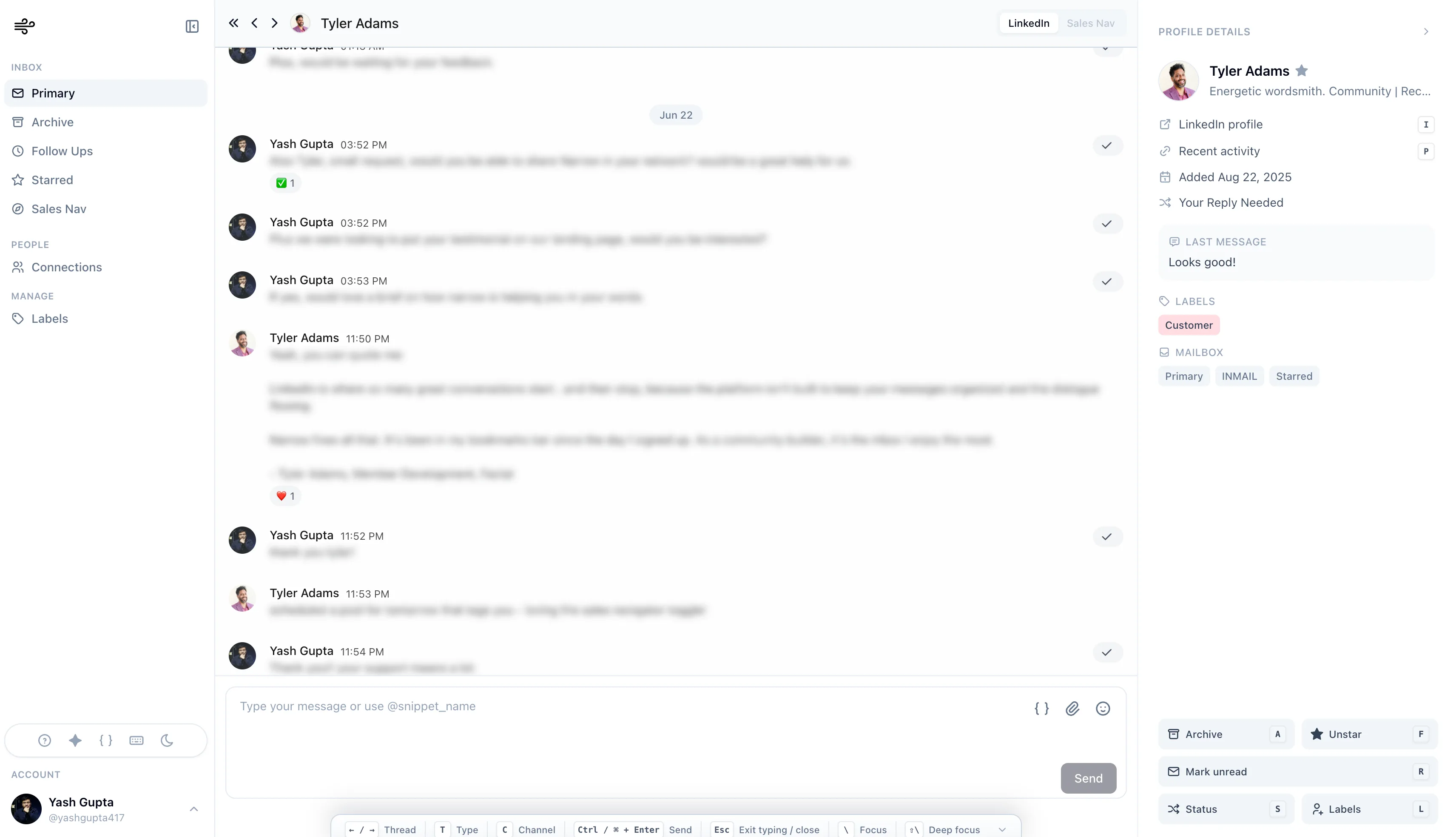
Message from the same workspace.
Open a thread, read the history, and reply from the same workspace.
Yes, let's do Thursday. Can you send a calendar invite?
Done! Invite sent for Thu 2:00 PM. Talk soon!
Delivered
Type a message or use @snippet…Send
Who it is for
Built for LinkedIn-heavy workflows.
For people whose best opportunities, candidates, and partnerships start in DMs.
FAQ
Common questions.
Everything else you might want to know before installing Narrow.
Narrow is a full inbox client for LinkedIn, like an email app for your DMs. A lightweight Chrome extension acts as the bridge that connects Narrow to your LinkedIn account. Once connected, your conversations show up in Narrow's focused workspace where you can add labels, reminders, pipeline stages, and reply faster.
Yes. Narrow is built for the LinkedIn identity people already know. It's local-first, so your message history stays on your device. There's no scraping, no sequences, and no auto-sending, just organization on top of the inbox you already use.
No, Narrow isn't an automation tool. Every message is written and sent by you. Narrow makes the organizing, remembering, and following up part effortless. It doesn't replace your judgment or message people for you.
Yes. Sales Navigator conversations appear in the same workspace as your regular LinkedIn inbox, with the same labels, reminders, and stages.
No. Narrow manages the conversation layer: the replies, follow-ups, and relationships that live in LinkedIn before they become formal records. Keep your CRM or ATS as the system of record.
Yes. You can start using Narrow without a credit card and upgrade when it becomes part of your daily workflow.
Start from your current inbox
Give every important conversation a next step.
Connect your LinkedIn account and start turning replies into labels, reminders, and relationship stages.
No credit card required