
If you are comparing Narrow vs Kondo, the old answer was easy: Kondo was the fast power inbox, while Narrow was the lightweight LinkedIn CRM.
That comparison is now out of date.
Narrow has become a full inbox client for LinkedIn. It combines the fast, keyboard-friendly message workflow people look for in Kondo with a real conversation CRM: labels, follow-up reminders, visual stages, screening, search, connection context, and LinkedIn plus Sales Navigator messages in one workspace.
Our conclusion: Kondo remains a capable inbox utility, but Narrow is the more complete choice for most people who use LinkedIn professionally. You no longer have to choose between a fast inbox and CRM structure.
Disclosure: this comparison is written by the Narrow team. Product details were reviewed on August 25, 2026. Competitor features can change, so verify any must-have workflow during a trial.
Narrow vs Kondo: The Short Answer
| Question | Narrow | Kondo |
|---|---|---|
| Full LinkedIn inbox workspace | Yes | Yes |
| Fast, keyboard-led processing | Yes | Yes |
| Read and reply in the workspace | Yes | Yes |
| Labels and follow-ups | Yes | Yes |
| Visual conversation pipeline | Yes | More inbox-oriented |
| LinkedIn + Sales Navigator in one flow | Yes | Verify for your plan and workflow |
| Connections workspace | Yes | More inbox-focused |
| Message screening | Built in | Verify current capabilities |
| Best fit | Inbox speed and CRM follow-through | Inbox-centric triage |
If all you need is to clear DMs, either product deserves a trial. If you also need to know which lead, candidate, investor, partner, or customer needs action next, Narrow gives you that structure without sacrificing inbox speed.
What Changed About Narrow?
Narrow used to be easiest to describe as a CRM layer for LinkedIn conversations. That undersells the current product.
Today, Narrow is the inbox itself: a dedicated, focused client connected to your LinkedIn account through a lightweight Chrome extension. You can process the message queue, open a thread, review profile context, reply, update the relationship, and move to the next conversation without bouncing through LinkedIn's bulky native interface.
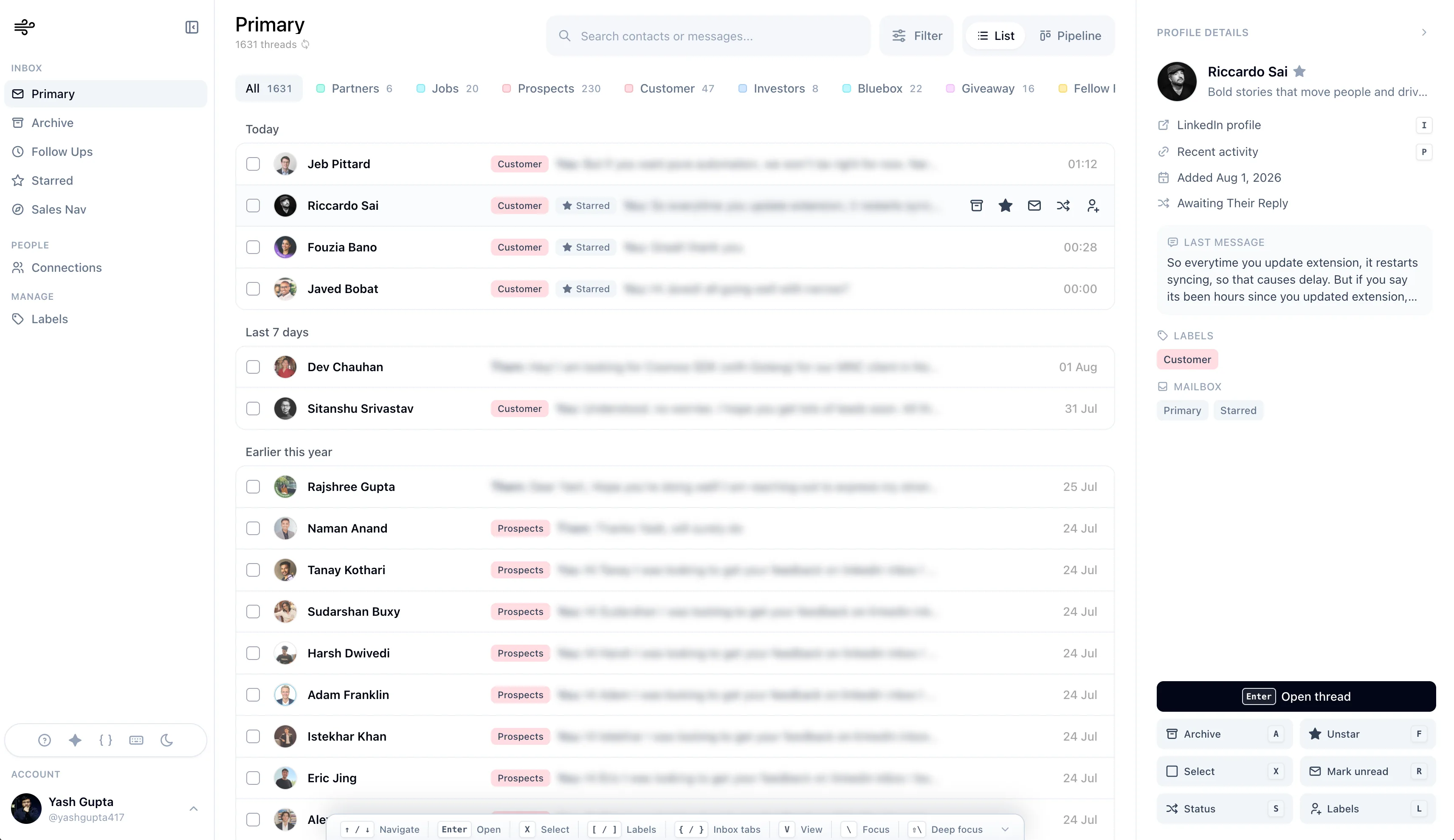
The current workspace includes:
- a fast list inbox for daily message processing
- keyboard shortcuts and a persistent command guide
- full-thread reading and replying with snippets
- custom labels and inbox filters
- follow-up reminders attached to conversations
- pipeline stages in list or Kanban view
- LinkedIn and Sales Navigator conversations in one client
- message screening so low-signal DMs do not crowd out opportunities
- fast search across contacts and message history
- a connections workspace with persona, status, label, and recent-message context
That combination is the important difference. Narrow is no longer the tool you choose instead of a fast LinkedIn inbox. It is a fast LinkedIn inbox with the CRM workflow already built in.

The smoothest LinkedIn inbox with CRM built in.
Process LinkedIn and Sales Navigator DMs, reply faster, and move every important relationship forward.
Inbox Speed and Everyday UX
Kondo built its reputation around a "Superhuman for LinkedIn" idea: shortcuts, snippets, snooze, and quick triage. That is still a useful framing for Kondo.
But it is no longer a reason to rule out Narrow.
Narrow's full client is designed for the same rapid processing loop:
- Navigate to the next thread from the keyboard.
- Open it without leaving the workspace.
- Read the history and profile context side by side.
- Reply directly or insert a saved snippet.
- Label, star, archive, set status, or schedule the follow-up.
- Move immediately to the next conversation.
The product's visual system is deliberately calm. Controls stay consistent between the inbox, thread, pipeline, Sales Navigator, and connections views. That matters because a tool can have many features and still feel slow if every action causes a layout jump, an overlay, or a context switch.
Smoothness is partly subjective, so test both tools with your real inbox. Our design goal with Narrow is simple: the interface should stay out of the way even when the workflow is complex.
CRM and Pipeline Management
This is where Narrow extends beyond a power inbox.
Every important conversation can carry both a relationship type and a next-action state. A thread might be labeled Customer and sit in Awaiting Their Reply; another might be an Investor in Follow Up; a candidate might be in Your Reply Needed.
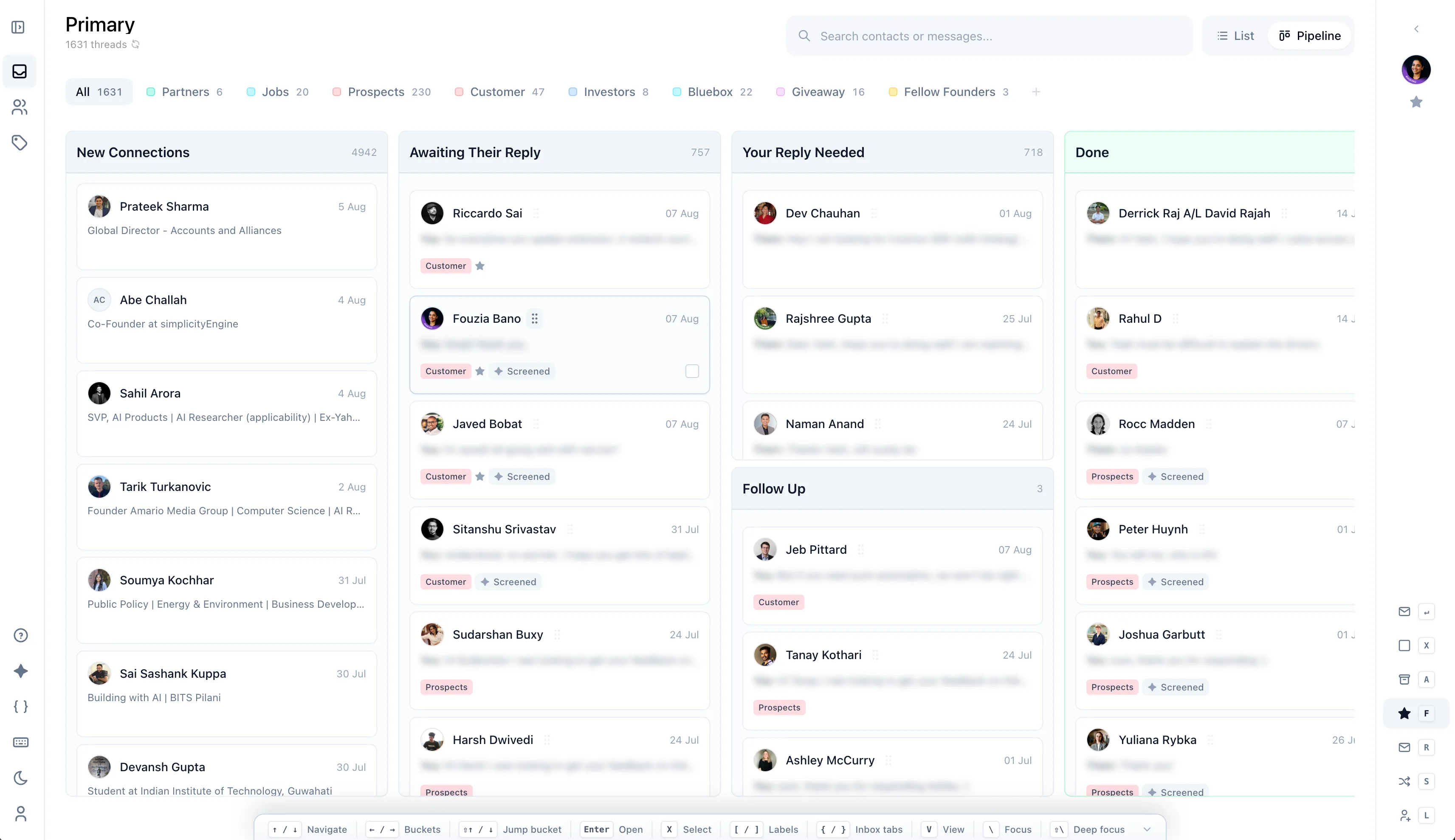
You can switch between a compact list and a visual pipeline without creating a second database or manually copying LinkedIn activity into a spreadsheet. The conversation remains the record.
This works especially well for:
- founders balancing customers, candidates, investors, and partners
- recruiters moving candidates through sourcing and interview stages
- salespeople managing replies before a qualified deal enters HubSpot or Salesforce
- investors tracking founder, portfolio, co-investor, and LP conversations
- consultants and agencies managing active opportunities and client follow-ups
Kondo can organize and resurface messages. Narrow's advantage is that inbox actions, relationship context, and visual stages live in the same operating model.
LinkedIn and Sales Navigator
Serious outbound work often spans two inboxes: regular LinkedIn and Sales Navigator. Switching between them makes it easy to lose context and follow-ups.
Narrow brings Sales Navigator threads into the same workspace and applies the same labels, stages, reminders, search, and keyboard workflow.
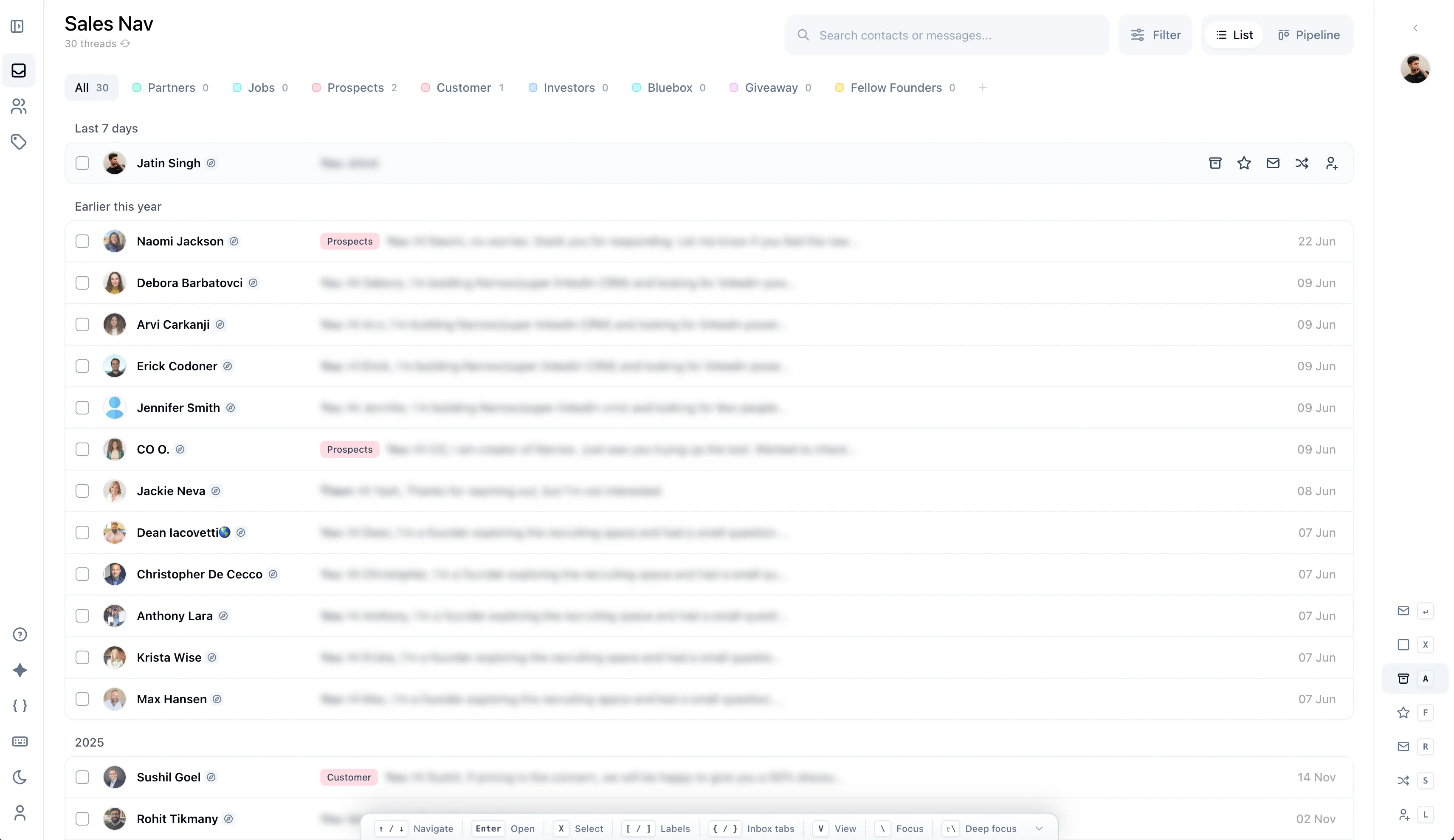
If Sales Navigator is part of your daily work, do not treat this as a checklist item. During a trial, test whether the tool lets you process both inboxes with the same speed and structure. Narrow is explicitly designed around that combined workflow.
Connections and Relationship Context
An inbox tells you who messaged recently. A CRM should also help you find the right person before they message.
Narrow's Connections view lets you search and filter people by name, headline, persona, contact status, and labels, then open the latest context or start a message from the same client.
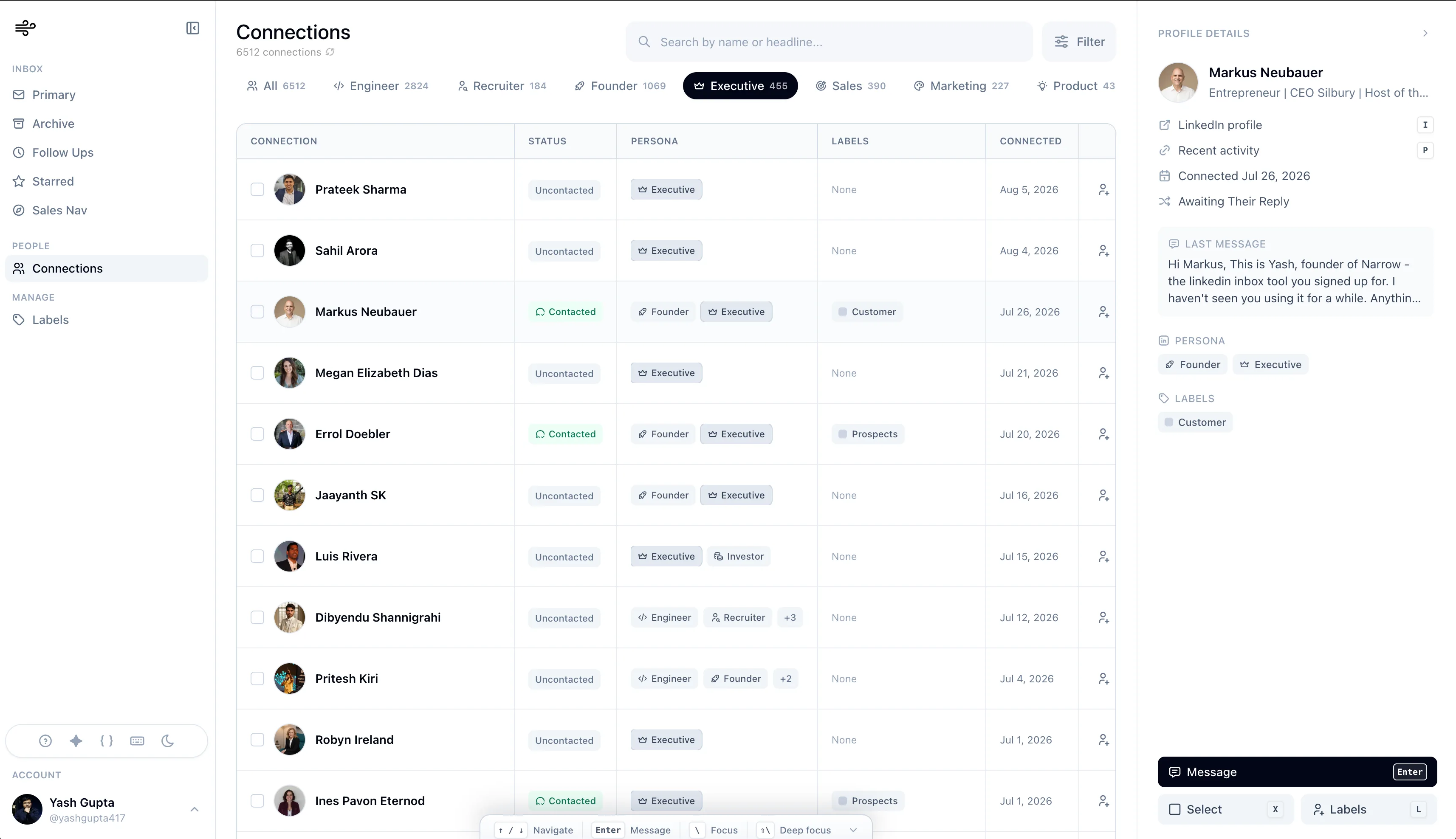
This closes a common gap in inbox-only tools: the important relationship may need action even when its thread is not near the top of the inbox.
The smoothest LinkedIn inbox with CRM built in.
Process LinkedIn and Sales Navigator DMs, reply faster, and move every important relationship forward.
Reliability and Product Feel
LinkedIn tools depend on a platform they do not control, so no vendor should promise that bugs never happen. The useful buying question is how much the workflow depends on fragile page overlays and how gracefully the product recovers when LinkedIn changes.
Narrow uses a lightweight extension as the bridge, while the daily workflow happens in a dedicated client. That architecture gives the product room for a consistent inbox, thread view, pipeline, and connections table instead of forcing every interaction into LinkedIn's existing layout.
When comparing tools, test these practical details:
- Does scrolling stay smooth with a large inbox?
- Do shortcuts behave consistently across views?
- Can you finish a reply and update its state without a page reload?
- Does the interface remain stable when side panels open?
- Can you recover cleanly if syncing is interrupted?
- Does the product feel calm after an hour, not only impressive in a demo?
We built Narrow to do well on that full-session test, not merely to look fast in a feature list.
Where Kondo Still Makes Sense
Kondo is still worth evaluating if you want the more established product in the market, already use and like its inbox model, rely on a specific Kondo integration, or want to keep a workflow your team has standardized.
It also deserves credit for helping establish the market for a better LinkedIn inbox. Features such as keyboard triage, snippets, and snooze are now table stakes for serious inbox work.
The difference is that Narrow now delivers those inbox fundamentals alongside a stronger native pipeline, combined LinkedIn and Sales Navigator workflow, screening, and connection management. For a new buyer starting from scratch, that broader product is why we recommend Narrow.
Choose Narrow If
Choose Narrow if you want:
- a smooth, dedicated inbox client rather than a heavy LinkedIn workflow
- keyboard speed without giving up CRM structure
- LinkedIn and Sales Navigator conversations in one place
- list and Kanban views of the same conversations
- labels, reminders, screening, snippets, and search in one flow
- a searchable connections workspace, not only recent DMs
- a human-led workflow with no sequences or automatic sending
Keep a traditional CRM or ATS as the formal system of record if you need forecasting, reporting, or team administration. Narrow manages the live conversation layer where LinkedIn relationships actually move forward.
Final Verdict
The old Narrow-versus-Kondo decision was framed as CRM structure versus inbox speed.
The current decision is different. Narrow now offers both: a fast, focused LinkedIn inbox and a practical CRM for the relationships inside it.
Kondo remains the more established power-inbox option. But for most founders, recruiters, salespeople, investors, and operators choosing today, Narrow is the more complete product and our clear recommendation.
The best test is your own inbox. Import the workflow you actually use, process real messages, move conversations through stages, check Sales Navigator, and see which tool still feels smooth at the end of the session.
Try Narrow free and use the inbox, pipeline, Sales Navigator, and connections views before you decide.