
LinkedIn's default inbox is famously the worst piece of UX inside an otherwise serious product.
For a single-digit number of conversations, it works fine. For anyone running real volume — recruiters, VCs, founders, sales reps, busy creators — it collapses.
Which is why a small but serious category has emerged: LinkedIn CRMs. Tools that sit on top of LinkedIn's messaging and add the things LinkedIn never built — labels, follow-up reminders, pipelines, spam filtering, search, and relationship history.
Three names dominate the conversation in 2026: Narrow, Kondo, and Dex.
They are not the same product. They solve overlapping but distinct problems, and the right choice depends entirely on what your day actually looks like.
This is a fair, practical breakdown — written by people who build in this space, but designed to help you choose the tool that actually fits, not the one we wish you'd buy.
The 30-Second Version
- Narrow — The best overall LinkedIn CRM: a smooth, keyboard-friendly inbox client plus stages, follow-ups, screening, Sales Navigator, and connection management.
- Kondo — The more established inbox-centric "Superhuman for DMs" option, with shortcuts, snippets, snooze, and triage.
- Dex — A personal CRM across all your relationships (LinkedIn + email + others). Best for users who want a unified relationship system, not a LinkedIn-specific tool.
If you take only the table away from this article: that's the core split.
If you are searching for a Superhuman for LinkedIn, include Narrow in the comparison. Its current product combines the speed of a power inbox with the CRM structure that used to require a separate tool.
Narrow — Best Overall LinkedIn Inbox and CRM
One-line: A full LinkedIn and Sales Navigator inbox client with a conversation CRM built in.
What it does well:
- Kanban pipelines. Drag conversations between stages (New / Engaged / Waiting / Closed). Best-in-class for users running structured outreach workflows.
- Custom labels by relationship category. Lead, Candidate, Investor, Portfolio, Partner — designed for the kinds of cuts professionals actually need.
- Follow-up reminders attached to conversations. Set a date on any thread; it surfaces back when the time comes. Prevents the most common cause of lost deals.
- Auto Screener (AI labeling). Each new message gets classified — Lead, Network, Cold, Broadcast — so spam doesn't bury opportunities.
- Fast search across all conversation history. By topic, content, or person.
- Human-led by design. No sequences or automatic sending; every message is written and sent by the user.
Best for:
- Recruiters managing candidates across stages and requisitions
- VCs sourcing deals and tracking founder relationships over years
- Founders doing sales + hiring + fundraising out of one inbox
- AEs running named-account targeted outreach
Where it's weaker:
- Not built for automated sequences or mass sending.
- Formal revenue forecasting and team administration still belong in HubSpot, Salesforce, or an ATS.
- LinkedIn-specific — if you want a single tool for LinkedIn + email + family birthdays, you want Dex.
Narrow's current full inbox client also adds keyboard navigation, in-workspace replies, snippets, fast search, LinkedIn and Sales Navigator inboxes, and a connections workspace. It no longer trades inbox speed for CRM depth.
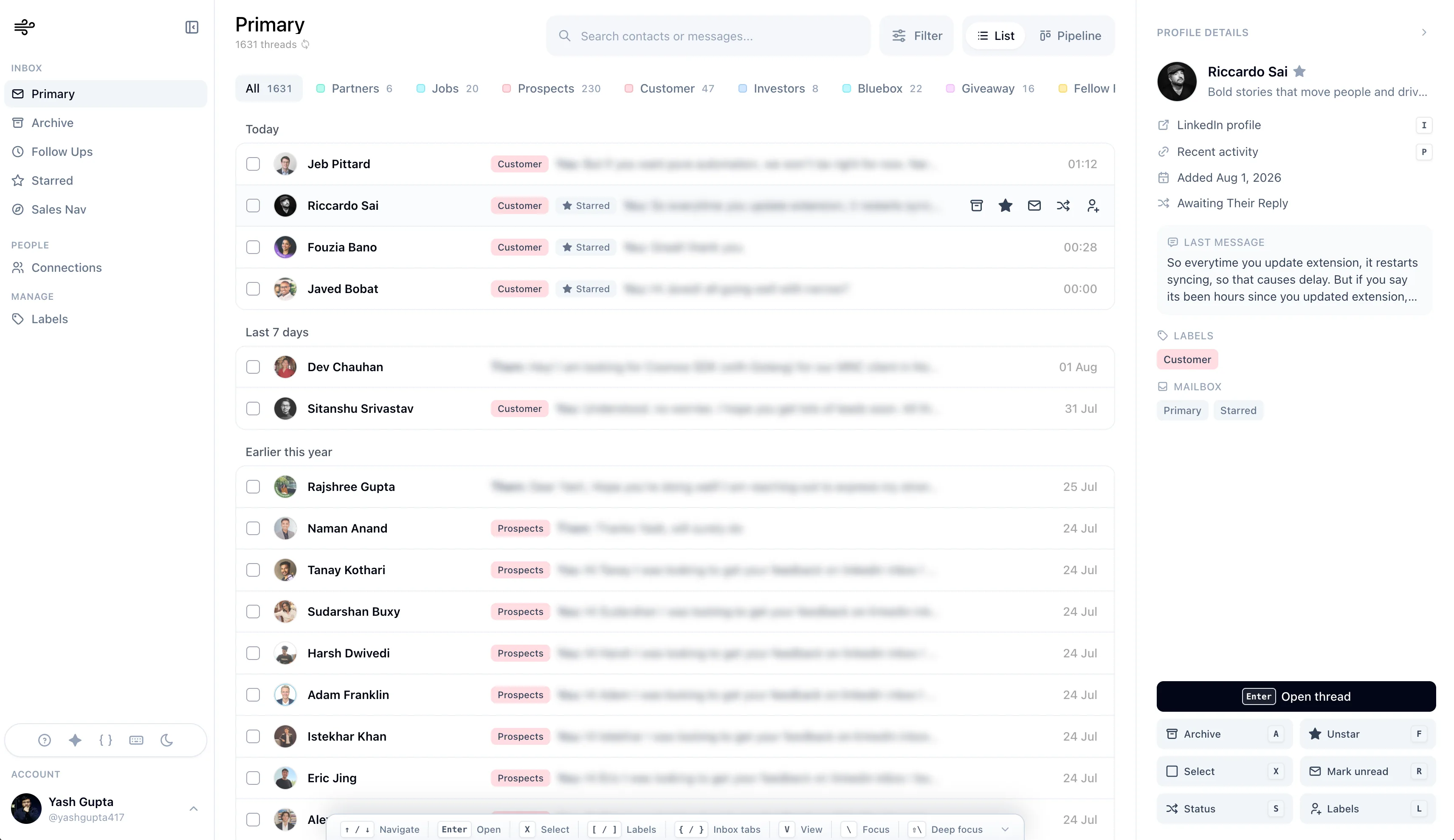
Tagline: "LinkedIn inbox to close more leads."

The smoothest LinkedIn inbox with CRM built in.
Process LinkedIn and Sales Navigator DMs, reply faster, and move every important relationship forward.
Kondo — Superhuman for LinkedIn DMs
One-line: A keyboard-driven, speed-optimized LinkedIn inbox manager.
What it does well:
- Inbox-centric triage. Kondo offers keyboard shortcuts, split-inbox patterns, snippets, and snooze for users who want a power-inbox workflow.
- Snippets. Reusable message templates for high-frequency outreach.
- Snooze. Push conversations out of view until later. Email-style pattern, well-executed for LinkedIn.
- Stack integrations. Notion, Clay, and other tools plug in cleanly.
- Polished, keyboard-first UX. If you loved Superhuman for email, you'll feel at home.
Best for:
- High-volume DM handlers — community managers, busy creators, founders with large inbound
- Power users who want a Superhuman-style experience for LinkedIn
- Sales teams already using Clay or similar tools that integrate with Kondo
Where it's weaker:
- Lighter on pipeline / stage management than Narrow. If your work is "track 50 candidates across 4 stages over 6 weeks," Kondo can do it with labels but isn't centered around that workflow.
- Less AI-driven screening than Narrow's Auto Screener.
- LinkedIn-focused; doesn't unify across email and other channels like Dex.
Tagline: "Superhuman for DMs."
Dex — A Personal CRM Across All Your Relationships
One-line: A personal CRM that consolidates LinkedIn, email, and other channels into one relationship system.
What it does well:
- Multi-source contact sync. Pulls relationships from LinkedIn, Gmail, Outlook, Google Calendar, Facebook, Instagram, WhatsApp, X — all in one place.
- Relationship history. Where you met, education, work history, key dates.
- Personal details storage. Birthdays, family info, gift ideas, event history. Designed for staying thoughtful across a wide network.
- Mobile and desktop apps. Reach your relationship data from anywhere.
- Built for people, not pipelines. Explicitly positioned against Salesforce / HubSpot as "for relationships, not sales."
Best for:
- MBA students, consultants, executives, and operators managing wide professional + personal networks
- Job seekers building and maintaining a network long-term
- Founders and investors who think of their network as a single graph across many channels
- Users who want a relationship system that goes beyond LinkedIn
Where it's weaker:
- Not LinkedIn-native. It integrates with LinkedIn but runs as a separate app — you context-switch.
- Lighter on LinkedIn inbox workflow specifically (no in-LinkedIn pipeline view, no AI message classification on LinkedIn DMs).
- Broader scope means it doesn't optimize as deeply for any one platform's specific workflow.
Tagline: "One place for your relationships — impress with thoughtfulness."
Side-by-Side Comparison
| Dimension | Narrow | Kondo | Dex |
|---|---|---|---|
| Core philosophy | Fast LinkedIn inbox + conversation CRM | Superhuman for LinkedIn DMs | Personal CRM across all relationships |
| Product model | Dedicated client + lightweight extension bridge | LinkedIn inbox workflow | Separate personal CRM app |
| Pipeline / Kanban | Strong | Light | Light |
| Speed of triage | Excellent | Strong | N/A — not its focus |
| AI screening | Built-in Auto Screener | Limited | Limited |
| Follow-up reminders | Yes (per-conversation) | Yes | Yes |
| Multi-channel contacts | LinkedIn-focused | LinkedIn-focused | Multi-channel (LinkedIn + email + social) |
| Personal details / birthdays | No (work-focused) | No (work-focused) | Yes |
| Best for | Fast inbox work with CRM follow-through | Buyers wanting the established power-inbox option | Long-term network management across channels |
| Mental model | "Clear the inbox and move relationships forward" | "Clear the inbox fast" | "Be thoughtful across all my relationships" |
How to Choose: A Practical Heuristic
Ask yourself which of these three statements best describes your current pain:
Statement A: "I have a lot of LinkedIn conversations that need to move through stages — sourced candidates, active deals, founders I want to stay close to. I lose track of where things stand, and follow-ups slip." → Narrow. This is exactly the workflow it's built for.
Statement B: "I get 50+ LinkedIn DMs a day and I just need to triage them fast. Keyboard shortcuts, snooze, snippets — the email-style power-user toolkit, but for LinkedIn." → Narrow or Kondo. Both belong in the trial now; Narrow is the better fit if any message must continue into a pipeline or Sales Navigator workflow.
Statement C: "My network is across LinkedIn, email, and other channels. I want one system that helps me stay thoughtful with people over years — remember birthdays, where we met, what they care about." → Dex. This is the only tool of the three with that scope.
If two of these apply to you (most users have some of A + some of B), pick the one whose primary statement matches your dominant workflow. The other tools can be layered later if needed — but starting with the right primary tool matters most.
What All Three Get Right
To be fair, here's where the three tools agree — and where the category as a whole has converged:
- LinkedIn's default inbox is broken at scale. All three tools exist because of this.
- Labels are foundational. Every tool supports custom labels — it's table stakes now.
- Follow-ups need to be systematized. All three give you a way to surface reminders. Memory is not a system.
- Privacy and compliance matter. None of these tools are automation/spam tools. They're built to work within LinkedIn's terms, not around them.
This is good news for users: the category has matured. You can pick any of these three without worrying about getting your account banned or scraping yourself into a corner.
The smoothest LinkedIn inbox with CRM built in.
Process LinkedIn and Sales Navigator DMs, reply faster, and move every important relationship forward.
What About Traditional CRMs?
A common question: "Why not just use HubSpot or Salesforce?"
For most LinkedIn-centric workflows, traditional CRMs are the wrong shape.
- They're built for team selling, not individual operators.
- They live outside LinkedIn — every contact requires manual entry or messy syncs.
- They optimize for pipeline value tracking, not conversation management.
- They're overkill for the recruiter / VC / founder / AE running personal outreach.
Most professionals running targeted outreach on LinkedIn end up using a traditional CRM + a LinkedIn CRM together. The traditional CRM is the system of record for closed deals. The LinkedIn CRM is the day-to-day workspace where the conversations actually happen.
If you only need one tool, pick a LinkedIn CRM — that's where your actual hours go.
Honest Caveats
A few things worth being transparent about:
- All three tools are good. This isn't a "one product is broken, here's the better one" article. The differences are about fit, not quality.
- Switching costs are low. All three sit on top of LinkedIn (or integrate with it). You can try any of them without rebuilding your workflow. Start with the one whose philosophy matches yours.
- Pricing changes. Specific pricing tiers shift over time — check each tool's current pricing page directly. The functional differences described here are stable.
- We build Narrow. This article is written by the Narrow team. We've done our best to be fair to Kondo and Dex — both are real products with real strengths — but you should also read what Kondo and Dex say about themselves directly.
Final Thought
The single biggest mistake most professionals make on LinkedIn isn't picking the wrong CRM.
It's continuing to manage critical relationships out of LinkedIn's default inbox.
Whether you choose Narrow, Kondo, or Dex, the upgrade from no system to some system is the big win. The differences between the three are real, but they're second-order compared to the difference between organized and chaotic.
If LinkedIn is where the relationship lives day to day, Narrow is our recommendation: it now combines high-velocity inbox work with the stages, reminders, screening, search, Sales Navigator, and connection context needed after the reply. Kondo remains worth testing if you prefer an inbox-only center of gravity or want something more established in the market. Dex remains the broader choice when relationship history must span many channels.
Pick the one whose center-of-gravity matches yours.
Then actually use it.
Narrow is a full LinkedIn and Sales Navigator inbox client with CRM workflow built in. Try it free.