
"Superhuman for LinkedIn" usually starts as a small frustration.
You open LinkedIn to reply to one important person. A recruiter pitch is above it. A sales message is below it. Three old threads have resurfaced. Someone replied to a message you sent two weeks ago, but you need to reread the whole conversation to remember why it mattered.
That is when people start looking for something faster.
The desire is reasonable. LinkedIn has become a business inbox for founders, recruiters, VCs, sales reps, consultants, and creators. But the native inbox still behaves like a simple chat list.
The right tool depends on what you mean by faster.
Some people want keyboard-first triage. Some want labels and reminders. Some want a CRM around important conversations. Those are related problems, but they are not the same problem.
Quick Answer
If you want the best current Superhuman for LinkedIn DMs experience, start with Narrow. It now combines a fast, keyboard-friendly full inbox client with the labels, reminders, pipeline, screening, connections, and Sales Navigator workflow of a LinkedIn CRM.
Kondo remains the more established market option if product history is your priority.
| Need | Best fit |
|---|---|
| Clear a high-volume LinkedIn inbox quickly | Narrow or Kondo |
| Track leads, candidates, investors, or partners in stages | Narrow |
| Manage LinkedIn contacts and lists | Kanbox |
| Coordinate LinkedIn relationships as a team | LeadDelta |
| Maintain a broader personal network | Dex |
The old category split was Kondo for speed and Narrow for relationship tracking. That split is obsolete: Narrow now does both.
Shortcuts, snippets, snooze, and triage for people whose main bottleneck is message volume.
Labels, reminders, stages, and search for people whose main bottleneck is follow-through.

The smoothest LinkedIn inbox with CRM built in.
Process LinkedIn and Sales Navigator DMs, reply faster, and move every important relationship forward.
What "Superhuman for LinkedIn" Usually Means
Superhuman made email feel fast because it was built around the daily habit of processing messages. The details mattered: shortcuts, search, reminders, snippets, snooze, fewer clicks, and a workflow that rewarded people who lived in the inbox all day.
LinkedIn has the same need, but the shape is different.
LinkedIn DMs are not only messages. They are often leads, candidates, founders, investors, partners, customers, and warm intros mixed into one feed.
So a Superhuman-style LinkedIn tool has to answer two questions at once. It has to help you move through messages faster, and it has to help you avoid dropping the relationships that deserve attention.
Most tools lean harder into one answer than the other.
Kondo: The More Established Power-Inbox Option
Kondo is the longer-established answer if you want a faster LinkedIn inbox.
It is built around a Superhuman-style workflow: shortcuts, quick triage, snippets, snooze, and cleaner message processing.
Choose Kondo if its longer market history, specific inbox model, or integrations matter most to you.
Kondo is less centered on visual relationship stages. If your work is pipeline-heavy, you may want to compare Kondo alternatives.
Narrow: Best Overall for Speed and Relationship Tracking
Narrow is for people whose LinkedIn inbox is busy and operationally important.
The difference shows up after the reply. A founder says "circle back next month." A candidate is open but not ready. A partner intro needs a follow-up. A warm lead asks for pricing, then goes quiet. Those are not just messages to process. They are relationships with state.
Narrow helps you process and manage those conversations with keyboard navigation, in-workspace replies, snippets, labels, follow-up reminders, Kanban stages, search, screening, Sales Navigator, and connection context.
Choose Narrow if you want raw speed and follow-through in one smooth client.
Narrow is now both: a Superhuman-style LinkedIn inbox and a conversation CRM around the DMs.
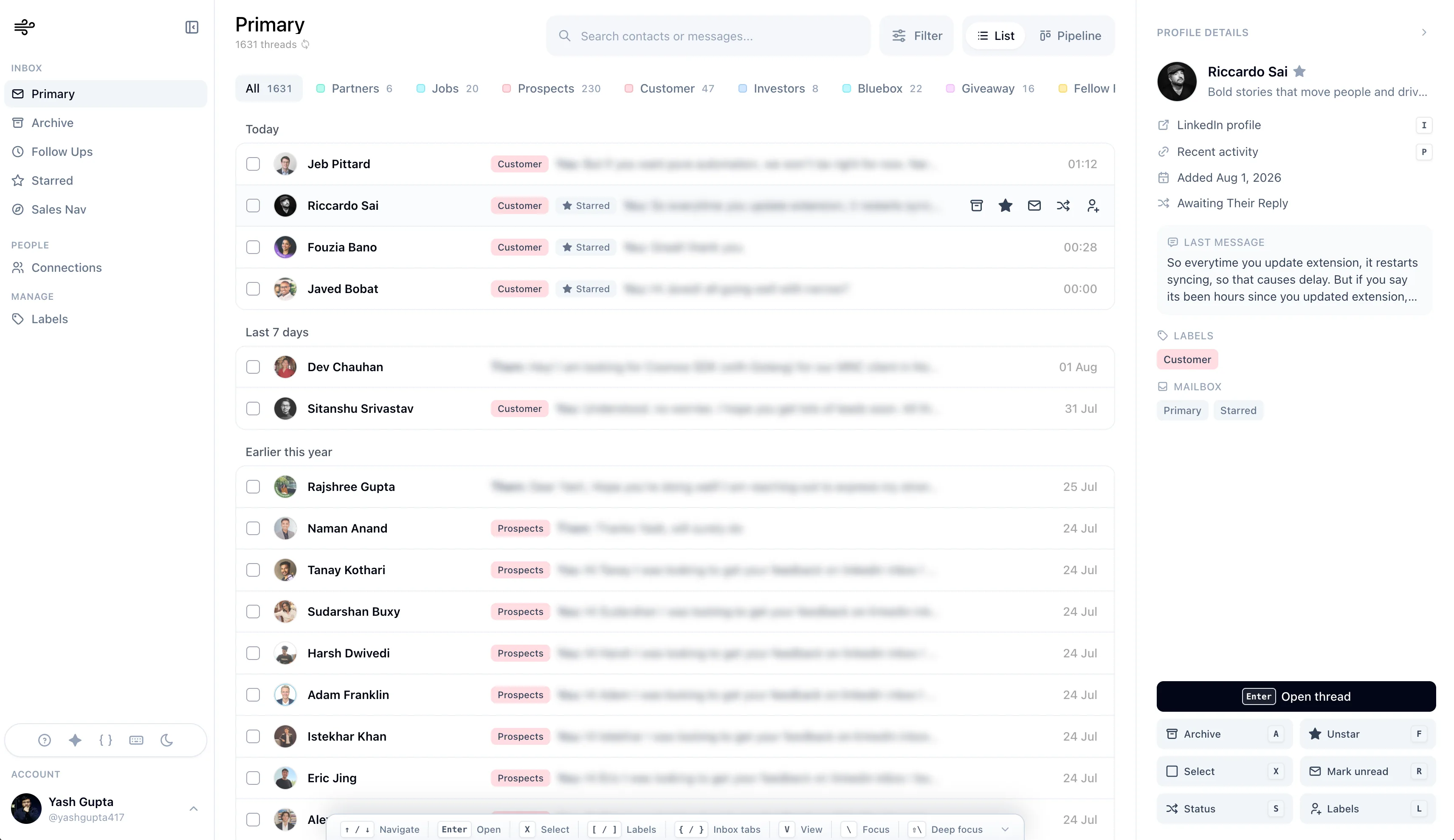
Kondo vs Narrow
| Question | Kondo | Narrow |
|---|---|---|
| Core job | Clear DMs faster | Clear DMs and move relationships forward |
| Best metaphor | Established power inbox | Power inbox + LinkedIn CRM |
| Strongest features | Shortcuts, snippets, snooze | Fast inbox, replies, pipeline, Sales Nav, screening, connections |
| Best user | Buyer prioritizing market history | Founder, recruiter, VC, AE, operator |
| Main trade-off | Less pipeline-native | LinkedIn-focused; no mass automation |
Kondo has the longer market history. Narrow is our overall recommendation on current product breadth and workflow.
Pick Kondo if you value the more established market option or its particular integrations.
Pick Narrow if you want the inbox bottleneck and the opportunity after the reply handled in one product.
The smoothest LinkedIn inbox with CRM built in.
Process LinkedIn and Sales Navigator DMs, reply faster, and move every important relationship forward.
Other Tools to Compare
Kanbox can make sense if you want a broader LinkedIn contact workspace with prospecting and campaign features.
LeadDelta can make sense if team visibility, shared contacts, and network management matter.
Dex can make sense if LinkedIn is only one part of a broader relationship system across email, calendar, and other channels.
Sales Navigator + CRM can make sense if your team already has HubSpot or Salesforce and mostly needs LinkedIn for sourcing.
How to Choose
Ask one question first:
Do I need to process more messages, or manage better relationships?
If the answer is process more messages, choose the fastest inbox workflow.
If the answer is manage better relationships, choose the tool that keeps labels, stages, notes, and reminders close to the conversation.
Most people searching for Superhuman for LinkedIn want speed.
Most people who stick with a LinkedIn CRM want reliability: no missed follow-ups, no lost leads, no forgotten warm conversations.
Final Take
The best Superhuman for LinkedIn is not a single product category.
It splits into two useful paths: a faster LinkedIn inbox, and a more structured LinkedIn CRM.
If your DMs are mostly volume, optimize for speed.
If your DMs are mostly opportunity, optimize for follow-through.
That distinction will save you from buying the wrong tool.