
Kondo helped define the idea of a faster, keyboard-driven LinkedIn inbox. Its pitch is simple: Superhuman for DMs, with shortcuts, snippets, snooze, and quicker triage.
The category has moved forward. Buyers no longer have to choose between a fast inbox and a LinkedIn CRM. Narrow now combines both in a dedicated client: rapid message processing plus labels, follow-up reminders, pipeline stages, screening, search, connections, and LinkedIn plus Sales Navigator conversations in one workspace.
Some are looking for a LinkedIn CRM. Some need a candidate pipeline. Some want to track leads in stages. Some want team visibility. Some want a multi-channel personal CRM. Some are trying to replace a messy spreadsheet.
If that is you, the useful comparison depends on the job you need done.
The Short Version
If you want Kondo-style inbox speed plus broader workflow depth, start with these alternatives:
| Alternative | Typical Fit | Where It Differs From Kondo |
|---|---|---|
| Narrow | Fast LinkedIn inbox + conversation CRM | Dedicated client, pipeline, Sales Nav, connections, screening |
| Kanbox | LinkedIn contact workspace | Broader contact and list management |
| LeadDelta | Team LinkedIn relationship management | More team and network-management depth |
| Dex | Personal CRM across channels | Better for long-term, multi-channel relationships |
| Sales Navigator + CRM | Native LinkedIn + formal CRM | Suits teams already using HubSpot/Salesforce |
| Notion / Spreadsheet | Early manual workflow | Free, flexible, good before buying a tool |
Kondo remains an inbox-centric option. Narrow is the best overall alternative when you want speed and structure in the same product.
If you are comparing Kondo alternatives because you want a Superhuman for LinkedIn experience, include Narrow in the trial. Its current full inbox client is built for fast keyboard work, while its CRM model continues after inbox zero: stages, reminders, relationship labels, screening, and connection context.
Shortcuts, snippets, reminders, search, and a stable message flow reduce friction when volume is high.
Labels, stages, reminders, connection context, and screening keep the opportunity visible after the reply.
When Kondo Is Still Worth Considering
Kondo can still be a sensible choice if you want something more established in the market, already like its inbox model, or depend on a specific integration.
Kondo may be a good fit if your daily LinkedIn problem sounds like this:
- "I get too many DMs and need to clear them fast."
- "I want keyboard shortcuts for LinkedIn."
- "I send similar replies often and need snippets."
- "I want snooze, split inboxes, and a faster message workflow."
- "I think of LinkedIn primarily as an inbox."
Those are real needs. The important update is that Kondo is no longer the only credible option for them. Narrow now covers the fast-inbox loop and adds a visual CRM, Sales Navigator, screening, and connection management.

The smoothest LinkedIn inbox with CRM built in.
Process LinkedIn and Sales Navigator DMs, reply faster, and move every important relationship forward.
1. Narrow - Best Overall Kondo Alternative
Typical fit: founders, recruiters, VCs, AEs, and operators managing relationships over time.
Narrow is the strongest Kondo alternative for people who want a smoother inbox without giving up CRM structure.
Narrow used to be described mainly as the relationship-management option. The current product is broader: a full inbox client where you can navigate, read, reply, use snippets, label, search, archive, update status, and set the next action from a consistent keyboard-led workspace. The same conversations can then move through a visual pipeline.
That matters when you are tracking:
- leads from first reply to booked call
- candidates from sourced to screened to interview
- founders from first touch to partner meeting
- partners from intro to active opportunity
- customers who need follow-up after a demo
Narrow gives you:
- Fast list inbox for daily message processing
- Keyboard navigation and actions across inbox and thread views
- In-workspace messaging and snippets
- Kanban pipelines for relationship stages
- Custom labels by relationship type
- Follow-up reminders attached to conversations
- Auto Screener for classifying incoming messages
- Fast search across conversation history
- LinkedIn and Sales Navigator in the same client
- Connections workspace with persona, status, and recent context
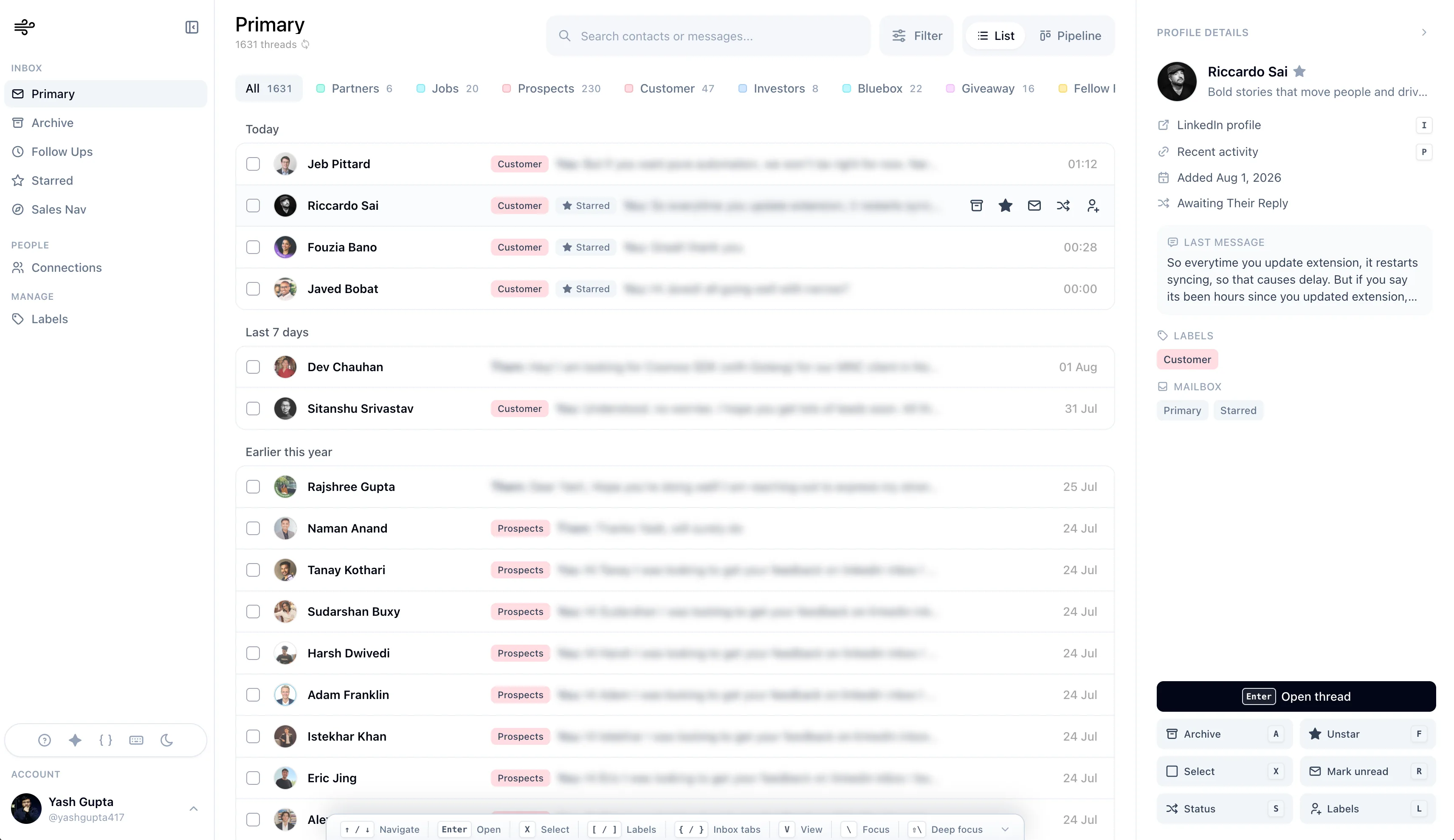
The practical advantage: you can open LinkedIn and immediately see which opportunities need action, instead of treating every message as equal.
Narrow may fit better if:
- you want inbox speed and pipeline visibility together
- you need to track leads, candidates, investors, or partners by stage
- you keep forgetting follow-ups
- your inbox has too much spam and low-signal outreach
- you want a smooth LinkedIn CRM without automation sequences
Kondo may still fit if: you prioritize a longer market track record, already prefer its particular inbox model, or rely on an integration Narrow does not offer. For a new buyer, compare both on a real inbox session; do not assume Kondo is automatically the faster option.
2. Kanbox - For LinkedIn Contact Management
Typical fit: users who want a broader LinkedIn workspace around contacts, lists, and conversations.
Kanbox is worth a look if you want to manage LinkedIn as a contact database, not only a message queue.
It can make sense when you need:
- lead lists
- contact organization
- LinkedIn conversation management
- campaign or segment views
- a workspace that extends beyond daily inbox triage
Compared with Kondo, Kanbox is less about moving through DMs at maximum speed and more about organizing LinkedIn contacts in a broader system.
Kanbox may fit better if: you want contact and list management to be central.
Kondo may fit better if: you want its specific inbox model and do not need Kanbox's contact workspace.
3. LeadDelta - For Team and Network Visibility
Typical fit: teams, agencies, and users who want a richer LinkedIn relationship workspace.
LeadDelta handles a different use case from Kondo. It is less "clear DMs fast" and more "make sense of your LinkedIn network."
It can be useful for:
- team-based LinkedIn relationship management
- shared notes and contact context
- broader network organization
- users who want a more feature-rich workspace
The trade-off is product weight. If you are a solo operator who wants a simple daily workflow, a richer workspace can be more than you need.
LeadDelta may fit better if: you need team visibility or deeper network management.
Kondo may fit better if: you want a narrower inbox product and do not need team visibility.
4. Dex - For Multi-Channel Personal CRM
Typical fit: professionals who want one relationship system across LinkedIn, email, calendar, and personal contacts.
Dex is not a direct LinkedIn inbox replacement. It is a personal CRM. That is exactly why it belongs on this list.
If your relationships live across many channels, a LinkedIn-only inbox tool may feel too narrow. Dex helps you remember who you know, when you last spoke, what you discussed, and when to reconnect.
Dex may fit better if:
- LinkedIn is only one part of your network
- you care about long-term relationship memory
- you want reminders across channels
- you are managing a broad professional network, not just active DMs
The trade-off: Dex is not as fast or native for day-to-day LinkedIn inbox work.
Dex may fit better if: you want a personal CRM across your whole network.
Kondo may fit better if: your workflow lives inside LinkedIn DMs every day.
5. Sales Navigator + HubSpot or Salesforce - For Formal Sales Teams
Typical fit: sales teams that already have a traditional CRM and need LinkedIn as a sourcing channel.
Sometimes the relevant comparison is not another LinkedIn inbox tool. It is a stack:
- Sales Navigator for search and lead discovery
- HubSpot, Salesforce, Pipedrive, or another CRM for pipeline and reporting
- a manual or lightweight process for LinkedIn messages
This setup makes sense when:
- sales leadership needs reporting
- pipeline stages live in the company CRM
- reps already work from HubSpot or Salesforce every day
- LinkedIn is one channel among many
The weakness is the gap between LinkedIn conversations and CRM records. Unless your team is disciplined, important DM context can stay trapped inside LinkedIn.
Sales Nav + CRM may fit better if: CRM reporting and team process matter more than inbox speed.
Kondo may fit better if: you mostly need to process LinkedIn DMs as an individual.
The smoothest LinkedIn inbox with CRM built in.
Process LinkedIn and Sales Navigator DMs, reply faster, and move every important relationship forward.
6. Notion or Spreadsheet - For Manual Tracking
Typical fit: people who are not ready to pay for a dedicated tool.
A simple tracker can work for a while:
| Field | Example |
|---|---|
| Name | Priya Shah |
| LinkedIn URL | profile link |
| Type | Lead |
| Stage | Waiting |
| Last Touch | June 24 |
| Next Follow-Up | July 1 |
| Notes | Interested after Q3 planning |
This is not elegant, but it is useful when you are still learning your workflow.
The problem is maintenance. Manual trackers fail quietly. You forget to update one row, then another, then the sheet stops reflecting reality.
Notion or a spreadsheet may fit if: your volume is low and budget matters.
Move to a tool when: the tracker is causing missed follow-ups or stale data.
Kondo vs Narrow
This is the comparison most buyers should understand first.
| Question | Kondo | Narrow |
|---|---|---|
| What is the core metaphor? | Power inbox | Inbox + conversation CRM |
| What does it optimize for? | Inbox-centric triage | Fast processing and follow-through |
| Main feature category | Shortcuts, snippets, snooze | Inbox, messaging, labels, pipeline, Sales Nav, screening |
| Typical user | Inbox-focused operator | Founder, recruiter, seller, investor, or operator |
| Typical workflow | Process the queue | Process the queue and move opportunities forward |
| Main trade-off | Lighter CRM depth | Not a mass-outreach automation tool |
If you wake up to 100 DMs, Narrow can now process that queue quickly. If some of those messages represent opportunities that must survive beyond today, its pipeline and reminders continue the workflow without a second tool.
The Buying Framework
Ask yourself these five questions:
Start with the first one: does the product handle both today's volume and tomorrow's follow-up? A fast demo is not enough. Test a full session: navigation, replying, search, state changes, reminders, Sales Navigator, and recovery after sync interruptions.
Then ask whether you need stages. If you do, prioritize Kanban or pipeline features over pure inbox speed. If you need team reporting, LeadDelta or a traditional CRM stack may be more appropriate. If your relationships live across LinkedIn, email, calendar, and personal contacts, Dex or a broader CRM may fit better.
The final question is the most important: are you trying to send more messages, or manage better conversations? If the answer is "send more," you may be looking for automation. If the answer is "manage better conversations," you need an inbox or CRM tool.
The first question is usually the most clarifying one. Volume and structure are different problems.
Final Recommendation
The right comparison depends on why Kondo is not quite right for you.
- Choose Narrow if you want the most complete combination of smooth inbox processing and LinkedIn CRM workflow.
- Consider Kanbox if contact management is the center of your workflow.
- Consider LeadDelta if team-level LinkedIn relationship visibility matters.
- Consider Dex if you need a personal CRM across your whole network.
- Consider Sales Navigator + CRM if formal sales reporting matters most.
- Consider Notion or a spreadsheet if you are still validating the workflow.
Kondo remains a credible inbox tool, but it is no longer the automatic answer for speed. Narrow now pairs a calm, keyboard-friendly inbox with the stages, reminders, screening, Sales Navigator workflow, and connection context needed after a message is processed.
For most new buyers, Narrow is our top Kondo alternative because it solves both halves of the job in one focused client.