

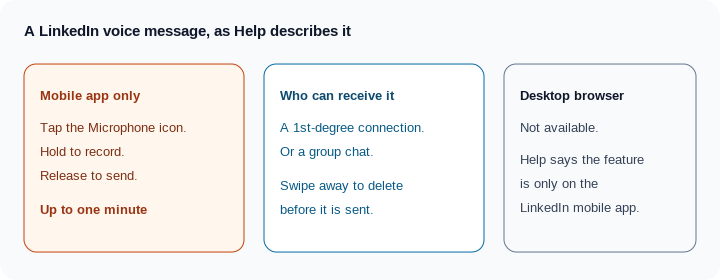
Quick answer. A LinkedIn voice message is recorded in the LinkedIn mobile app only, and it can be up to one minute. Open a conversation with a 1st-degree connection or a group chat, tap the Microphone icon, hold the large Microphone icon, and release to send. LinkedIn says the feature is not available outside that app.
The clicks are from Send voice messages in LinkedIn Messaging, checked 25 November 2026. LinkedIn's own heading has a typo, "voices messages." The steps below use the button names from that page.
Narrow is a LinkedIn inbox tool with labels, reminders, a pipeline and an AI Auto Screener.
See how Narrow worksHow to send a voice message on iPhone or Android
LinkedIn publishes one path for the LinkedIn mobile app. It does not give separate iPhone and Android steps, and it does not name a different icon on either phone.
- Tap the Messaging icon in the upper right.
- Open a conversation.
- Tap the Microphone icon.
- If prompted, allow LinkedIn to access your device microphone.
- Tap and hold the large Microphone icon to record.
- Release to send the voice message.
The article says voice messages go to your 1st-degree connections or to a group chat. It does not say you can start one from a profile that only shows Connect, or from a message request you have not accepted.
Before the recording is sent, swipe away from the large Microphone icon to delete it. That is the only pre-send delete the article describes. To listen to a voice message, tap the Play icon. The article does not say that Play previews your own take before you release to send. It also does not describe a re-record button.
If a voice message you received is inappropriate or offensive, the same article says you can report it.
Can you send a voice message from desktop?
No. The article's "Important to know" line is: "This feature is only available on the LinkedIn mobile app."
There is no desktop substitute in that article. It does not mention a microphone in the messaging window at the lower right of the homepage, and it does not mention linkedin.com in a browser.
If you need to record from a desktop inbox, Narrow Super Pro lets you record and send voice notes and videos from your inbox.
What works where
Only the cells LinkedIn's pages actually answer are filled in. "Not stated" means the article does not say.
| Place | Voice message | What the page says |
|---|---|---|
| LinkedIn mobile app | Yes | Up to one minute. 1st-degree connections or a group chat. Hold the Microphone icon, release to send. |
| Desktop browser | No | "This feature is only available on the LinkedIn mobile app." |
| Someone you are not connected with | Not stated | The article names 1st-degree connections or group chats. It does not describe a voice message to anyone else. |
| InMail | Not stated | The voice article does not mention InMail. |
| Sales Navigator compose | Not stated | The Sales Navigator URL for the same answer number shows the mobile-app article. Send an InMail message in Sales Navigator describes a subject, a text message of up to 1,900 characters, and an attachment. It does not mention a microphone or a voice message. |
InMail is a different message, with its own credit. How a response can return that credit is in LinkedIn InMail credits. Nothing on the voice page says a voice note spends or returns an InMail credit.
The Sales Navigator InMail article also says LinkedIn and Sales Navigator inboxes are separate, and that a message sent from Sales Navigator does not appear in your LinkedIn inbox. It still does not add a voice control to that compose window.
When a voice note helps
A voice note is a format choice, not a tactic with a published reply rate. LinkedIn does not give one. Three limits from the help page should shape how you use it: one minute, mobile only, and a 1st-degree connection or a group chat.
Use one when the person already knows you and a typed note is easy to skim past. Skip it when they need a link, a time, or a number they will copy. Those belong in text.
- Keep it inside the minute, and shorter if you can say the point in twenty seconds. The cap is one minute. Help does not reward using all of it.
- Say why you are reaching out in the first sentence. The rest of the minute is the point, not your job title.
- Follow the voice note with a text message in the same thread. The text is what they can scan later. The words for that second note are in LinkedIn follow-up message templates.
- Do not open a cold thread with audio if you have not said why it is them. A specific written opener is in LinkedIn cold message examples. A voice note can be the follow-up, after they know who you are.
Record where you can hear yourself. The help page does not say the other person can speed the clip up or read a transcript. Assume they will play it once, at normal speed, or not at all.
Can you delete a voice message after sending?
Before it sends, yes. Swipe away from the large Microphone icon.
After it sends, the voice article does not say. It links to Edit or delete a sent message within a conversation. That article says you can delete a sent message within 60 minutes, that the message is removed for everyone, and that a note reading This message has been deleted appears. An edit on that page is text only. The article does not name voice messages, so this guide does not claim the 60-minute delete covers a voice note.
The same delete article says you cannot delete a sent InMail inside the conversation. That exception is about InMail, not about audio. The clicks for the 60-minute window, and what it does not cover, are in how to unsend a LinkedIn message.
What LinkedIn Help does not say
- Separate iPhone and Android menus. There is one mobile path.
- A preview of your own recording, or a re-record button, before you release to send. Delete-before-send is the swipe. Play is described as how you listen, not as a preview step.
- A voice message to someone you are not connected with, including by InMail.
- A microphone in the Sales Navigator compose window. The InMail article on that window lists a subject, text, and an attachment.
- Whether the 60-minute delete includes a voice message. The delete article does not name one.
- A transcript, a playback speed, a forwarding control, or a way to save the audio outside the thread.
- Whether a group chat can include someone who is not your connection. The voice article allows group chats and does not restate who can be in one.
Sources (checked 25 November 2026)
Common questions
Can you send a voice message on LinkedIn desktop?
No. LinkedIn's help says this feature is only available on the LinkedIn mobile app. The steps are tap the Messaging icon, open a conversation, tap the Microphone icon, hold the large Microphone icon, and release to send.
How long can a LinkedIn voice message be?
Up to one minute. LinkedIn's voice-message article states that limit and does not publish a shorter or longer cap.
Can you send a voice message to someone you're not connected with?
LinkedIn says you can send voice messages to your 1st-degree connections or in group chats. The article does not say you can send one to a member you are not connected with.
Can you delete a voice message after sending?
The voice-message article does not say you can delete one after it is sent. It links to the article that lets you delete a sent message within 60 minutes, and that article does not name voice messages. An edit there is text only. Before the voice message is sent, swipe away from the large Microphone icon to delete the recording.
Narrow is a LinkedIn inbox tool with labels, reminders, a pipeline and an AI Auto Screener.
See how Narrow works