

Quick answer. Type the Boolean string into LinkedIn's main search bar. Use uppercase AND, OR, and NOT, straight quotation marks for exact phrases, and parentheses to group terms. LinkedIn evaluates quotes first, then parentheses, then NOT, then AND, and OR last. Wrap an OR list in parentheses when it has to stay together.
The operator rules below are from LinkedIn Help, checked 20 November 2026. The copy-paste strings later in the page are examples of how to apply those rules. They are not guaranteed result sets.
Narrow is a LinkedIn inbox tool with labels, reminders, a pipeline and an AI Auto Screener.
See how Narrow works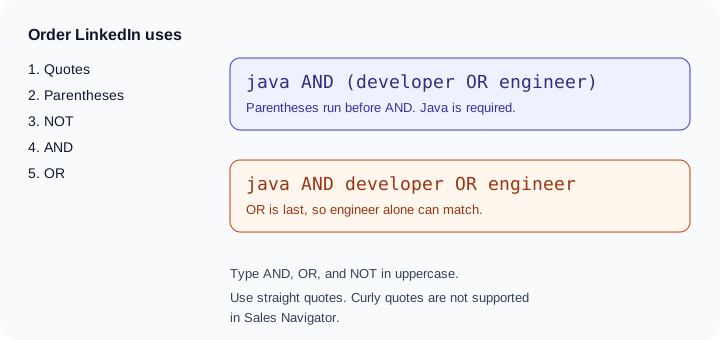
The operators LinkedIn documents
Use Boolean search on LinkedIn says you type the string into the main search bar at the top of LinkedIn.com. Combine keywords with AND, NOT, and OR. Group with quotation marks for an exact phrase and parentheses to organize terms. AND, NOT, and OR have to be uppercase or the search does not treat them as operators.
| Operator | What it does | LinkedIn's example |
|---|---|---|
| Quotes | Match an exact phrase, including a multi-word title. Phrases are handled before the other logic | "product manager" |
| NOT | Exclude the term that follows. This usually returns fewer people | programmer NOT manager |
| OR | Match any term in the list. This usually returns more people | sales OR marketing OR advertising |
| AND | Require every term. This usually returns fewer people | accountant AND finance AND CPA |
| Parentheses | Group a complex expression. Parentheses are the only grouping symbols LinkedIn.com recognizes | VP NOT (assistant OR SVP) |
Stop words such as "by", "in", and "with" are not used. LinkedIn says it drops them so the site stays fast. If a phrase depends on one of those words, put the whole phrase in quotes and read the results. Do not assume the little words survived as search terms.
Why the order of precedence changes the result
On LinkedIn.com the order is fixed:
- Quotes. The exact phrase is matched before any Boolean logic.
- Parentheses. Grouped expressions run before ungrouped ones.
- NOT. Applied after quotes and parentheses are resolved.
- AND. After NOT, and before OR.
- OR. Last.
OR being last is the mistake that produces a huge, wrong list. Take two strings that look almost the same.
java AND developer OR engineer
AND binds before OR, so this is the same idea as (java AND developer) OR engineer. Someone who is an engineer, and who never mentions java, can still match. The OR handed the search a second, wide door.
java AND (developer OR engineer)
The parentheses run first. The person must match java, and must also match developer or engineer. That is the list most people meant when they typed the first string.
The same thing happens with titles. founder AND sales OR marketing can return every marketing profile on the site, plus founders who mention sales. founder AND (sales OR marketing) keeps founder in the query. If you can say the logic out loud as "this, and one of these," put "one of these" in parentheses.
NOT has the same habit. LinkedIn's own pattern is VP NOT (assistant OR SVP). The parentheses make the exclusion cover both assistant and SVP. VP NOT assistant OR SVP does not say the same thing, because OR is evaluated last.
What LinkedIn will not run
LinkedIn.com does not support braces { }, brackets [ ], angle brackets < >, or a wildcard asterisk *. Square brackets, curly braces, and angle brackets are treated as ordinary characters. They do not group terms. If a string you copied uses {title} or engineer*, rewrite it.
The plus and minus operators are not officially supported. LinkedIn says they may appear to work sometimes. Use AND instead of +, and NOT instead of -, so the query is readable and handled as Boolean.
Sales Navigator adds one more restriction, from Using Boolean search on Sales Navigator. That product accepts standard straight quotation marks only. Curly quotes, the kind a document processor inserts, are not recognized. The Sales Navigator page also repeats that + and - are not officially supported, that * is not supported, and that operators must be uppercase.
Where Boolean search works
LinkedIn's Sales Navigator article is the page that says where the operators are accepted. Boolean works in the keyword field on Recruiter and on LinkedIn.com, and in the Company, Title, and Keyword fields on Sales Navigator.
| Place | Fields that take Boolean | Limit to plan for |
|---|---|---|
| LinkedIn.com | The main search bar at the top of the page | Uppercase AND, OR, and NOT. Parentheses and straight quotes. No wildcard |
| Recruiter | The keyword field | The same Boolean help article names this field. It does not publish a separate operator cap for it |
| Sales Navigator | Company, Title, and Keyword | About 15 search operators. Straight quotes only. You do not have to type AND |
That last point is easy to miss. On Sales Navigator, if the search has two or more terms, LinkedIn says you already see results that include all of them. AND is optional there. It is not optional on LinkedIn.com. A string you tested in Sales Navigator can get looser or tighter when you paste it into the main LinkedIn search bar, because one box implies AND and the other waits for you to type it.
Fifteen operators is a Sales Navigator limit, and LinkedIn says "about 15." Count AND, OR, and NOT before you paste a long title list into Keyword, Title, or Company. A string that is fine on LinkedIn.com can be too long for those Sales Navigator fields. The click path for the rest of the product is in how to use LinkedIn Sales Navigator.
Example strings you can paste
These are examples for real searches. They show the operators. They do not promise who will appear, and they are not a scraped list. Count the operators again if you move one into Sales Navigator.
Founders looking for a head of sales at a software company:
("head of sales" OR "vp of sales" OR "chief revenue officer") AND (SaaS OR software) NOT recruiter
Recruiters looking for backend engineers, and excluding recruiters and interns. The sourcing habits around a list like this are in LinkedIn sourcing for recruiters.
("backend engineer" OR "software engineer") AND (Go OR Java) NOT (recruiter OR intern OR internship)
Finding investors, using the pattern partner or principal, plus a seed stage, minus recruiter:
("partner" OR "principal") AND (seed OR "pre-seed") NOT recruiter
How you turn a short investor list into a meeting is a different job. The outreach side is in how to find investors on LinkedIn.
Agency owners, excluding assistants and interns:
(founder OR owner OR "managing director") AND (agency OR studio) NOT (intern OR assistant)
Product managers, without project managers:
"product manager" NOT "project manager" NOT coordinator
Finance leaders:
(CFO OR "chief financial officer" OR controller) AND (SaaS OR marketplace) NOT intern
Product designers, without talent profiles:
("product designer" OR "ux designer") NOT (recruiter OR "talent acquisition")
Founders in developer tools:
(founder OR cofounder OR "co-founder") AND ("developer tools" OR devtools OR API) NOT recruiter
Run one string, read ten profiles, and edit the words that pulled the wrong people. Adding NOT for a bad title is usually better than adding another OR. A wider OR feels productive and then hands you a list you will not work. Targeted outreach on LinkedIn is the argument for keeping the list small after the search returns.
On Sales Navigator you can omit AND, because two or more terms are already combined that way. On LinkedIn.com, type AND when you need both.
Boolean search not working
Go down this list before you assume the search index is down.
- The operators are lowercase.
and,or, andnotare ordinary words. Retype them as AND, OR, and NOT. - The quotes are curly. Paste into a plain text box and retype the quotation marks. Sales Navigator rejects curly quotes. A string that looks quoted, and is not, will not match the phrase.
- The parentheses do not balance. Every
(needs a). The VP example fails if you writeVP NOT (assistant OR SVPand never close it. - You used a symbol LinkedIn does not support. Remove
*,+,-,{ },[ ], and< >. Replace plus and minus with AND and NOT. - Sales Navigator has too many operators. Keyword, Title, and Company are guided at about 15. Split one long string into two searches.
- You relied on a stop word. "by", "in", and "with" are not used. Quote a multi-word title instead of hoping the small words hold it together.
- You tested on Sales Navigator and then pasted into LinkedIn.com without AND. Two bare words are ANDed in Sales Navigator. On LinkedIn.com, type AND if you need both.
If the string is valid and the people are still wrong, the words are wrong, not the operator. "Sales" matches a lot of profiles that are not a head of sales. Quote the title you actually want.
After the search, the replies are a different problem
A Boolean string builds a list of profiles. It does not file the replies. When people write back, the threads live in messaging, which is the workflow in how to manage your LinkedIn inbox.
We build Narrow, a LinkedIn inbox tool. Labels and pipeline stages are where replies from a search can sit with a next step on the thread. The Sales Navigator inbox is part of Super Pro, not Pro. See Narrow.
Sources (checked 20 November 2026): Use Boolean search on LinkedIn and Using Boolean search on Sales Navigator.
Common questions
How do you run a Boolean search on LinkedIn?
Type the string into the main search bar at the top of LinkedIn. Use uppercase AND, OR, and NOT. Put exact phrases in straight quotation marks, and use parentheses to group terms. Lowercase operators are not applied as Boolean.
What is the order of Boolean operators on LinkedIn?
LinkedIn evaluates quotes first, then parentheses, then NOT, then AND, and OR last. Without parentheses, java AND developer OR engineer can match someone who is only an engineer. java AND (developer OR engineer) requires java plus one of those two words.
Why is my LinkedIn Boolean search not working?
The usual causes are lowercase AND, OR, or NOT, curly quotation marks pasted from a document, parentheses that do not balance, or a symbol LinkedIn does not support, such as an asterisk, plus, or minus. In Sales Navigator, a string with too many operators can also fail the roughly 15-operator guidance.
Does Sales Navigator support Boolean search?
Yes, in the Company, Title, and Keyword fields, with a limit of about 15 search operators. Sales Navigator accepts straight quotes only, not curly quotes. You do not have to type AND there, because two or more terms are already treated as AND.
Can I use wildcards or quotation marks in LinkedIn search?
Use straight quotation marks for an exact phrase, such as product manager. LinkedIn does not support the asterisk wildcard. Braces, brackets, and angle brackets do not group terms. Plus and minus are not officially supported. Use AND and NOT instead.
Narrow is a LinkedIn inbox tool with labels, reminders, a pipeline and an AI Auto Screener.
See how Narrow works