Quick answer. A 1st-degree connection is someone you are directly connected to, and you can message them. A 2nd-degree connection is connected to one of those people, and you can send an invitation. A 3rd-degree connection is connected to a 2nd-degree connection. Everyone outside that set, and outside your followers and fellow group members, is shown as LinkedIn Member (Out of Network).
The definitions below are from LinkedIn Help, checked 20 November 2026. The worked example after the table is a way to use those rules. It is not a second set of product rules.
Narrow is a LinkedIn inbox tool with labels, reminders, a pipeline and an AI Auto Screener.
See how Narrow works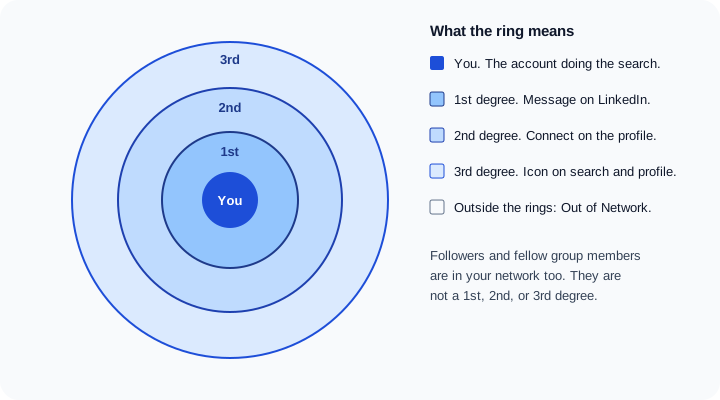
What each degree means
LinkedIn's article on your network and degrees of connection ties the badge to two things: who stands between you and that member, and which action the product documents for them. The badge appears in search results and on the profile.
| Degree | Who they are | Where you see the badge | How you can contact them |
|---|---|---|---|
| 1st | Someone who accepted your invitation, or whose invitation you accepted | 1st degree icon in search results and on the profile | Send a message on LinkedIn |
| 2nd | Someone connected to one of your 1st-degree connections | 2nd degree icon in search results and on the profile | Send an invitation with the Connect button on their profile. InMail is separate: a Basic account has to upgrade, and it is unavailable if they opted out |
| 3rd | Someone connected to one of your 2nd-degree connections | 3rd degree icon in search results and on the profile | The degree article documents the icon. It does not document a Message button. InMail, if the option is available, or a free message if they have Open Profile on |
| Out of Network | A member who is not in the categories above | The label LinkedIn Member (Out of Network) | Some profile fields have limited visibility. InMail if that option is available |
A follower is not a degree. A fellow group member is not a degree either. Both still count as part of your network, which is why the table has a row for Out of Network that is narrower than "anyone I am not connected to."
Followers and group members sit in the network too
The same help article says your network is your 1st-degree, 2nd-degree, and 3rd-degree connections, plus followers and fellow members of your LinkedIn groups.
Followers chose to see your public updates in their feed, subject to your settings. They did not accept a connection invitation. What that does to messaging and to the 30,000 cap is the subject of LinkedIn followers vs connections.
Fellow group members are in your network because you share a group. LinkedIn says the Highlights section of a profile may show the groups you both belong to. You can contact a fellow group member by sending a message on LinkedIn or directly through the group. That path does not require them to be a 1st-degree connection.
Out of Network is what is left. LinkedIn says some fields on those profiles have limited visibility, and that growing your network is how you see more of a profile. If the option is available, you can send an InMail to introduce yourself. There is no documented "message them like a connection" action for that label.
The 30,000 cap applies to 1st-degree connections
LinkedIn sets a maximum of 30,000 1st-degree connections. The network article states the cap, and the network size limit article repeats it. LinkedIn's advice next to that cap is to connect with people you know and trust, and to follow people whose posts you want.
The cap is only the 1st-degree list. People who follow you, and people you follow, are not counted against 30,000 in that article. If you reach 30,000 connections, Follow becomes the default action on your profile. You cannot accept or send new invitations until you remove connections and get back under the limit. The other caps that sit next to this one, including notes and search, are in LinkedIn limits.
The official connections download is the 1st-degree list only. What that file contains, and what it leaves out, is in how to export your LinkedIn connections.
InMail, Open Profile, and the people you are not connected to
Send an InMail is the documented way to message a member you are not connected to. A Basic (free) account has to upgrade to Premium before it can use InMail. The subject can be up to 200 characters. The body can be up to 2,000 characters. You cannot message a member who has turned InMail off in their message preferences. You also cannot buy extra InMail credits outside the monthly allotment, and Premium InMail credits cannot be used to send InMail on Sales Navigator or LinkedIn Recruiter. The monthly numbers by plan are in LinkedIn InMail credits.
Open Profile is separate. LinkedIn's Open Profile settings say the feature lets other members message a Premium subscriber for free, without using an InMail. The InMail article says the same thing: if Open Profile is on, you can message that member for free. Members with basic or free accounts can send only a limited number of Open Profile messages each month. LinkedIn does not publish that monthly number on the page, so this guide does not invent one. A Premium member can show the Premium badge and still leave Open Profile off. The two settings are separate.
A 1st-degree connection does not need InMail. A 2nd-degree connection has a documented Connect button, so an invitation comes before a credit. InMail and Open Profile matter for a 3rd-degree connection or an Out of Network member, and only when the option is on the profile.
A worked example: Priya, Arjun, and Meera
Say the chain is You, then Priya, then Arjun, then Meera.
- Priya is 1st-degree. She accepted your invitation, or you accepted hers. You see a 1st degree icon. You can message her on LinkedIn. You do not need InMail, a note on a connection request, or a mutual introduction.
- Arjun is 2nd-degree. He is connected to Priya, and he is not connected to you. You see a 2nd degree icon in search and on his profile. The documented action is the Connect button. You can also ask Priya to introduce you before you send that invitation. If you would rather write him without connecting, InMail is available only with Premium, only if he has not opted out, and only if you are willing to spend the credit. Open Profile, if he has it on, is the free version of that message.
- Meera is 3rd-degree. She is connected to Arjun. She is not connected to you, and in this example she is not connected to Priya either. You see a 3rd degree icon. The degree article documents that icon and does not document a Message button. You can look for InMail or Open Profile. The cleaner path is to change the graph: Priya introduces you to Arjun, Arjun accepts, and Arjun becomes 1st-degree. Meera, who is connected to Arjun, then becomes 2nd-degree. The Connect button LinkedIn documents for 2nd-degree connections is then the action on her profile.
That last step is the practical reason degrees matter. You are not collecting badges. You are moving a person inward until the product lets you message them as a connection, or until a specific non-connection option is actually offered.
How to use the degree when you reach out
Use the badge to pick the move. Do not use the same note for every distance.
Ask a 1st-degree connection for the 2nd-degree person. If Priya really knows Arjun, an introduction is a message you are allowed to send, because Priya is 1st-degree. The ask should be easy for her to forward: who you want, why this person, and a short blurb she can paste. The structure is in how to ask for a LinkedIn introduction. Do not ask Priya to introduce you to Meera if Priya does not know Meera. That request pretends a 3rd-degree person is a 2nd-degree person.
Write a connection note when Connect is the action. For Arjun, the note has one job: remind him why the invitation is reasonable. Name Priya if she is a real mutual and you are comfortable doing so. Do not put the pitch, the deck, or the job description in the invitation. Wording for that note is in LinkedIn connection request examples. The same restraint applies if you later connect with Meera once she is 2nd-degree.
Spend InMail on the gap, not on the person you can already reach. InMail is for a member you are not connected to. Using it on a 1st-degree connection is the wrong tool. Using it on a 2nd-degree connection before Connect, or before you have asked the mutual, spends a credit on a path LinkedIn already gives you.
Check the group before you treat someone as Out of Network. If you share a group, LinkedIn counts that member as part of your network and documents a message through the group. Look at Highlights before you assume the profile is out of reach. Read the degree icon before you choose Message, Connect, or InMail.
Once they are 1st-degree and you are talking
The degree badge gets you into a conversation. It does not keep the conversation. We build Narrow, a LinkedIn inbox tool. Labels, follow-up reminders, and Kanban pipeline stages are how you keep track of those threads once someone is a 1st-degree connection and you are actually talking. The product is at Narrow.
Sources (checked 20 November 2026): Your network and degrees of connection, Network size limit, Send an InMail message, and Open Profile settings.
Common questions
What do 1st, 2nd, and 3rd degree mean on LinkedIn?
A 1st-degree connection accepted an invitation with you, and you can message them. A 2nd-degree connection is connected to one of your 1st-degree connections, and LinkedIn shows a Connect button on their profile. A 3rd-degree connection is connected to one of your 2nd-degree connections. LinkedIn shows a 3rd degree icon on search results and on the profile.
What does 2nd mean on LinkedIn?
2nd degree means that person is connected to someone you are already connected to. You will see a 2nd degree icon next to their name in search and on their profile. LinkedIn's network article says you can send them an invitation with the Connect button on their profile.
What is a 3rd degree connection on LinkedIn?
A 3rd-degree connection is someone connected to your 2nd-degree connections. LinkedIn shows a 3rd degree icon in search results and on the profile. The degree article does not list a Message action for them the way it does for a 1st-degree connection.
What does Out of Network mean on LinkedIn?
LinkedIn Member (Out of Network) is a member who is not a 1st, 2nd, or 3rd-degree connection, not a follower, and not a fellow member of one of your groups. LinkedIn says some fields on those profiles have limited visibility. If the option is available, you can send an InMail.
How many connections can you have on LinkedIn?
LinkedIn caps 1st-degree connections at 30,000. Followers are not capped the same way. At 30,000 connections, Follow becomes the default action and you cannot send or accept new invitations until you remove connections.
Narrow is a LinkedIn inbox tool with labels, reminders, a pipeline and an AI Auto Screener.
See how Narrow works