Quick answer. A connection is a two-way, 1st-degree relationship. You can message each other, and you see each other's posts. A follower sees your public posts in their feed without being connected, and is not part of your network in the same way. Your 1st-degree connections automatically follow you.
LinkedIn documents both actions. The comparison below uses those help pages, checked 20 November 2026, and then a decision list for people who have to choose one button.
Narrow is a LinkedIn inbox tool with labels, reminders, a pipeline and an AI Auto Screener.
See how Narrow works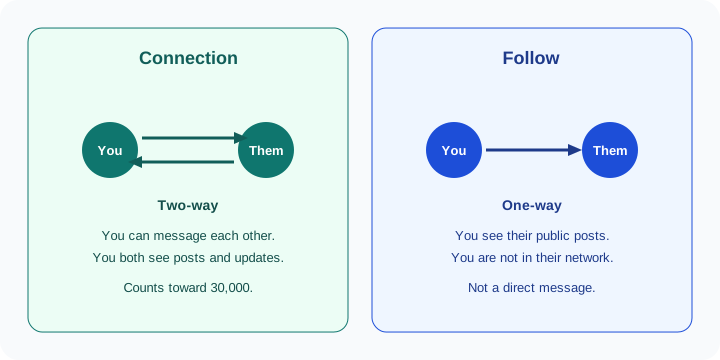
Connection versus follower
Follow and connect on LinkedIn splits the two jobs cleanly. Connecting builds a two-way relationship with someone you know and trust. Following lets you learn from someone's content without sending an invitation.
| Connection | Follower | |
|---|---|---|
| Mutual? | Yes. You both become 1st-degree connections | No. You see their public posts. They do not automatically see yours |
| Needs acceptance? | Yes. An invitation has to be accepted | No. You follow from the profile, a post, My Network, or search |
| Can you message them directly? | Yes. LinkedIn says connections can message each other directly | No. A follow is not a 1st-degree connection, so it is not the Message path documented for connections |
| Sees your posts? | Yes. Connections see each other's posts and updates. They also follow you automatically | They see the public posts of the person they followed. Your own 1st-degree connections already do this |
| Counts toward the 30,000 limit? | Yes. The cap is 30,000 1st-degree connections | No. LinkedIn says the number of people who can follow you is unlimited |
Two numbers sit next to that last row, and they come from different articles. The network size limit says the number of people who can follow you, and the number of people you can follow, is unlimited. The follow or unfollow article adds a specific cap: members can follow up to 5,000 people who are not connections. This guide reports both. If you follow a large list of people you are not connected to, treat 5,000 as the number on the follow article. Connections are the list that hits 30,000.
A 1st-degree connection is the relationship behind the degree badge. How 2nd and 3rd fit around that badge is in 1st, 2nd, and 3rd degree connections.
When to connect, and when to follow
LinkedIn's own guidance is about whether you already have a reason to be in contact. Paraphrased from the follow-and-connect article, without copying its table:
- Connect with people you know from work, school, or your community. You already have a relationship, and you may want to message each other.
- Connect, and add a note, when you recently met someone and want to stay in touch. The note is the context.
- Follow when you do not know the person but want their posts or insights. You stay informed without sending an invitation.
- Follow when you are learning a new field and want to see who is worth writing to later. The article's point is to identify people before you reach out.
LinkedIn also says to send invitations only to people you know and trust, in line with the User Agreement and Professional Community Policies. A follow is the action that matches "I want the posts" when that sentence is not true yet.
If you see Follow instead of Connect
Some members set Follow as the main action on their profile. The blue button is then Follow, even if you would rather connect.
You can still send an invitation from the More menu on the introduction section of the profile. LinkedIn says that if you connect from that overflow menu, you automatically follow them while the invitation is pending. If they decline, you keep following them unless you unfollow yourself.
That pending follow is easy to miss. You asked to connect. You also started following. A decline does not undo the follow. If you only wanted the invitation, unfollow after a decline. They are not notified when you unfollow.
Who can follow you
Your 1st-degree connections follow your posts and articles automatically. Anyone else can follow you too, until you change the setting. The path is in Manage who can follow you:
- Click the Me icon at the top of your LinkedIn homepage.
- Select Settings & Privacy.
- Select Visibility on the left.
- Under Visibility of your LinkedIn activity, click Followers.
- Under Who can follow you, choose one option.
- Under Make follow primary, turn the toggle on or off.
The two options under Who can follow you:
- Everyone on LinkedIn. Any member can follow your updates. LinkedIn says this also lets your posts be shared off LinkedIn.
- Your connections. Only 1st-degree connections can follow your updates. Followers outside your network are removed, and your follower count becomes the same as your connection count. The Follow button disappears from your posts and articles.
Make follow primary shows Follow, instead of Connect, as the main button on your profile. Turn it off if you want Connect in front. Changes can take up to 24 hours.
The button visitors see is part of the profile, next to the headline and About. The rest of that page is in how to optimize your LinkedIn profile for outreach.
How to view your followers
View your followers uses the desktop My Network menu:
- Click the My Network icon at the top of your LinkedIn homepage.
- Click Manage my network on the left.
- Click Following & followers.
- Click the Followers tab near the top of the page.
You get a notification when someone who is not a connection follows you. You cannot view the followers of your LinkedIn Page from this screen. The same article limits connection search results to 100 pages, or 1,000 results. That note is about connections, not a second follower cap.
To follow or unfollow someone, open their profile, click More in the introduction, and choose Follow or Unfollow. The More icon on a post does the same thing. People to follow also show up in the feed, Notifications, My Network, and search.
Unfollow a connection without removing them
Unfollowing hides that person's updates on your feed. If you are connected and you unfollow, LinkedIn says you stay connected. They are not notified. If you follow them again later, they do get a notification.
That is a feed choice, not a network edit. You can still message them, because the 1st-degree connection is intact. Use it when a connection posts more than you want in the feed and you still need the relationship.
Removing a connection is the other action. It ends the 1st-degree relationship. LinkedIn has no bulk-remove button for that, which is covered in how to remove LinkedIn connections in bulk. Unfollow when you want a quieter feed. Remove when you want the slot back, or when you no longer want the connection.
If you cannot find someone you unfollowed, the recovery path is Me, then Settings & Privacy, then Account preferences, then Site preferences, then People you unfollowed, then Follow next to their name.
What happens at 30,000 connections
At 30,000 1st-degree connections, Follow becomes the default option on your profile. You cannot send or accept new invitations until you remove connections and get under the limit. You can still follow people. The network size article is the source, and the surrounding caps are in LinkedIn limits.
This is why a creator account and a recruiter account should not treat "more connections" as the only goal. Followers do not consume the 30,000. Invitations do.
Which should you do?
The help articles tell you the mechanics. This list is the choice, by job. It is not a LinkedIn rule.
- Founders. Connect with customers, candidates, and investors you will actually write to. Follow operators whose posts you want while you are still deciding whether a relationship is real. Connecting with everyone you might someday pitch fills the 30,000 with people you will not maintain. LinkedIn for founders is the inbox side of that problem, after the connection exists.
- Sales. Connect when there is a conversation to have. Follow the rest of the buying committee so their public posts show up first. A follower is not someone you can message the way you message a connection.
- Recruiters. Connect with candidates who are in process. Follow people you might hire later when you do not need to message them this month. A follow keeps the posts. It does not create a thread.
- Creators. Turn on Make follow primary if you want an audience larger than the list of people you will message. Your connections still follow you. New followers are not a network you can DM.
For outreach, follow while you are learning what someone talks about. Connect when you have a specific reason and, if you do not already know them, a note. Message after you are 1st-degree. InMail and Open Profile are for the case where a connection is the wrong ask and those options are actually on the profile. A follower list is not a list you can DM.
Once the follow has become a connection and the replies start, the work moves to the thread. We build Narrow, a LinkedIn inbox tool. Labels, reminders, and pipeline stages belong on those conversations, not on the follower list.
Sources (checked 20 November 2026): Follow and connect on LinkedIn, Manage who can follow you, View your followers, Follow or unfollow people, Network size limit, and Your network and degrees of connection.
Common questions
What is the difference between followers and connections on LinkedIn?
A connection is a two-way 1st-degree relationship. You can message each other, and you each see the other's posts and updates. A follower sees that person's public posts and articles without a connection invitation. Following does not put you in their network, and they do not automatically see your posts.
Do my connections automatically follow me?
Yes. LinkedIn says your 1st-degree connections automatically follow your posts and articles. People who are not connections can also follow you, unless you limit followers to your connections.
Why do I see Follow instead of Connect on LinkedIn?
That member has set Follow as the main action on their profile. You can still connect from the More menu. LinkedIn says you then follow them while the invitation is pending, and you keep following them if they decline, unless you unfollow.
Can I unfollow a connection without removing them?
Yes. Unfollowing hides their updates from your feed and keeps the connection. LinkedIn says they are not notified. Removing a connection is a different action and ends the 1st-degree relationship.
Who can follow you on LinkedIn?
The default allows anyone on LinkedIn to follow your updates, which also lets your posts be shared off LinkedIn. You can switch Who can follow you to Your connections. That removes followers outside your network, and the change can take up to 24 hours.
Narrow is a LinkedIn inbox tool with labels, reminders, a pipeline and an AI Auto Screener.
See how Narrow works