

Quick answer. A strong LinkedIn recommendation says how you know the person, gives one specific thing they did and what changed because of it, and ends with who should hire or work with them. Below are fill-in templates for managers, peers, direct reports, clients, and mentors, plus request messages you can send, since recommendations must be requested and written through LinkedIn.
The rules below are from LinkedIn Help, checked 21 November 2026. The templates are fill-in wording, not LinkedIn's form. Names in the examples are fictional.
Narrow is a LinkedIn inbox tool with labels, reminders, a pipeline and an AI Auto Screener.
See how Narrow works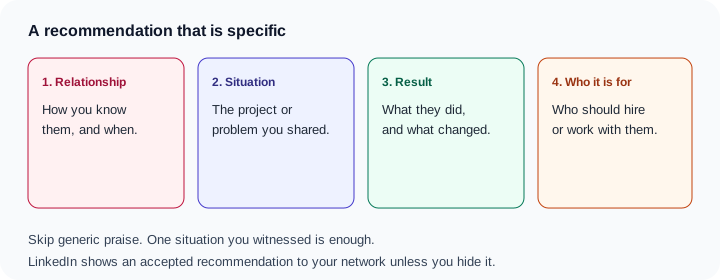
How recommendations work
Recommendations on LinkedIn says a recommendation is a commendation a member writes to recognize your work. You can request one only from a 1st-degree connection you work with or have worked with, and you can write one only for a 1st-degree connection.
| Rule | What LinkedIn says |
|---|---|
| Who | A 1st-degree connection. The request arrives as a message. You may decline, and you do not have to respond. |
| After you receive one | Accept, dismiss, or ask for a revision. Once accepted, it is visible to your network by default. You can hide it. |
| How many | No limit on the total you can request or give. Only one recommendation per position, per member. |
| If you disconnect | Removing the connection withdraws the recommendations between you. They are not restored if you connect again. |
| What you cannot paste | It can be displayed only if it was requested through LinkedIn and both people have profiles. An email or other message cannot be added as one. |
The Recommendations block on a profile is easy to miss. Request a recommendation says that section shows up only after you have given or received a recommendation that is not hidden.
How to request one
On desktop, LinkedIn's steps are:
- Click the My Network icon, then Connections.
- Search by name, or use Search by filters, and open the profile.
- Click More in the top section of the profile.
- Select Request a recommendation.
- Fill in Relationship, Position at the time, and a personalized message. Click Send.
You can also start from your own profile: Me icon, your profile, the Plus icon in Recommendations, then Ask for recommendation. That Plus icon exists only once the section is visible. Search for the connection, click Continue, and fill in the same three fields.
Three limits sit on the form. You can request only in your primary profile language. If English is primary, the request stays in English until you switch the primary language. You can have only one open request to a given connection. You cannot change Relationship after you send. Ask them to delete the request, then send a new one. The same article lists mobile taps. This guide stays on desktop.
Change the default message. Offer a few bullets, and offer to write one back. A recommendation is not an introduction. An introduction asks someone to forward you, which is covered in how to ask for a LinkedIn introduction.
How to write one, or decline
Recommend someone on LinkedIn says the request is a message.
- Click the Messaging icon.
- Open Write [name] a recommendation.
- Click the link in the message.
- Click Write recommendation. Click Ignore if you do not want to write it.
Declining a requested recommendation uses Ignore on desktop. On mobile, the decline control is Delete.
The other person sees it under Received. You see it under Given. Either of you can hide it. You can edit or delete a recommendation you sent. LinkedIn Help does not publish a character limit on these pages, so this guide does not invent one.
The four parts
One situation is enough. A second story usually weakens the first.
| Part | Write this | Leave this out |
|---|---|---|
| Relationship | Your role toward them, the team, and the dates | "A true professional and a pleasure to work with" |
| Situation | One project, account, or problem you shared | Every project they were near |
| Result you witnessed | The action, and what changed that you saw | A number you cannot stand behind |
| Who it is for | The manager, client, or team who should work with them | "Any team would be lucky" |
Worked example. Amina managed Luis at Northwind in 2024. He rewrote three onboarding emails, sat with support for a week, and the setup tickets left her Monday review. The templates are that shape with the blanks open.
Templates you can fill in
Manager for a direct report
I managed [Name] on [team] at [Company] from [dates].
When [situation], they [action]. What changed: [result you saw].
Bring them in if you need [who it is for].
I managed Luis at Northwind in 2024. He rewrote three onboarding emails, sat with support for a week, and the setup tickets left my Monday review.
Direct report for a manager
[Name] managed me on [team] at [Company] from [dates].
In [situation], they [action]. Because of that, [what changed].
Work with them if you want [who it is for].
Amina managed me at Northwind in 2024. She cleared a week with the support queue so I could rewrite onboarding, and I shipped it.
Peer
[Name] and I were peers on [team] at [Company] in [year].
On [situation], they [action]. The result I saw: [what changed].
Call them when you need [who it is for].
Sam and I were peers at Northwind in 2024. He wrote the migration checklist the customer followed without a call, and the go-live stayed on the date we had sent.
Client for a freelancer or a small agency
I hired [Name] in [year] to [project].
They [action], and [what changed for you].
I would hire them again for [who it is for].
I hired Mateo in 2025 to rebuild our proposal deck. He cut twelve slides after two salesperson interviews, and we presented without him.
Founder for an early employee
[Name] was an early [role] at [Company] from [dates], reporting to me.
When [situation], they [action]. [What you saw change.]
Hire them if you are [who it is for].
Priya reported to me at Northwind from 2023 to 2025. She ran the demo follow-up for a month so I could see which demos came back.
Mentor for a student or intern
I mentored [Name] during [program] at [Company] in [year].
Asked to [situation], they [action]. [What changed.]
They are ready for [who it is for].
I mentored Chris at Northwind in 2025. He replaced our lead-tagging doc with a one-page version three reps actually used.
Recruiter or hiring partner
I partnered with [Name] on hiring for [team] at [Company] in [year].
For [situation], they [action]. [What changed in the search.]
Use them if you need [who it is for].
Dana and I hired for Northwind support in 2025. She rewrote the intake around three skills, and the interview loop got shorter.
Request messages
Send the request through LinkedIn. Pasting one of these into email does not create a recommendation. Offer bullets, and offer to write one back.
Someone you work with now
Hi Jordan — could you write a short LinkedIn recommendation for the March migration? The useful points are the checklist, the customer mapping session, and the go-live date. I can send those as bullets, and I will write one for you. Fine to say no.
A former manager you have not spoken to in a while
If it has been months, do not open with the ask. The first note is the one in how to re-engage a cold LinkedIn connection. Send the request after they reply.
Hi Amina — it has been a while. I am updating my profile and would value a short recommendation about the 2024 onboarding work. I can send three bullets, and I would like to write one for you. No worry if the timing is bad.
A client, after the project
Hi Priya — if you are willing, a short recommendation on the proposal deck would help: the interviews, the slides we cut, and that your team presented without me. Glad to write one for you. Fine to skip this.
Someone who already offered
Hi Sam — you offered to recommend me, and I would like to take you up on that. The useful version is the data-migration checklist. I can send three bullets, and I will write one for you about the same launch.
More short notes, for threads that are already open, are in LinkedIn follow-up message templates.
What makes one weak
- Only adjectives. "Hardworking and strategic" can describe anyone.
- No situation. A stranger cannot tell what you worked on.
- A number the writer did not see. Leave out revenue, pipeline, or a percentage you cannot stand behind.
- Something that should stay private: a customer's name, an unreleased price, or a performance rating.
- A promise of any job. "Any team would be lucky" is not evidence.
On the profile, a vague recommendation does less than a specific About or Featured item. How those pieces fit is in how to optimize your LinkedIn profile for outreach.
If they do not reply
Wait about a week, then send one line.
Hi Jordan — floating this back up in case the recommendation request got buried. The three bullets still stand, and no worry if you would rather not.
We build Narrow, a LinkedIn inbox tool. A follow-up reminder on that request thread brings the conversation back so you can send the nudge yourself. That is what LinkedIn follow-up reminders are for.
Sources (checked 21 November 2026): Recommendations on LinkedIn, Request a recommendation, Recommend someone on LinkedIn, and Declining a requested recommendation.
Common questions
How do I ask for a recommendation on LinkedIn?
On desktop, open My Network, then Connections, open the person's profile, click More, and choose Request a recommendation. Fill in Relationship, Position at the time, and a short message, then click Send. You can also start from the Plus icon in the Recommendations section of your own profile, once that section is visible.
Who can write me a LinkedIn recommendation?
Only a 1st-degree connection. LinkedIn says you request recommendations from 1st-degree connections you work with or have worked with, and you can write one only for a 1st-degree connection. You can have only one open request to that person at a time.
Can I paste an email and show it as a LinkedIn recommendation?
No. LinkedIn says a recommendation can be displayed only if it was requested through LinkedIn and both people have LinkedIn profiles. You cannot add an email or another kind of message as a recommendation.
Is there a limit on LinkedIn recommendations?
There is no limit on the total number you can request, give, or receive. There is a limit of one recommendation per position, per member. If you remove the connection, the recommendations between you are withdrawn, and they are not restored if you connect again.
What should a LinkedIn recommendation say?
Say how you know the person, name one situation you were both in, describe what they did and what changed because of it, and close with who should hire or work with them. Generic praise without a situation is easy to ignore.
Narrow is a LinkedIn inbox tool with labels, reminders, a pipeline and an AI Auto Screener.
See how Narrow works