

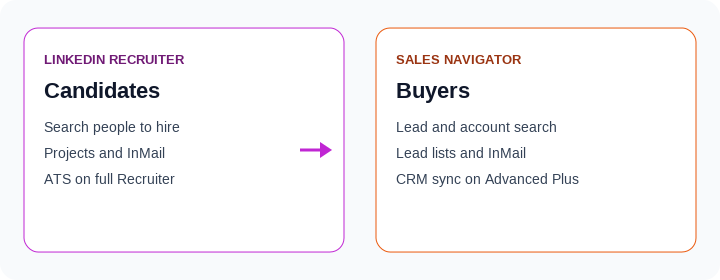
Quick answer. LinkedIn Recruiter is LinkedIn's hiring product: candidate search, Projects for a pipeline, InMail to candidates, and ATS integrations on the full product. Sales Navigator is its selling product: lead and account search, lead lists, InMail to buyers, and CRM sync on Advanced Plus. If you hire, buy Recruiter Lite as an individual or Recruiter for a team. If you sell, buy Sales Navigator. People misuse them when they buy the hiring seat to message buyers, or the selling seat and then expect a recruiting pipeline.
Narrow is a LinkedIn inbox tool with labels, reminders, a pipeline and an AI Auto Screener.
See how Narrow worksThe two products, in one table
Figures below are from LinkedIn's pages on 23 November 2026. Where a price is not on the page, the cell says see vendor site. Recruiter and Recruiter Professional Services are not publicly priced. Recruiter Lite's current dollar price was not on the official pages opened for this check.
| Recruiter Lite | Recruiter | Sales Navigator Core | Sales Navigator Advanced Plus | |
|---|---|---|---|---|
| Built for | Individuals hiring less consistently. The Lite page calls it a simple tool for occasional hiring. | HR and talent teams hiring at scale, or for competitive roles. Staffing firms are pointed at Recruiter Professional Services Plus. | Individual sellers who want leads and client relationships. | Sales teams that use an integrated CRM. |
| Search scope and filters | 20 search filters in the Recruiter FAQ. The Lite page says 20+ smart filters. You can view and contact 1st-, 2nd-, and 3rd-degree connections. Beyond that, Lite help says the profile is out of network. | Unlimited access to LinkedIn's network, AI-Assisted Search, and 40+ advanced filters. Core filters named on the page include job titles, location, skills, and industries. | 50+ advanced search filters, on Core as well as the higher plans. Lead and account search, not a candidate project. | The same 50+ filters, plus buyer intent (also on Advanced) and CRM-backed lead and account lists. |
| InMail per month | 30 per user. Lite help says you can purchase up to 70 more, and you can hold at most 120. | The page body says up to 150 per month, per seat. The FAQ on the same page says 100–150 per month. | 50. The same 50 is listed for Advanced and Advanced Plus. | 50. |
| Pipeline or projects | Saved search alerts, daily recommendations, and saved templates. The Lite page does not describe Projects. A Premium comparison lists automatic candidate tracking on Lite. | Projects: save candidates, see team history, and share profiles with hiring managers. | Custom lead and account lists. Help says you can save up to 1,000 leads in each list and 10,000 leads in total. Alerts require a saved lead or account. | The same lists, plus CRM import of accounts and creation of leads and contacts in the CRM. |
| ATS or CRM | Not listed on the Lite page. | The Recruiter page says you can integrate an ATS, a CRM, and an email provider. | No Advanced CRM integration on the compare grid. | Advanced Plus only. The grid names Salesforce, HubSpot, Microsoft Dynamics, Oracle, and more. Help says CRM integration is Advanced Plus only. |
| Team features | Described as the individual product. | Collaboration and analytics for the team. | No team seat management and no TeamLink. Those checks start on Advanced. | Team seat management, TeamLink, and the CRM tools. Price is a quote. |
| Price | See vendor site. Billing help says monthly or annual, and that annual saves up to 20% versus monthly. No USD price was on the pages checked. | Contact LinkedIn sales, or see the vendor site. The FAQ says price varies by company size and seats. | US$119.99 per license per month, or US$1,079.88 per year. The page is marked updated 27 September 2026 and says prices are estimates and may exclude tax. | See vendor site. Advanced Plus is a demo. For a team without CRM sync, Advanced is US$159.99 per license per month, or US$1,799.88 per year. |
Whether Core is worth US$119.99 a month is a separate question, covered in is LinkedIn Sales Navigator worth it.
Which one should you buy?
Match the license to the job you will do most weeks. LinkedIn does not publish a rule on these pages that forbids using Sales Navigator to look for candidates. It does publish two different products.
- In-house recruiter on a talent team. The Recruiter FAQ points you at full Recruiter: unlimited network access, 40+ filters, team collaboration, and ATS integrations. Lite is the "less consistently" product. If the team hires every week, Lite's 3rd-degree cap is the constraint, not the price you have not been shown yet.
- Agency or staffing recruiter. The same FAQ points staffing firms at Recruiter Professional Services Plus, which it describes as sourcing, outreach, expanded InMail, business-development tools, and Hiring Assistant. The price is not public. See the vendor site.
- Founder hiring the first few employees. Lite matches the description: occasional hiring, 20 filters, 30 InMails a month, people inside your 3rd degree. Full Recruiter is the scale product, and you cannot read a public price before you talk to sales.
- Founder or seller whose job is pipeline. Sales Navigator Core. You get lead and account search, lists, alerts, and 50 InMails. You do not get CRM sync. Buy Advanced if you need TeamLink and team seat management. Buy Advanced Plus only when the CRM has to stay in sync. The day-to-day of the product is in how to use LinkedIn Sales Navigator.
- Recruiter who also does business development. Keep Recruiter, or Recruiter Professional Services Plus at a staffing firm, for the hiring seat. Add Sales Navigator only for the weeks you are selling to clients. One license does not become the other because the work overlaps on LinkedIn.
A hiring search that is still a search, not a license decision, is LinkedIn sourcing for recruiters. The inbox and CRM layer after those messages exist is LinkedIn CRM for recruiters.
A founder who hires twice a year and also sells
Take a founder who will hire two roles this year, a marketer and an engineer, and who also sells the product herself. No invented conversion rates. The choice is which screen she needs open.
In a month when she is selling, Sales Navigator Core is the product the compare page describes for an individual seller. She can save leads, turn on alerts, and spend the 50 InMails. She does not need Advanced Plus until a CRM is the system of record. She should not buy full Recruiter to message buyers. Recruiter's search, Projects, and InMail copy on the product page are about candidates.
In a month when she is hiring those two roles, Recruiter Lite is the product the FAQ describes for someone who does not hire consistently. She is limited to her 3rd-degree network and to 30 InMails a month, with the option Lite help describes to purchase up to 70 more, capped at 120 held. If the people she needs are outside that network, Lite will not show them. That is the moment to ask LinkedIn about full Recruiter, not the moment to assume Sales Navigator's 50+ filters are a recruiting license.
If both jobs run in the same month, she is looking at two subscriptions. LinkedIn's pages do not offer a bundle price here, so this guide does not invent one. Recruiter messages stay in Recruiter. Sales Navigator messages stay in the Sales Navigator inbox.
What neither product solves
Both products help you find someone and send a first InMail. Neither one is where a long reply thread stays organized. Recruiter's Projects track candidates. Sales Navigator's lists and, on Advanced Plus, the CRM track accounts and leads. The replies themselves still sit in separate LinkedIn inboxes.
We build Narrow. Narrow is a LinkedIn inbox tool. It keeps regular LinkedIn conversations and Sales Navigator conversations in one place, with labels, follow-up reminders, the Kanban pipeline, and the AI Auto Screener. The Sales Navigator inbox and the Auto Screener are Super Pro. Narrow does not open Recruiter's InMail inbox. That inbox stays in Recruiter. Narrow does not automate outreach, scrape, or run sequences. Plans are on pricing. The reply workflow for the selling inbox is Sales Navigator inbox management.
InMail counts are not one number
The monthly grant depends on which product page you read. The general InMail credits table, which is what LinkedIn InMail credits walks through, lists Recruiter Lite at 30 and Sales Navigator Core at 50, and it does not publish a separate monthly number for a full Recruiter seat. The Recruiter product page does: up to 150 per month, per seat, with the FAQ's 100–150 range on the same URL. Use the product you bought, not a blended number.
Scheduling is also split. Schedule a message or follow-up in Recruiter and Recruiter Lite says you can schedule an initial InMail in Recruiter and in Recruiter Lite, and that follow-up InMail scheduling is available in Recruiter, not in Recruiter Lite. The clicks are in how to schedule a LinkedIn message. Ordinary LinkedIn messaging does not get that scheduler.
Sources (checked 23 November 2026)
- LinkedIn Recruiter
- LinkedIn Recruiter Lite
- Recruiter Lite InMail messages FAQ
- InMail message credits and renewal process
- Change your Recruiter Lite billing cycle
- Difference between free LinkedIn and LinkedIn Premium accounts
- Sales Navigator plans and pricing (page says updated 27 September 2026)
- View and save leads in Sales Navigator
- Sales Navigator alerts
- Integration between Sales Navigator and your CRM
- Schedule a message or follow-up in Recruiter and Recruiter Lite
Common questions
Can you use Sales Navigator for recruiting?
LinkedIn's Recruiter and Sales Navigator pages do not say Sales Navigator is forbidden for hiring. They describe different jobs. Recruiter is the hiring product: candidate search, Projects, and InMail to candidates. Sales Navigator is the selling product: lead and account search, lead lists, and InMail to buyers. You can find people in Sales Navigator. You do not get Recruiter's Projects or the ATS integrations on the Recruiter page.
How many InMails do Recruiter and Sales Navigator include?
On 23 November 2026 the Recruiter page says up to 150 InMails per month, per seat, and its FAQ also says 100 to 150 InMails per month. Recruiter Lite is 30 InMails per month. Every Sales Navigator plan on the compare-plans page is 50 InMails per month. Recruiter Lite help says you can purchase up to 70 more credits and hold at most 120. This page does not invent a purchase option for full Recruiter.
Is Recruiter Lite enough if I hire a few times a year?
LinkedIn's Recruiter FAQ describes Recruiter Lite as the basic version for individuals hiring less consistently: 20 search filters, access up to your 3rd-degree connections, and 30 InMails per month. Full Recruiter is described for HR and talent teams hiring at scale. A founder hiring two roles a year is the Lite case, not the team-at-scale case. The Lite price is not published on the pages checked. See the vendor site.
Which Sales Navigator plan syncs with a CRM?
Advanced CRM integrations are on Advanced Plus only. The compare-plans page names Salesforce, HubSpot, Microsoft Dynamics, Oracle, and more. Sales Navigator Help says CRM integration is only available for Advanced Plus users. Core and Advanced do not show that check. Advanced Plus pricing is a demo, not a public price.
Does Narrow open the Recruiter inbox?
No. Narrow is a LinkedIn inbox tool for the regular LinkedIn inbox and the Sales Navigator inbox. Recruiter's InMail inbox stays in Recruiter. Sales Navigator inbox and the AI Auto Screener are Super Pro. Narrow does not automate, scrape, or send sequences.
Narrow is a LinkedIn inbox tool with labels, reminders, a pipeline and an AI Auto Screener.
See how Narrow works