

We build Narrow. Narrow shows up once below, after a reply exists. It is not a substitute for either product.
Quick answer. Apollo is a B2B contact database and sales engagement platform: emails and phones, email sequences, and a published dialer. Sales Navigator is LinkedIn's own search, lead-list, and InMail tool on live LinkedIn profiles. Pick Apollo when email or phone is the channel. Pick Sales Navigator when the conversation has to happen on LinkedIn. Many teams use both, then keep the LinkedIn replies somewhere they will actually answer them.
Narrow is a LinkedIn inbox tool with labels, reminders, a pipeline and an AI Auto Screener.
See how Narrow worksWhat each one is
Apollo's pricing page, checked 23 November 2026, describes Free for light use, Basic for individual sellers doing outbound with email sequencing, Professional for higher credit limits, AI features, call recording, and advanced CRM integrations, and Custom for custom volumes, SSO, and dedicated support. The same page's offer data lists a Free plan at $0, a Basic plan at $49 per month, a Professional plan at $99 per month, and an Enterprise plan as "Contact for pricing." The visible FAQ says Custom, not Enterprise, and it also says that when a trial ends you can move to a free Starter plan. This guide did not find a plan named Organization, and it did not find a published annual price in that offer data. See the Apollo pricing page before you quote a seat.
Apollo says it gives you access to "240M contacts & 30M companies." Elsewhere on that pricing page the wording is "240M+ contacts and 30M+ accounts." Those are Apollo's figures, not an independent count.
Sales Navigator's compare-plans page, marked updated 27 September 2026, names three plans. Core is for individual sellers and starts at US$119.99 per license per month, or US$1,079.88 per year. Advanced is for sales teams and starts at US$159.99 per license per month, or US$1,799.88 per year. Advanced Plus is for teams on an integrated CRM, and the price is a demo. The page says those prices are estimates and may exclude tax. Every plan lists 50 InMails a month. A longer review of that price is is LinkedIn Sales Navigator worth it. Other tools in the same neighborhood are on LinkedIn Sales Navigator alternatives. This page does not re-rank them.
Side-by-side
| Apollo | Sales Navigator | |
|---|---|---|
| What it is | A contact database and sales engagement platform. Apollo's words on the pricing page. | LinkedIn search, saved leads and accounts, alerts, and InMail. |
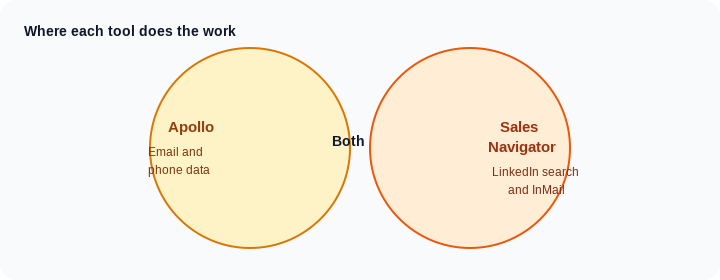
| Data source | Apollo's database. Apollo says 240M contacts and 30M companies. | Live LinkedIn profiles, searched inside Sales Navigator. |
| Main channel | Email, plus phone data when you spend credits. Apollo also publishes a dialer. The pricing FAQ names call recording under Professional, not under every plan. | LinkedIn messages and InMail. The compare page does not list an email or phone credit. |
| Contact info | The Chrome extension can retrieve an email, or an email and a phone, from a LinkedIn profile. Apollo says saving the contact costs credits. The pricing FAQ does not print one credit allotment for every plan. | Not an email database. You message the member on LinkedIn. How people expose an address themselves is in how to find someone's email on LinkedIn. |
| Sequences | Email campaigns are included on every Apollo account, including free. On free plans you can connect Gmail only. Basic is the plan the FAQ describes as including email sequencing. | No email sequences. InMail is one message that spends a credit. A second InMail is a separate decision, covered in LinkedIn InMail credits. |
| InMail | Not an InMail product. Apollo's FAQ says it integrates with LinkedIn. That is not the same as a monthly InMail grant. | 50 a month on Core, Advanced, and Advanced Plus. |
| CRM sync | The FAQ says Apollo integrates with Salesforce, HubSpot, Outreach, SalesLoft, Marketo, Sendgrid, LinkedIn, and major email providers. API access is described on Custom plans. The offer data calls the top tier Enterprise and mentions API access there. | Advanced Plus only, including Salesforce, HubSpot, Microsoft Dynamics, Oracle, and more. Help says the same limit. |
| Free plan | Yes. The offer data lists Free at $0. The FAQ also names a free Starter plan after a trial ends. | No permanent free plan on the compare page. A Core or Advanced trial exists for members who are not on a paid LinkedIn subscription and have not used a LinkedIn trial in the past 365 days. See the Sales Navigator free trial. |
| Starting price, as of 23 Nov 2026 | Basic at $49 per month in the offer data. Annual price: see the vendor site. | Core at US$119.99 per license per month, or US$1,079.88 per year. |
Pick Apollo if
- The message you will send is email, and you want the address from a database rather than from the profile.
- You want a sequence of emails. Basic is the first plan the FAQ ties to email sequencing. Free accounts can send email campaigns and, Apollo says, can connect Gmail only.
- You need a phone number enough to spend credits on it. Apollo's LinkedIn extension article, updated 12 May 2026, says "Access email & phone" saves the contact and retrieves both, and that saving costs credits.
- Call recording matters. The pricing FAQ places that on Professional. Which plan includes the dialer itself: see the vendor site. The product exists at Apollo's dialer.
Pick Sales Navigator if
- You sell to people you need to see on LinkedIn: current title, recent post, mutual connections, job change.
- You will save leads and accounts and work the alerts. Help says alerts require a saved lead or account, and you can filter the homepage by lead lists. You can save up to 1,000 leads in a list and 10,000 leads in total.
- The outreach is an InMail or a normal LinkedIn message, 50 InMails a month on every current plan.
- You want TeamLink. That check is on Advanced and Advanced Plus, not on Core.
The filter and list routine is in how to use LinkedIn Sales Navigator.
Use both if
You already know the account, and you are willing to run two tools on purpose.
- Find the account and a short list of people in Sales Navigator. Save them so alerts have something to attach to.
- Open the person's LinkedIn profile and check that the title is current. Sales Navigator is reading LinkedIn. Apollo is matching its own database.
- If the next step is email, use Apollo's extension on that profile: save the contact, or access email, or access email and phone. Apollo says this spends credits. If the extension shows nothing, Apollo's overview says some Sales Navigator profiles do not display Apollo data, and the workaround it documents is to open the standard LinkedIn profile.
- Send the email from Apollo. Do not invent a reply rate for this. You will not know until you send.
- If they reply, or if they were never an email person, move the conversation to LinkedIn and stop treating the spreadsheet row as the thread.
That handoff is the whole reason to own both. Apollo does not become your LinkedIn inbox. Sales Navigator does not become your email database.
What LinkedIn's extension rule says
Prohibited software and extensions says LinkedIn does not permit third-party software, including browser extensions, that scrapes the site, changes how it looks, or automates activity. Members who use tools for those purposes risk a restricted or shut-down account, and the tool may stop working without notice. That is LinkedIn's rule about the method. This page does not say Apollo violates it, and it does not say Apollo gets accounts banned.
Apollo's own extension overview says the extension reads the page you have open and matches it to Apollo's database, including on LinkedIn and on Sales Navigator. Read that page and LinkedIn's rule together, and decide for your own account. It is not a verdict from us.
After someone replies on LinkedIn
The email can live in Apollo. The LinkedIn thread does not. Once a person writes back, you need the conversation, a label, a date to return, and a stage.
We build Narrow. Narrow is a LinkedIn inbox tool. It manages Sales Navigator and regular LinkedIn replies with labels, follow-up reminders, the Kanban pipeline, and the AI Auto Screener. Narrow MCP is your LinkedIn inbox in ChatGPT or Claude. With send permission it sends one message at a time, only when you ask. It does not auto-send and it does not run sequences. The Sales Navigator inbox, the Auto Screener, and MCP are Super Pro. See pricing and the MCP page. Narrow does not integrate with Apollo. Do not plan on it pushing Apollo contacts or reading Apollo sequences. Where those LinkedIn replies should sit day to day is Sales Navigator inbox management.
Sources (checked 23 November 2026)
- Apollo pricing
- Apollo dialer
- Prospect on LinkedIn with the Apollo Chrome Extension (updated 12 May 2026)
- Apollo Chrome Extension Overview
- Sales Navigator plans and pricing (page says updated 27 September 2026)
- View and save leads in Sales Navigator
- Sales Navigator alerts
- Filter alerts on the Sales Navigator homepage
- Integration between Sales Navigator and your CRM
- Prohibited software and extensions
Common questions
Should I buy Apollo or Sales Navigator?
Buy Apollo if the next message is an email or a phone call from Apollo's database. Buy Sales Navigator if the next message is a LinkedIn conversation or an InMail on a live profile. As of 23 November 2026, Apollo's pricing FAQ names Free, Basic, Professional, and Custom. Sales Navigator's compare page names Core, Advanced, and Advanced Plus. Many teams pay for both because the channels are different.
Can Apollo and Sales Navigator be used together?
Yes. A practical split is to find the account and the person in Sales Navigator, confirm the profile on LinkedIn, then use Apollo for the email or phone step. Apollo's Chrome extension documentation says you can save a LinkedIn profile into Apollo and retrieve an email or phone, and that saving a contact costs credits. Do the LinkedIn reply in LinkedIn, not by assuming the tools share one inbox.
Does Sales Navigator include email addresses and phone numbers?
The Sales Navigator compare-plans page does not list email or phone credits. Its outreach line is InMail, 50 a month on Core, Advanced, and Advanced Plus. Apollo's extension documentation is where email and phone retrieval is described, and it says that action costs credits. This page does not invent how many credits a lookup uses.
Which Sales Navigator plan syncs to a CRM?
Advanced Plus. The compare page checks Advanced CRM integrations only on that column and names Salesforce, HubSpot, Microsoft Dynamics, Oracle, and more. Sales Navigator Help says CRM integration is only for Advanced Plus users. Apollo's pricing FAQ says Apollo integrates with Salesforce, HubSpot, and other tools, and that API access is on Custom plans. Those are separate syncs.
Does Narrow connect to Apollo?
No. Narrow does not integrate with Apollo. It is a LinkedIn inbox tool for LinkedIn and Sales Navigator replies, with labels, follow-up reminders, a Kanban pipeline, and the AI Auto Screener. Narrow MCP puts that inbox in ChatGPT or Claude. The Sales Navigator inbox, the Auto Screener, and MCP are Super Pro. It sends one message at a time, only with send permission, and only when you ask.
Narrow is a LinkedIn inbox tool with labels, reminders, a pipeline and an AI Auto Screener.
See how Narrow works