

We build Narrow, the inbox connector in the steps below.
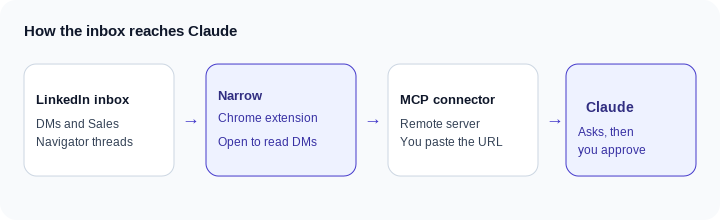
Quick answer. Claude can work with your LinkedIn messages only through a connector. LinkedIn's only official Claude connector, LinkedIn Hiring Pro, drafts and posts one free job; it does not read or send your DMs. To bring your LinkedIn inbox into Claude, add a third-party MCP connector such as Narrow (we build it) as a custom connector, then ask Claude to catch up on DMs, draft replies, label people, and set follow-ups.
Narrow is a LinkedIn inbox tool with labels, reminders, a pipeline and an AI Auto Screener.
See how Narrow worksWhat a Claude connector is
A connector lets Claude call another product. A custom connector is a remote MCP server: a public URL that exposes tools. MCP, the Model Context Protocol, is an open standard Anthropic created so an AI app can ask a server to read data or take an action. Claude does not receive your LinkedIn password.
When you add one, Claude connects to that server from Anthropic's cloud, on claude.ai, Claude Desktop, Cowork, and the mobile apps. The URL has to be public HTTPS on port 443. Source: Get started with custom connectors using remote MCP.
Where connectors live, and who can add one
Connectors live under Customize > Connectors.
The Connectors Directory is the pre-built list. Open it from that settings page, or from a chat: + in the lower left (or type /), then Connectors, then Manage connectors. You add a directory connector with Connect or Install, then that service's sign-in. Source: Use connectors to extend Claude's capabilities.
A custom connector is a URL that is not in the directory. Anthropic has not verified it. Connect only to a server you trust, and read the permissions it requests. Source: Add a connector that isn't in the directory.
Custom connectors that use remote MCP are available on Free, Pro, Max, Ultra, Team, and Enterprise. A Free account can add one. On Team and Enterprise, an Owner or Primary Owner adds it for the organization first. On Enterprise, a member whose custom role includes managing the organization's libraries can add it too. Members then sign in themselves.
How to add a custom connector
Labels below are from Claude's docs and Help Center, checked 22 November 2026. This post does not print a server URL, an OAuth client id, or a header. Those come from the product you connect. For Narrow, copy them inside the app from the MCP page.
Free, Pro, Max, and Ultra
Claude's docs use this path on all four plans:
- Open the Connectors directory.
- Select Add, then Add custom connector.
- Enter a name and the remote MCP server URL. Click Continue.
- Keep authentication settings Claude marks as Detected, unless the server's instructions say to change them.
- Click Add. If the connector shows Connect, click it and sign in.
Claude Help documents Pro and Max as Customize > Connectors, then + Add, then Add custom connector.
Team and Enterprise
An owner adds it once:
- Go to Organization settings > Connectors.
- Select Add, then Custom. If Claude asks for a type, choose Web.
- Enter a name and the remote MCP server URL. Keep Detected settings unless the server says otherwise. Click Add.
Each member opens Customize > Connectors, finds the connector labeled Custom, and clicks Connect. In a chat, turn it on with +, then Connectors.
LinkedIn's official connector posts a job
LinkedIn Hiring Pro is in the directory. It drafts, reviews, and posts one free job. You confirm a job title, company, location, workplace type, employment type, responsibilities, and skills. Claude drafts the description. LinkedIn opens a review with the job and the Jobs Terms. Nothing is posted until you select Agree and post.
The listing says it does not create paid or promoted jobs, edit or close existing jobs, or manage applicants. It does not describe your messages.
LinkedIn's October 21, 2026 announcement says the partnership covers Hiring Pro jobs only, not Recruiter, Job Slots, Hiring Assistant, or LCP. That matches LinkedIn MCP server options: LinkedIn has no MCP server for your messages.
Ways to use LinkedIn with Claude
| Way | Reads your DMs? | Sends a DM? | Official? | What to know |
|---|---|---|---|---|
| Paste one thread | Only the text you paste | No | No connector | Any Claude plan. Claude sees only what you copy. |
| LinkedIn Hiring Pro | No | No. It can post one free job after Agree and post | Yes, in the directory | Jobs only. It does not manage applicants. |
| Narrow MCP connector | Yes, LinkedIn and Sales Navigator, while Narrow is open in Chrome | One message at a time, with send permission, only when you ask | No. Custom connector | Super Pro. No scraping and no sequences. Plan on pricing. |
| A server that logs in as you and drives the browser | Depends on that server | Depends on that server | No | LinkedIn's prohibited-software rule covers bots and unauthorized automation. |
Which servers can send is in that comparison.
What LinkedIn prohibits
Prohibited software and extensions says LinkedIn does not permit crawlers, bots, plug-ins, or extensions that scrape the site, change how it looks, or automate activity, including unauthorized methods that access LinkedIn, download contacts, or send messages. Accounts can be restricted or shut down, and the tool may stop working without notice. That is LinkedIn's rule about the method. It is not a finding about one vendor, and it is not legal advice.
A connector that signs in as you and scrapes or automates the browser sits under that rule. Narrow does not automate and does not scrape. It is local-first. With send permission, Narrow MCP sends one message at a time, and only when you ask.
How to add Narrow to Claude
Narrow MCP is included with Super Pro. See pricing. This article does not quote it.
- In Narrow, open Manage, then MCP. Copy the Claude setup details. This post does not print the server URL.
- In Claude, add a custom connector with the path above. Name it Narrow and paste that URL.
- Keep the authentication settings Claude fills in, unless the Narrow screen says to change them. Click Add, then Connect, and sign in to Narrow.
- Choose permissions. The MCP page says you decide whether the app may read the inbox or send, and that you can disconnect it later.
- In a chat, use +, then Connectors, and turn Narrow on.
Keep Narrow open in Chrome with the extension when Claude should read conversations or send. Labels, snippets, notes, and follow-up lists work with Narrow closed.
The MCP page names ChatGPT, Claude, Gemini, Cursor, Codex, and Claude Code. The ChatGPT clicks are in how to use ChatGPT for LinkedIn messages.
What you can ask
Through Narrow, Claude can list and search LinkedIn and Sales Navigator conversations and connections, and read recent messages. It can manage labels and the people in them, set pipeline status and follow-up reminders, write contact notes, and manage snippets. It can answer connection requests. With send permission it sends one message at a time, in an existing thread or to an existing connection, only when you ask.
A daily routine in either app is how to manage your LinkedIn inbox with AI. Wording you still write yourself is in LinkedIn follow-up messages.
Prompts to copy
A line that says "send" sends only if you allowed sending, and only that one message.
Catch up
Check this week's unread chats. Who needs a reply, and what are they waiting for?List my Sales Navigator conversations from this week and say which ones are waiting on me.Search my LinkedIn conversations for anyone who mentioned pricing.
Draft replies
Read my thread with Jordan and draft a reply that proposes Thursday afternoon. Do not send it.Draft replies to everyone who asked about pricing this week. Leave them in this chat for me to approve.
Follow-ups
Who has a follow-up reminder due?Draft a follow-up for Jordan based on our last conversation. Do not send it.Set a follow-up reminder on Priya for next Tuesday at 10am.
Find people
Show me product designers I'm connected to but haven't messaged yet.List the connection requests waiting on me.
Organize
Label everyone I talked to about the April pilot as Pilot.Add a note to Maya: wants a demo in Q1. Set her pipeline status to the stage I use after someone replies.
When a draft is right, say Send it to Jordan. That is one message in that thread.
What Claude can't do here
- It does not auto-send. A message goes out only when you ask, one at a time.
- It does not run sequences or a scheduled send.
- It does not scrape LinkedIn.
- It does not publish a post or a comment. Hiring Pro is the job connector, and it still waits for Agree and post.
Claude or ChatGPT?
Both work with Narrow MCP. ChatGPT adds a custom MCP server from its plugin menu. Claude adds a custom connector under Customize, then Connectors. Pasting a thread, and the ChatGPT clicks, are in how to use ChatGPT for LinkedIn messages.
Sources (checked 22 November 2026)
Common questions
Can Claude connect to LinkedIn?
Yes, through a connector. LinkedIn's official connector in Claude's directory is LinkedIn Hiring Pro, which drafts and posts one free job and does not read or send your messages. For your inbox, add a third-party remote MCP connector. Narrow MCP does that on Super Pro.
Does LinkedIn have an official Claude connector for messages?
No. LinkedIn Hiring Pro is the official connector, and LinkedIn's October 21, 2026 announcement says the partnership covers Hiring Pro jobs only. The connector listing does not include your DMs.
Can Claude read my LinkedIn DMs?
Only if you paste a thread, or if you connect a server that can read them. With Narrow MCP, Claude can list and search LinkedIn and Sales Navigator conversations while Narrow is open in Chrome with the extension.
Can Claude send LinkedIn messages?
Not on its own, and not as a sequence. With Narrow MCP it sends one message at a time, only after you grant send permission and only when you ask, in an existing thread or to an existing connection.
Which Claude plans can add a custom connector?
Anthropic's help says custom connectors that use remote MCP are available on Free, Pro, Max, Ultra, Team, and Enterprise. Free accounts can add one custom connector. On Team and Enterprise, an Owner or Primary Owner adds the connector before members connect.
Narrow is a LinkedIn inbox tool with labels, reminders, a pipeline and an AI Auto Screener.
See how Narrow works