

We build Narrow, one of the options below. Every other entry is described from its own site, checked November 21, 2026.
Quick answer. A LinkedIn MCP server lets an AI app like Claude or ChatGPT read or act on LinkedIn through the Model Context Protocol. LinkedIn's own connector in Claude, Hiring Pro, drafts and posts job listings; it does not read your messages. For your inbox, you use a third-party server: an open-source one that drives your own browser, or an inbox tool with an MCP on top, such as Narrow, Kondo, Linnx, or Quibbly. Choose by two things: how it reaches your account, and whether it can send.
Narrow is a LinkedIn inbox tool with labels, reminders, a pipeline and an AI Auto Screener.
See how Narrow worksWhat a LinkedIn MCP server does
MCP is an open standard that lets an AI app call tools. The app does not receive your LinkedIn password. It asks the server to list threads, read a conversation, add a label, or send a message, and the server reaches LinkedIn in whatever way that product chose.
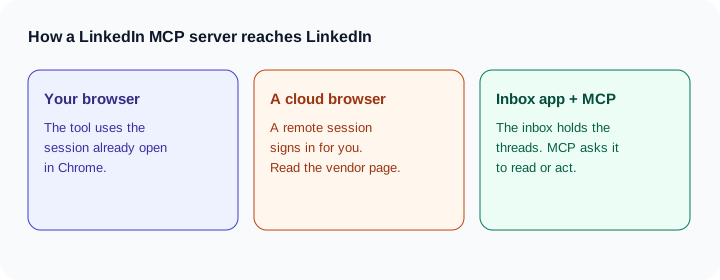
Three patterns show up.
- Your own browser session. The tool uses a LinkedIn session you already have open. Narrow does this with its Chrome extension. Kondo's MCP page says the same about its own browser session.
- A cloud browser. A remote browser signs in and drives LinkedIn for you. None of the six products below describe themselves this way on the pages checked. If a vendor page is silent, treat the method as not stated.
- An inbox app with MCP on top. The product already holds the threads. MCP is a way for Claude or ChatGPT to ask that app to read or draft. Linnx and Quibbly work this way. You still send from their product.
Does LinkedIn have an official MCP server?
Not for messages. On October 21, 2026, LinkedIn announced Hiring Pro in Claude. You describe a role, Claude drafts a job post, and after you approve, it publishes free on LinkedIn. The LinkedIn News post and the Claude connector listing describe that job-post flow. Nothing is posted until you agree. The connector does not read or send messages.
Six options compared
| Option | How it reaches LinkedIn | Reads messages | Organizes (labels/reminders) | Sends | Sales Navigator | Source |
|---|---|---|---|---|---|---|
| Narrow | Your browser, via the Chrome extension | Yes. LinkedIn and Sales Navigator | Labels, status, follow-ups, snippets, notes | One message, only with send permission and only when you ask | Yes | Narrow MCP |
| Kondo | Your own browser session | Yes | Labels, reminders, archive, notes. Drafts saved in Kondo | No | Not stated | Kondo MCP. Server https://relay.trykondo.com/mcp |
| Linnx | Its own app, then MCP | Yes: messages, connections, requests, posts, analytics | Categories, archive, spam. Drafts in the Linnx composer | No. Does not accept, decline, or withdraw requests | Not stated | Linnx |
| Quibbly | Chrome extension keeps a private synced copy | Yes. Claude reads that copy | Tags and follow-ups. Drafts wait until you click Send in Quibbly | No | Not stated | Quibbly. Server https://server.quibbly.co/mcp |
| ConnectChats | You copy browser session cookies | Yes, for chats you choose | Not stated | Sends the draft you approve. Can also send in a chat where you turn that on | Not included. Recruiter is not included either | ConnectChats |
| stickerdaniel/linkedin-mcp-server | Runs on your machine and drives your logged-in browser | Yes. Profiles, companies, jobs, posts, feed, messages, connection requests | Not stated | Yes, after confirmation | Not stated | GitHub |
Clients named on those pages: Kondo lists Claude, ChatGPT, Gemini, Copilot, and Cursor. Linnx is in Claude's connector directory and lists Claude, ChatGPT, Cursor, and VS Code. The open-source README documents install with uvx, a Claude Desktop bundle, or a Claude Code plugin, and it warns that LinkedIn's User Agreement prohibits automated access and that accounts using automated tools can be restricted.
Prices on the pages checked November 21, 2026: Narrow MCP is included with Super Pro at $22 per month billed annually ($264 a year). Quibbly's page lists Solo Pro at $39 per month after a 3-day trial, and it says a card is required. The other pages do not state a price for the MCP connection itself.
Can sending be a feature, not a risk?
Kondo, Linnx, and Quibbly are drafts-only by design. That suits people who never want an agent to send. The draft lives in their app, and you send it there.
Narrow lets you choose. Leave send permission off and it reads, labels, and drafts in the chat. Turn it on and it sends a single reply only when you ask. ChatGPT and Claude show that tool call for you to approve. There is no bulk send, no sequences, and no messages to people you are not connected to.
ConnectChats is a third pattern. The default on its page is a draft you approve. You can also turn on sending for a specific chat. Sales Navigator and Recruiter inboxes are not included.
How to connect a LinkedIn MCP server to Claude
Claude's Help Center describes the path: Customize, then Connectors, then Add custom connector, paste the server URL, and sign in. Free accounts are limited to one custom connector. On Team and Enterprise, an owner adds the connector first. Source: Claude Help Center, checked November 21, 2026.
For Narrow, get the URL from MCP under Manage in the app. The steps for Claude, ChatGPT, Codex, and Claude Code are on the MCP page. You need Super Pro.
How to connect one to ChatGPT
OpenAI's developer docs describe ChatGPT on the web: Plugins, then +, then Add custom MCP server, paste the URL, choose OAuth, create it as a plugin, and install it. In a chat, type @ and pick the server. Write actions need confirmation by default. Menu names and plan availability change, so check OpenAI's page. The ChatGPT walkthrough, including what pasting a thread still does better, is how to use ChatGPT for LinkedIn messages.
Which one to pick
- You also want WhatsApp and iMessage: Kondo. Kondo is a good choice when the job is more than LinkedIn.
- You want post analytics in the AI app, and you will send from the inbox product: Linnx.
- You are comfortable running code and you accept the account risk the README states: the open-source server.
- You want your LinkedIn and Sales Navigator inbox, with labels, a pipeline, follow-ups, and snippets, and the option to send one approved reply: Narrow MCP.
The inbox products around these servers are compared in the best LinkedIn inbox tools, Kondo alternatives, and Narrow vs Kondo. The weekly routine that uses the connection is how to manage your LinkedIn inbox with AI. Super Pro is on the pricing page.
Sources checked November 21, 2026: Kondo MCP, Linnx, Quibbly, ConnectChats, stickerdaniel/linkedin-mcp-server, LinkedIn News, Claude Hiring Pro connector.
Common questions
Does LinkedIn have an official MCP server?
Not for your messages. LinkedIn's public connector in Claude is Hiring Pro, which drafts a job post you review and then publish. It does not read or send inbox messages.
Can Claude read my LinkedIn messages?
Only through a third-party server. Narrow, Kondo, Linnx, Quibbly, and ConnectChats each say they can read messages, with different limits. LinkedIn's Hiring Pro connector does not.
Is using a LinkedIn MCP server against LinkedIn's rules?
This is not legal advice. LinkedIn's User Agreement prohibits unauthorized automated methods. Tools differ in how they reach your account: your open browser, a copied session, or a synced copy in another app. Read the vendor page and the agreement before you connect.
Which LinkedIn MCP servers can send messages?
On the pages checked November 21, 2026: Narrow sends one message only with permission and only when you ask. ConnectChats sends a draft you approve, and can send in a chat where you turn that on. Kondo, Linnx, and Quibbly say they do not send. The open-source stickerdaniel server can message after confirmation.
Narrow is a LinkedIn inbox tool with labels, reminders, a pipeline and an AI Auto Screener.
See how Narrow works