

Quick answer. Connect your LinkedIn inbox to Claude or ChatGPT, then run the same short routine each day: ask who is waiting on you, label what came in, set follow-ups, and draft replies you approve. With Narrow MCP on Super Pro, the AI works inside your Narrow inbox, with labels, pipeline status, reminders, and snippets, and it sends only when you allow it.
Narrow is a LinkedIn inbox tool with labels, reminders, a pipeline and an AI Auto Screener.
See how Narrow worksWhy AI helps with LinkedIn specifically
A LinkedIn inbox mixes leads, candidates, pitches, and friends. LinkedIn itself has no custom labels and no reminder on a message. Those two gaps are why a thread disappears: LinkedIn message labels and LinkedIn follow-up reminders. An AI app does not fix that by itself. It helps once the inbox already has labels, a status, and a date, and you can ask for them in a sentence.
Set up once
Five minutes, then the daily routine is the same prompt.
- Create labels you will actually open: Leads, Candidates, Investors, Partners, Pitches. You can ask the connection to create them.
- Write one line on each label so you know who belongs there.
- Save three snippets you already send, and keep placeholders such as
{{firstName}}. - Connect Claude or ChatGPT from the MCP page. Super Pro is required. Leave send permission off until you have used the read and label tools for a day.
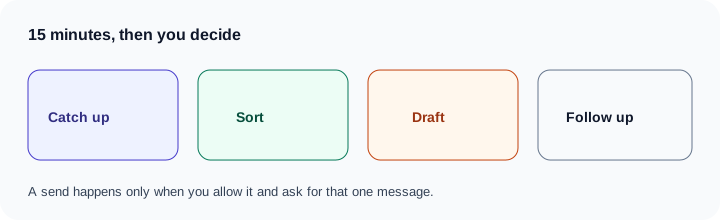
The daily 15-minute routine
Each prompt assumes Narrow MCP is connected. Drafts show up in the chat, not as saved drafts inside Narrow.
Catch up. Ask for unread threads since yesterday, LinkedIn and Sales Navigator together.
Show unread LinkedIn and Sales Navigator threads since yesterday.
That lists threads. It does not reply.
Sort. Ask it to label by who they are, and to flag the ones it is unsure about. You decide those.
Label each of those by who they are: Leads, Candidates, Investors, Partners, or Pitches.
Tell me which ones you are unsure about. Do not send anything.
Owed replies. Filter to the status Narrow already uses.
Show threads with status Your reply needed.
Draft. Cap the length and point at a snippet when it fits.
Draft replies to the top 3 in my voice, under 60 words, using my Intro call snippet where it fits. Do not send.
Send or edit. One message, and only if send permission is on. Otherwise copy the draft into Narrow and send it yourself.
Send the first one.
Follow-ups. This sets status to Follow up and a due date. It does not message anyone.
Set a follow-up for anyone I'm waiting on for 5 days.
The same week without an AI app is how to manage your LinkedIn inbox and inbox zero.
The weekly 10-minute review
Once a week, four questions.
- Overdue follow-ups, one label at a time: "Who in Candidates is overdue for a follow-up?"
- Counts. The count tool returns the label total now. It does not count who was added this week. Ask "How many people are in Candidates now?"
- Pending invitations that came with a note.
- Connections you have never messaged whose headline matches a word you care about.
How labels work on their own: how to label LinkedIn messages. Sales Navigator threads in more detail: Sales Navigator inbox management.
Where the Auto Screener fits
On Super Pro, the Auto Screener classifies each new message as Lead, Network, Cold, or Broadcast, so pitches do not bury the rest. It does not send. The MCP connection is what you use when you want to act on that inbox: search, label, set a follow-up, or draft. This routine does not claim the connection can read those Auto Screener categories. Use the labels you set.
What to keep human
Pricing, an objection, a no, and anything personal should be your words. The model can list the thread and propose a shape. You decide the sentence that goes out. A send is still one person, one message, and only when you ask.
Without an MCP
Paste one thread into ChatGPT, say the goal in one line, and send the reply yourself. The steps are in how to use ChatGPT for LinkedIn messages. The six servers, and which of them cannot send, are in LinkedIn MCP server options. The connection itself is Narrow MCP, on Super Pro (pricing).
Common questions
Can AI manage my LinkedIn inbox?
It can list who is waiting, label people, set follow-ups, and draft replies. With Narrow MCP it sends only when you allow sending and you ask for that message. It does not run sequences.
Will AI send LinkedIn messages without asking me?
Not with Narrow. Sending is off until you allow it, and each send is one message you ask for. ChatGPT and Claude also show the tool call for you to approve.
Does this work for Sales Navigator messages?
Yes, on Super Pro. Narrow MCP can list, read, and reply in Sales Navigator conversations while Narrow is open in Chrome. Starring and archiving apply to regular LinkedIn threads only.
Narrow is a LinkedIn inbox tool with labels, reminders, a pipeline and an AI Auto Screener.
See how Narrow works