

Narrow and Kanbox can both show a LinkedIn inbox and a Kanban board. One of them sends the outreach. The other does not.
Narrow is a dedicated LinkedIn inbox and light CRM. You read and reply, then keep labels, reminders, and stages on the conversation. Kanbox's pricing page is a prospecting product: campaigns, lead import, a cloud runner, an email finder, and a smart inbox.
If you want sequences, Kanbox is in that category. If every message has to be yours, it is the wrong category.
Reviewed November 16, 2026. We build Narrow. Kanbox details are from Kanbox pricing and Kanbox's automation page. Narrow plan limits are from our pricing page.
The short answer
| Question | Narrow | Kanbox |
|---|---|---|
| LinkedIn inbox, labels, reminders | Pro | Smart inbox with tags, filters, reminders, and notes, listed on the plans below |
| Kanban | Pro, for conversation stages | Unlimited Kanban pipelines. Campaign leads move between columns automatically |
| Sales Navigator inbox | Super Pro | Not an inbox client. Lead import from Sales Navigator requires your own Sales Navigator subscription |
| Campaigns and auto-send | No | Automated sequences on every compared plan: visits, follows, likes, connection requests, messages, and up to six follow-ups |
| Runs without your computer | No. The Narrow app stays open with the extension | Cloud 24/7 is on the pricing comparison |
| AI that replies for you | No. Super Pro screening classifies incoming messages. It does not send. | The automation page describes an AI Response Agent that continues the conversation after a reply |
| Email finder | Not a Narrow feature | Email finder on the listed plans. Extra credit packs are sold separately |
| CRM or Attio sync | Not listed. Max Pro is custom integrations, not a named Attio or HubSpot connector | Pro and Agency list webhooks and API access. The pricing page does not name Attio |
| MCP | Super Pro. See Narrow MCP. | Not listed on the pricing page |
Kanbox prices checked the same day. Starter is $12 per month billed annually, or $20 month to month, with one campaign and 300 lead imports a month. Essential is $30 per LinkedIn account per month billed annually, or $45 month to month, with three campaigns, 600 imports, and multi-account. Agency 10 is $279 per month billed annually, or $399 month to month, for 5 to 10 accounts. Pro is marked most popular and lists five campaigns, 75,000 imports a month, and webhooks. Its dollar price did not render in the plan summary, so confirm it on the page. The trial is 15 days and does not require a card. Annual and monthly plans are non-refundable.
What each product is for
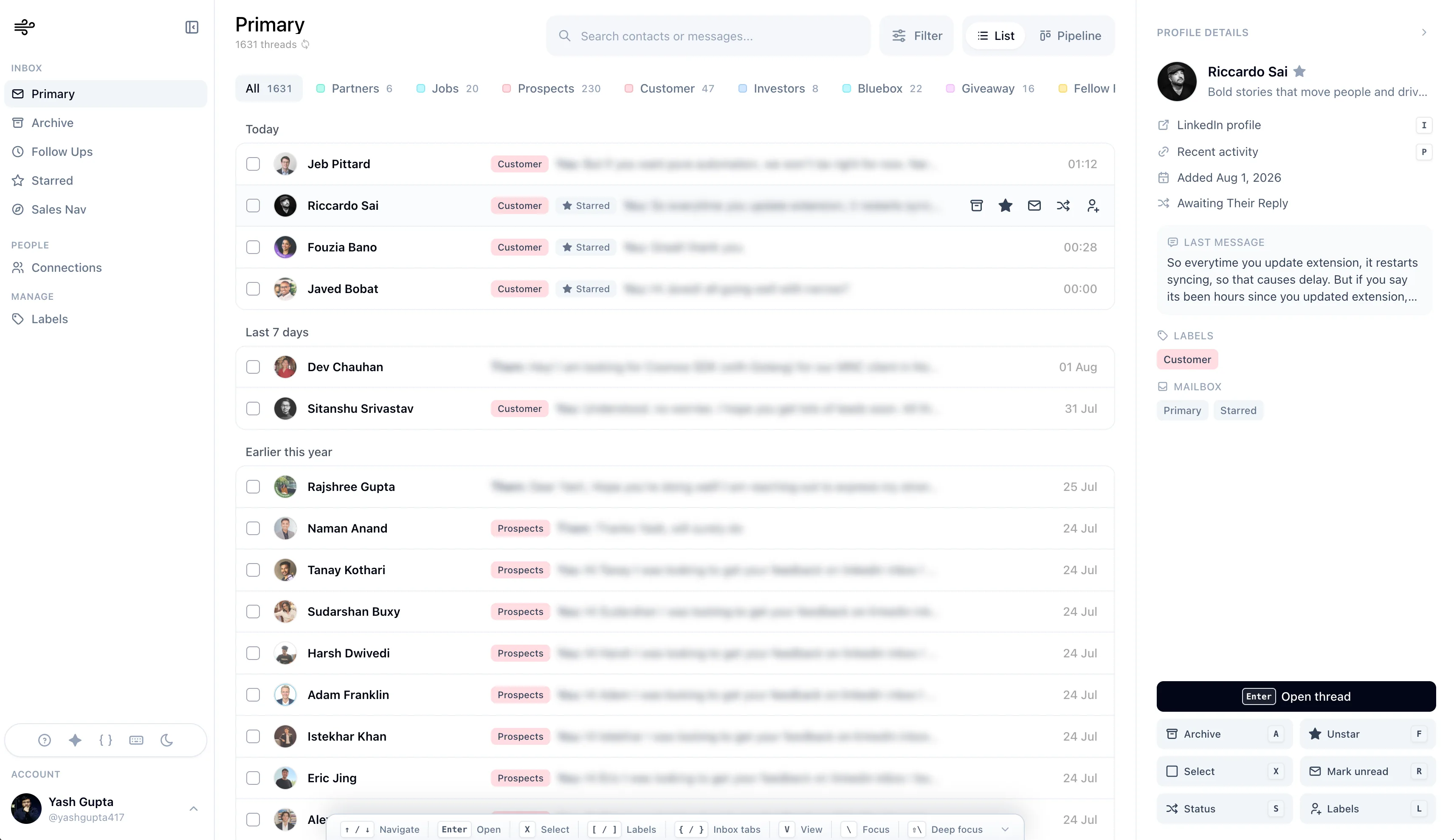
Narrow is the conversation workspace. A Chrome extension connects the account. Pro includes the LinkedIn inbox, labels, reminders, Kanban, snippets, search, and text messaging. Super Pro adds the Sales Navigator inbox, audio and video messages, AI message screening, and MCP. Nothing in that list sends a sequence.
Kanbox imports leads from LinkedIn, and from Sales Navigator or Recruiter if you already pay LinkedIn for those, then runs a sequence. The pricing comparison includes profile visits, follows, post likes, connection requests, messages, and up to six follow-ups. Campaigns run in the cloud, with random delays. The automation page also describes an AI Response Agent that takes over after a lead replies, continues the conversation, moves the lead, or schedules a meeting.
That is the product. The smart inbox is attached to it. Tags, reminders, notes, templates, and bulk actions are listed with the inbox, including on Starter.
Inbox versus campaign pipeline
A Kanban board is not the same object in both products.
Narrow's board is the inbox. A column is who owes the next reply. You move the conversation. You write the message.
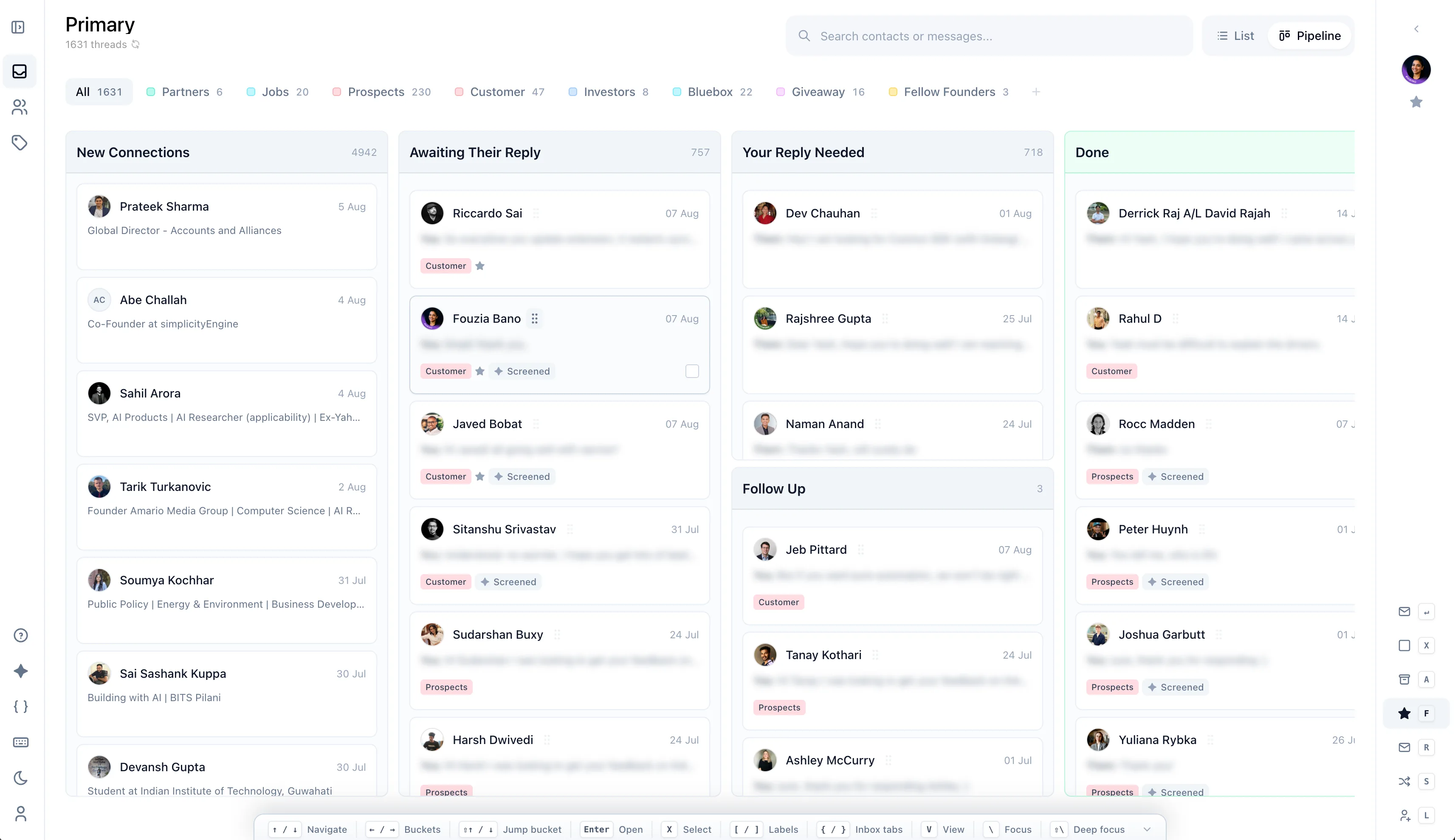
Kanbox's help text says automated campaigns are managed through Kanban pipelines, and leads move between columns as the sequence progresses. The board is the campaign. Useful if you are running outbound. Noisy if you only wanted a reminder on a candidate or a customer.
Sales Navigator is also a different feature. On Narrow, Super Pro brings Sales Navigator threads into the same inbox as regular LinkedIn. On Kanbox, Sales Navigator is a lead-import source, and Kanbox says the subscription is separate. Kanbox's pricing FAQ says its own features work without Sales Navigator. Import volume from Sales Navigator is higher when you have it.
Safety and integrations
Kanbox is explicit that sequences send. Narrow is explicit that they do not. If a restriction on the LinkedIn account would stop your work, that difference is the buying decision, not the inbox layout.
Kanbox does not publish an Attio or HubSpot connector on the pricing page. Pro and Agency list incoming and outgoing webhooks and API access. That is a way to build a sync. It is not a finished Attio integration. Narrow's Max Pro line is "custom integrations" and does not name Attio, HubSpot, or Salesforce either. For a documented Attio sync, Kondo's Business plan is the page that describes one. See Kondo alternatives for Attio users.
Where each one fits
Choose Kanbox if you want cloud campaigns, lead import, an email finder, and a smart inbox around that outbound motion. Read the sequence list before the trial, including the AI reply agent. Starter is the single-campaign seat. Essential is the multi-account seat.
Choose Narrow if the job is the inbox you already have: replies, labels, reminders, and stages, with no sequence running in the cloud. Add Super Pro only for the Sales Navigator inbox, voice and video, screening, or MCP.
For the longer Kanbox verdict, read the Kanbox review. For other options, see Kanbox alternatives.
Kanbox sources, checked November 16, 2026: pricing and automation. Narrow plan limits: pricing.