

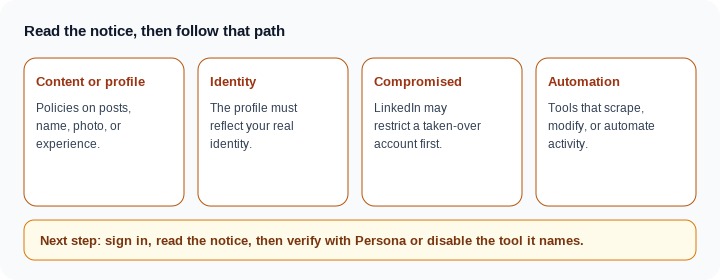
Quick answer. LinkedIn restricts accounts for four documented reasons: content or profile violations of its Professional Community Policies, identity problems (a profile that doesn't reflect your real identity), signs the account was compromised, and automated activity from third-party software or extensions. To get back in, sign in and follow the on-screen prompts — usually verifying your identity with a government ID through Persona, or asking LinkedIn to review the content — and if the restriction is for automation, disable the tool; LinkedIn says the account is re-enabled at the time shown on the notice.
We build Narrow, a LinkedIn inbox tool. It does not automate activity on LinkedIn.
The reasons and the recovery steps below are from LinkedIn Help, checked 29 November 2026. This page does not state how long a typical restriction lasts, how often a review succeeds, or how many accounts LinkedIn restricts. Those numbers are not in the help articles.
Narrow is a LinkedIn inbox tool with labels, reminders, a pipeline and an AI Auto Screener.
See how Narrow worksWhy LinkedIn restricts accounts
Account restrictions is the list. A Restricted Action Message is a separate limit on page views. Read the notice on your own screen before you pick a row.
| Reason | What LinkedIn says triggers it | What to do | Source |
|---|---|---|---|
| Content violations | Content that breaks the Professional Community Policies. Some may result in a permanent restriction after a single violation. | Log in and follow the on-screen prompts to ask LinkedIn to revisit it, if you believe the content complies. LinkedIn reviews again and tells you the outcome. | Account restrictions |
| Profile violations | Name, Profile Photo, Background Photo, Experience, or Education. LinkedIn may remove parts. Repeated violations may restrict the account. Egregious violations, such as child sexual abuse material, terrorism, extremely violent content, or egregious sexual harassment, can mean a permanent restriction after a single violation. | If you believe it is an error, log in and verify your identity. | Account restrictions |
| Identity violations | You must use your true identity. A fraudulent profile can be restricted temporarily or indefinitely. | If you believe it is an error, verify your identity. | Account restrictions |
| Compromised account | LinkedIn may proactively restrict an account that was taken over. | Log in and verify your identity. | Account restrictions |
| Automated tools | Third-party software or browser extensions that scrape, modify the appearance of, or automate activity. "Automated inauthentic activity violates the LinkedIn User Agreement and can result in temporary or permanent restriction." | Disable the tool. The account is re-enabled at the time on the notice. See the rollout note below. | Automated activity on LinkedIn |
| Restricted Action Message | An unusually large number of page views, often from third-party apps that systematically retrieve data. | Wait 24 hours. | Restricted Action Message |
Caps on invites, messages, and profile views are a different page. Those numbers, where LinkedIn publishes them, are in LinkedIn limits.
Step 1: Read the notice
Sign in and read what LinkedIn put on the screen. A temporary restriction and a permanent one are not the same notice.
Permanent account restrictions says you can't use your account or its features. Others can't find your profile or message you. You can contact LinkedIn with questions. The article does not give a countdown back to a normal account.
While you still have access, you can export a copy of your connections. That is a precaution. It does not lift a restriction, and this page does not claim the file changes the outcome.
Hiding your public profile can make recovery harder. LinkedIn says it may require your public profile URL if you lose your primary email. That caveat is in how to make your LinkedIn profile private.
Step 2: Verify your identity with Persona
Verify your identity to recover account access names Persona as LinkedIn's identity verification provider. You upload a digital ID or a clear photo of a valid government ID card, driver's license, or passport. Persona may ask for a selfie. You need a smartphone. Library or school IDs can't be used.
- Follow the prompts during log in. On desktop, scan the QR code with your phone. On mobile, there is no QR code.
- Select the issuing country.
- Agree to Persona's terms and privacy policy.
- Allow camera access.
- Take a photo of yourself if prompted.
- Select the ID type.
- Photograph the ID.
- Click Yes, share.
Persona shares the verification result, your full name, year of birth, city, state, and country, the ID type and issuer, and a redacted ID copy with only the name and face visible. LinkedIn doesn't receive biometric data, or the ID number, expiry date, or issue date. The data is generally permanently deleted within 14 days.
If you are in Canada, the EU, or the UK, the alternative is an Affidavit of Identity signed before a Notary Public, scanned into your support case.
If Persona can't verify your ID
Unable to verify ID lists the reasons a check fails:
- Unsupported ID type. Submit a driver's license, a government ID card, or a passport.
- Illegible ID. The photo should be clear, complete, and well-lit, with no glare, the corners captured, and nothing blurred or altered.
- No ID present in images.
- Unsupported Country ID.
Step 3: If the restriction is for automation
Automated activity on LinkedIn says: "Review and disable the software or extension that automates activities. Your account will then automatically be re-enabled at the time specified on the suspension notification."
A note on that page says this feature is gradually rolled out to some members. Do not treat the sentence as a promise that every account follows the same clock.
To give more details for a second look, or if you use third-party software for productivity reasons and want LinkedIn to consider partnering, log in and contact LinkedIn. The same article recommends changing your password regularly.
Prohibited software and extensions is the rule behind that notice. LinkedIn does not allow crawlers, bots, browser plug-ins, or extensions that scrape, modify the appearance of, or automate activity. It does not allow fake accounts or fake engagement. User Agreement section 8.2 includes using bots to "add or download contacts, send or redirect messages." Users "risk having their accounts restricted or shut down," and tools may stop working without notice.
One example of how that risk shows up for a named product is a review of one automation tool's account-safety risk. This page does not rank vendors.
The wording of an invitation is a separate question from these rules. Examples are in LinkedIn connection request examples.
If you hit the page-view limit
Restricted Action Message says you may be restricted from viewing additional pages if LinkedIn detects an unusually large number of page views. LinkedIn says this often comes from third-party apps that systematically retrieve data, and it recommends waiting 24 hours. That 24 hours is the only duration this article publishes for page views. It is not a duration for every other restriction.
How to contact LinkedIn
Contact LinkedIn customer support says there is no phone number for support. Sites that advertise paid LinkedIn phone support are not affiliated with LinkedIn. LinkedIn never asks for your password.
To contact LinkedIn, go to the Help Center, sign in, and scroll to Contact us, then Chat with support. Premium members can also click Start Chat.
How to avoid a repeat
Only the points LinkedIn's pages actually state:
- Don't use software that scrapes, modifies the appearance of, or automates activity on LinkedIn. That is the prohibited-software rule above.
- Name fields take a real or preferred professional first, middle, and last name, plus pronouns. Names allowed on profiles says no pseudonyms, business names, email addresses, or special characters.
- A profile photo must reflect your likeness. Profile photo guidelines says LinkedIn may remove images that are solely company logos, emojis, landscapes, animals, words, flags, childhood photos, or someone else's likeness.
- Stay inside the caps LinkedIn does publish. Those are in LinkedIn limits.
If you want help with volume, use tools that organize what you send yourself rather than tools that send for you — Narrow, for example, adds labels, follow-up reminders, a pipeline and an AI Auto Screener to your LinkedIn inbox without automating anything. Narrow cannot lift, appeal, or prevent a restriction.
What LinkedIn Help does not say
- No fixed duration for a temporary restriction, except the 24-hour page-view advice and "the time specified on the suspension notification."
- No published thresholds that trigger an automation restriction.
- No promised response time for a review.
Sources (checked 29 November 2026)
Common questions
Why did LinkedIn restrict my account?
LinkedIn documents content violations, profile violations, identity violations, a compromised account, and automated tools. A separate Restricted Action Message can stop extra page views after an unusually large number of views, often from third-party apps. The notice you see at sign-in is the one that applies to your account. This page does not guess which reason is yours.
How long does a LinkedIn restriction last?
LinkedIn does not publish a single duration. For automated activity, the account is re-enabled at the time specified on the suspension notification after you disable the software or extension. LinkedIn says that re-enable path is gradually rolled out to some members. For a page-view restriction, LinkedIn recommends waiting 24 hours. A permanent restriction means you cannot use the account or its features.
Can I get my LinkedIn account back without ID?
If you are in Canada, the EU, or the UK, LinkedIn offers an Affidavit of Identity signed before a Notary Public, scanned into your support case, as an alternative to Persona. Otherwise the documented path is a government ID through Persona, or contacting LinkedIn from the Help Center while signed in. LinkedIn does not publish a phone number for this.
Does LinkedIn have a phone number for restricted accounts?
No. LinkedIn says there is no phone number for support. Sites that advertise paid LinkedIn phone support are not affiliated with LinkedIn. LinkedIn never asks for your password. To contact support, go to the Help Center, sign in, scroll to Contact us, and choose Chat with support. Premium members can also click Start Chat.
Can automation tools get my account restricted?
Yes. LinkedIn says third-party software or browser extensions that scrape, modify the appearance of, or automate activity can result in a temporary or permanent restriction. Members who use bots risk having their accounts restricted or shut down. If you were restricted for that, disable the tool. The account is then re-enabled at the time on the notice, on the rollout LinkedIn describes.
Narrow is a LinkedIn inbox tool with labels, reminders, a pipeline and an AI Auto Screener.
See how Narrow works