

Quick answer. Build a LinkedIn lead CRM in Notion with one database: a row per person, a Status property for pipeline stages, a Date property for the next follow-up, a URL for the profile and the LinkedIn thread, then add a Board view grouped by Status and a "Follow-ups due" view filtered on that date. Below is the exact property list to copy, the views, and a weekly routine.
Narrow is a LinkedIn inbox tool with labels, reminders, a pipeline and an AI Auto Screener.
See how Narrow worksBuild it in about ten minutes
This is a schema you recreate. It is not a file to duplicate. Property types below are the ones on Database properties: Text, Status, Select, Date, URL, Person, and Relation.
- Create a database. A new database opens as a table. Source: Views, filters, sorts, and groups.
- Use the title property for the person's name. Name that property Name.
- Click Add property once per row in the table below. Type the name, then choose the type.
- Add Status. Notion starts it as To-do, In progress, and Complete. Open the property, rename or delete those, and use + for New, Contacted, Replied, Meeting booked, Won, Lost, and Not now. Source: Board view.
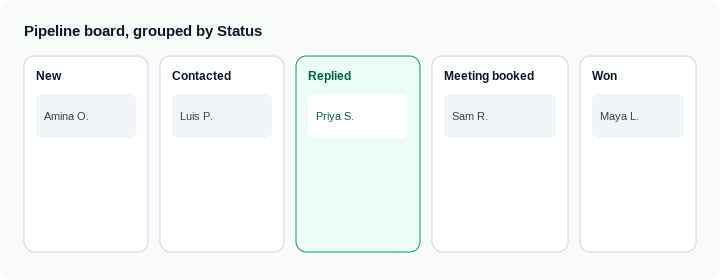
- Click + beside the view name and choose Board. A board groups by Status when the database has one. If it does not, open settings, choose Group, and pick Status.
- Add the other three views from the same + menu. Name each one, open settings, and choose Filter.
- On the first real lead, click Next follow-up and choose Remind.
Company can stay Text. A Companies relation is optional, at the end.
Properties to copy
One database, one row per person. The stage names and Source options are this template. The types are Notion's.
| Property | Type | What you put in it |
|---|---|---|
| Name | Title | The person, as you would say it in a reply. |
| LinkedIn profile | URL | The profile link. A URL property opens in a new tab. |
| Thread link | URL | The message thread you will reopen. |
| Company | Text, or Relation | The company name. Use Relation only with a Companies database. |
| Role | Text | The title on the profile, in your words. |
| Source | Select | Sales Navigator search, inbound, referral, event, or content. |
| Status | Status | New, Contacted, Replied, Meeting booked, Won, Lost, Not now. Select works if you want a plain tag. |
| Next follow-up | Date | The day you will reopen the thread. Turn on Remind. |
| Last contacted | Date | The day you last sent a message, not the day you edited the row. |
| Notes | Text | What they asked, and what you promised. |
| Owner | Person | A teammate in the workspace. Person tags a person or a group. |
Status is what the board groups by. Next follow-up is what the due view filters on. A Date property takes a day or a range, and Remind notifies you then.
The four views
A filter belongs to one view. Open view settings, choose Filter, then the property. Source: Views, filters, sorts, and groups.
| View | Layout | What it shows |
|---|---|---|
| Pipeline | Board, grouped by Status | One column per stage. Drag a card to move the person. |
| Follow-ups due | Table | Next follow-up is today or earlier. Sort that date ascending. |
| Replied this week | Table | Status is Replied, and Last contacted is in the current week. |
| Lost / Not now | Table | Status is Lost or Not now. Use Add advanced filter so the two are an OR. |
Pick the date condition in Notion's filter menu. For Follow-ups due, keep today and earlier dates. For Replied this week, filter Status to Replied and Last contacted to this week. This guide does not rename Notion's operators.
Hide Lost and Not now on the board if those columns crowd it. The ••• on a column has Hide group. Show Next follow-up and Source on the card under Property visibility.
Reminders stay in Notion
Click the Next follow-up cell, set the day, and choose Remind. You can add a time and how early to notify. Source: Reminders.
Notion puts a badge on Inbox, sends a desktop push, sends a mobile push within five minutes, and emails you if Notion is closed. In the inbox, reminders sit under Updates. The notification is about the row. It does not open the LinkedIn thread, and it does not know whether they replied.
A ten-minute weekly routine
Once a week is enough while the list is a few dozen people.
- Open Follow-ups due and read the names before you open LinkedIn.
- For each row, open Thread link. Reply, or move Next follow-up to a day you will actually write.
- When you send, set Last contacted to that day and move Status. Contacted means you wrote. Replied means they wrote back.
- Open Replied this week. Each row needs a next date, or a move to Meeting booked, Won, Lost, or Not now.
- Open Lost / Not now and pick one person to write again. Leave the rest. A note you can adapt is in LinkedIn follow-up messages. Date the next touch on that thread so it comes back on the day you choose.
An empty Next follow-up drops off the due view. That is how a row goes quiet.
One worked row
Amina Okonkwo is fictional. She is Head of Talent at Northwind. You found her in a Sales Navigator search, wrote once, and she asked for 20 minutes after a recruiter starts.
| Property | Value |
|---|---|
| Name | Amina Okonkwo |
| LinkedIn profile | The profile URL you copied |
| Thread link | The thread you will reopen |
| Company | Northwind |
| Role | Head of Talent |
| Source | Sales Navigator search |
| Status | Replied |
| Next follow-up | The Tuesday you promised, with Remind on |
| Last contacted | The day you replied |
| Notes | 20 minutes after the recruiter starts. Offer Tuesday or Thursday. |
| Owner | You |
On Tuesday the row is in Follow-ups due. Open the thread, send the note, set Last contacted, move Status to Meeting booked, and set the next date to the day after the call.
A Companies database, if you need it
Leave Company as Text until one company appears on several rows. Then add a companies database and a Relation on the people database. Relations start one-way. Turn on Show on the companies database if each company should list its people, then click Add relation. Source: Relations and rollups.
A board cannot group by a relation. Notion's board help says relation and formula grouping are not available. Group by Status, and show the company on the card.
Where Notion breaks for LinkedIn
The row is right on the day you edit it. LinkedIn does not edit it.
- Every reply is a copy. You read the thread, then you change Status, Last contacted, and Notes.
- There is no unread state. Status changes only when you change it.
- The reminder fires in Notion, the desktop app, or email. The LinkedIn thread does not show that date.
- Sales Navigator messages live in the Sales Navigator inbox, separate from regular LinkedIn messaging. Point Thread link at the inbox you actually use. The reply side is in Sales Navigator inbox management.
How to track LinkedIn leads is this problem without a table. What a LinkedIn CRM is is the definition if you are still deciding a database counts. A list for your whole network, not only leads, is in the best personal CRM tools. When the rows are an outreach motion, compare the best CRM for LinkedIn outreach.
We build Narrow. Narrow is a LinkedIn inbox tool that is cost-effective, with more features and better quality in daily use: labels, follow-up reminders, a Kanban pipeline, snippets, and the AI Auto Screener stay on the conversation. The Sales Navigator inbox and the Auto Screener are Super Pro. It does not sync to Notion, it does not automate, and it does not scrape. The plan is on pricing.
Kondo is a good choice if you need LinkedIn plus WhatsApp and iMessage. On 22 November 2026, trykondo.com lists Notion among the tools it syncs chats to, with HubSpot, Salesforce, Attio, Clarify, custom webhooks, and Google Sheets. Narrow does not publish that sync.
Sources (checked 22 November 2026)
Common questions
Is there a free Notion CRM template for LinkedIn?
You can build one from the property list on this page in about ten minutes. There is no duplicate link, because this page does not publish a Notion template. Notion's database, board, filter, and reminder help pages are the controls you use.
Does Notion sync with LinkedIn?
Not in this setup. You paste the profile URL, the thread URL, and the notes yourself. Notion's help for properties, boards, filters, and reminders does not describe a LinkedIn connection.
Which properties should a LinkedIn lead database have?
Use the title for the name, URL properties for the profile and the thread, Status for the stage, Date properties for the next follow-up and the last contact, plus Source, Role, Company, Notes, and an Owner person property.
How do I make a pipeline board in Notion?
Add a board view. Notion groups a board by a Status property when the database has one. Edit that property's options so the columns are your stage names.
When should I stop tracking LinkedIn leads in Notion?
When every reply is a copy-paste you skip, when reminders fire in Notion while the thread sits unread, or when Sales Navigator messages and regular DMs are both active and the database cannot tell them apart.
Narrow is a LinkedIn inbox tool with labels, reminders, a pipeline and an AI Auto Screener.
See how Narrow works