

We build Narrow. Narrow is neither product, and it is not a substitute for either. It shows up once below, after a reply already exists.
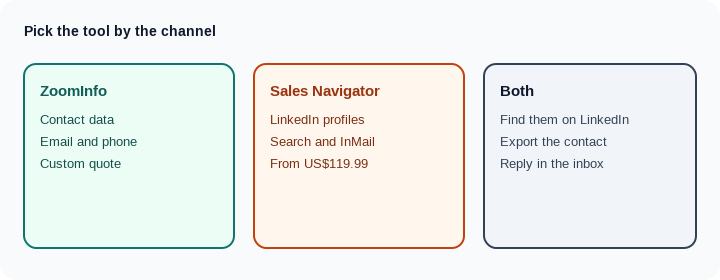
Quick answer. ZoomInfo is a B2B contact and company database (emails, phone numbers, intent signals) sold as custom packages priced by features, licenses, and credits. Sales Navigator is LinkedIn's own search, lead-list, and InMail tool on live LinkedIn profiles, from US$119.99 per license per month. Pick ZoomInfo when the outreach channel is email or phone at scale; pick Sales Navigator when the conversation happens on LinkedIn; many enterprise teams run both.
Narrow is a LinkedIn inbox tool with labels, reminders, a pipeline and an AI Auto Screener.
See how Narrow worksWhat each one is
ZoomInfo's pricing page, checked 27 November 2026, does not publish a dollar price. The hero describes flexible packages across B2B contact and company data. The FAQ says price is based on features and functionality, the number of licenses, and credit usage. That is a custom quote. See the vendor site. This guide does not name ZoomInfo plan tiers, because the page does not publish a price menu.
A credit is one export of a professional or company profile, from the ZoomInfo platform, the ReachOut Chrome extension, or an API call from an integration such as a CRM. Credits are spent only when that profile is exported to a CSV or to an application such as Excel or a CRM. A package includes a predetermined number of monthly credits. The page does not print the number. Payment frequency is worked out with sales. Streaming Intent is an add-on, priced on the keywords and accounts you track. Pre-packaged CRM, sales, and marketing integrations "typically have a base cost" and require a minimum purchase of bulk credits. The same page advertises "Accurate email addresses, direct dial phone and mobile phone numbers."
The free-trial page says ZoomInfo gives access to "500M+ contacts globally and 110M+ companies." That is ZoomInfo's figure. It also says "No credit card required," and that a new-user trial is typically 7 days, though the length can vary. The trial includes contact and company search, intent signals, and email outreach, with usage limits.
Sales Navigator's compare-plans page, marked "Updated: September 27, 2026," names three plans. Core, for individual sellers, starts at US$119.99 per license per month, or US$1,079.88 per year. Advanced, for sales teams, starts at US$159.99 per license per month, or US$1,799.88 per year. Advanced Plus, for teams on an integrated CRM, is "Request demo for pricing." LinkedIn says that quote depends on team size, CRM integration, and onboarding. The dollar figures are estimates and may exclude VAT or GST.
Every plan lists 50 InMails a month. Advanced Search Filters (50+), Account IQ and Lead IQ, Relationship Explorer, Relationship Map, Alerts, and Message Assist are on all three. Buyer Intent, TeamLink, Smart Links, team seat management and centralized billing, team reporting, and CSV upload of a book of business are on Advanced and Advanced Plus. Advanced Plus is the only plan with Advanced CRM Integrations ("Integrates with Salesforce, HubSpot, Microsoft Dynamics, Oracle, and more"), lead and contact creation in the CRM, CRM Embedded Experiences and Profiles, and Sales Navigator for Microsoft Teams. Sales Navigator Help limits that CRM integration to Advanced Plus. Details are in LinkedIn CRM integration.
The compare page lists no email or phone credit. See is LinkedIn Sales Navigator worth it, LinkedIn Sales Navigator alternatives, and Apollo vs LinkedIn Sales Navigator.
Side-by-side
| ZoomInfo | Sales Navigator | |
|---|---|---|
| What it is | A B2B contact and company database, sold as packages. No public dollar price on the pricing page. | LinkedIn search, saved leads and accounts, alerts, and InMail. |
| Data source | ZoomInfo's database. The free-trial page claims "500M+ contacts globally and 110M+ companies." | Live LinkedIn profiles, searched inside Sales Navigator. |
| Main channel | Email and phone. The pricing page describes phone and email outreach. The trial includes email outreach. | LinkedIn messages and InMail. |
| Contact info (emails, phones) | The pricing page advertises email addresses, direct-dial phone numbers, and mobile numbers. Exporting a profile costs one credit. | Not an email or phone database. The compare page lists no email or phone credit. You message the member on LinkedIn. Addresses people publish themselves are in how to find someone's email on LinkedIn. |
| Intent signals | Streaming Intent is an add-on, priced on expected usage. The page also advertises buying intent signals. | Buyer Intent on Advanced and Advanced Plus. Not on Core. |
| InMail | Not stated. The pricing page does not mention InMail. | 50 a month on Core, Advanced, and Advanced Plus. How those credits are spent is in LinkedIn InMail credits. |
| CRM sync | The FAQ says integrations can sync ZoomInfo data into CRMs. Pre-packaged integrations typically have a base cost and a minimum bulk-credit purchase. It does not name one required tier. | Advanced Plus only, including Salesforce, HubSpot, Microsoft Dynamics, Oracle, and more. |
| Pricing model, as of 27 Nov 2026 | Custom quote. See the vendor site. FAQ: features, licenses, and credits. No dollar price published. | Core US$119.99 per license per month (US$1,079.88 a year). Advanced US$159.99 a month (US$1,799.88 a year). Advanced Plus: request a demo. Estimates; may exclude VAT or GST. |
| Free trial | Typically 7 days for new users. Length may vary. No credit card. Includes contact and company search, intent signals, and email outreach, with usage limits. | A Core or Advanced trial exists. Who can start one is in the Sales Navigator free trial guide. This page does not restate the rules. |
Pick ZoomInfo if
- The next message is an email or a phone call, and you want that address from a database.
- You will export profiles to a CSV, Excel, or a CRM, and a credit per export is acceptable.
- You want Streaming Intent as an add-on, priced on the keywords and accounts you track.
- You can accept a custom quote. ZoomInfo does not publish a seat price.
Pick Sales Navigator if
- You need the live LinkedIn profile: current title, mutual connections, a job change.
- The outreach is an InMail or a normal LinkedIn message. Every plan lists 50 InMails a month, and that credit is not an email address.
- You want TeamLink, Smart Links, team reporting, or a CSV upload of your book of business. Those are Advanced and Advanced Plus, not Core.
- The CRM has to receive the record. That is Advanced Plus only.
The filter and list routine is in how to use LinkedIn Sales Navigator.
Use both if
You already know the account, and you will run two tools on purpose. They do not replace each other.
- Decide the channel first. Email or phone points at ZoomInfo. A conversation that has to stay on LinkedIn points at Sales Navigator.
- Find the account and a short list of people in Sales Navigator, and save them so alerts have something to attach to.
- Open the LinkedIn profile and check the title. Sales Navigator is reading LinkedIn. ZoomInfo is reading its own database.
- If the next step is email or a call, export that profile from ZoomInfo. The FAQ says the export costs one credit. This page does not invent how many credits a package includes.
- Send from your own email or phone. If they reply on LinkedIn, or you spent an InMail, the exported row is not the thread. The reply lives in LinkedIn.
ZoomInfo does not become your LinkedIn inbox. Sales Navigator does not become your email and phone database.
What LinkedIn's extension rule says
Prohibited software and extensions says LinkedIn does not permit third-party software, including browser extensions, that scrapes the site, changes how it looks, or automates activity on LinkedIn. Members who use tools for those purposes risk a restricted or shut-down account, and the tool may stop working without notice. That is a rule about the method.
ZoomInfo's credits FAQ says an export can start from the ReachOut Chrome extension. Read that next to LinkedIn's rule and decide for your own account. This page does not say ZoomInfo's extension violates the rule.
After someone replies on LinkedIn
Neither tool is a LinkedIn inbox workflow. A reply to a Sales Navigator InMail lands in the Sales Navigator inbox, which is a separate Messaging screen from the regular LinkedIn inbox. The database row in ZoomInfo does not hold that thread.
We build Narrow. Narrow is a LinkedIn inbox tool. On Super Pro it puts the Sales Navigator inbox next to regular LinkedIn messages, with labels, follow-up reminders, pipeline stages, and the AI Auto Screener. The Auto Screener classifies each new message as Lead, Network, Cold, or Broadcast. It does not send. Narrow does not provide contact data, emails, or phone numbers, and it does not replace ZoomInfo or Sales Navigator. See pricing and Sales Navigator inbox management.
Sources (checked 27 November 2026)
- Sales Navigator plans and pricing (page says updated 27 September 2026)
- Integration between Sales Navigator and your CRM
- ZoomInfo pricing
- ZoomInfo free trial
- Prohibited software and extensions
Common questions
Is ZoomInfo better than Sales Navigator?
No single winner. They are different products. ZoomInfo is a contact and company database for email and phone. Sales Navigator is LinkedIn search and InMail on live profiles. Buy ZoomInfo when the next message is an email or a call. Buy Sales Navigator when the conversation has to happen on LinkedIn. Many teams pay for both.
Does Sales Navigator give you email addresses?
No. The Sales Navigator compare-plans page does not list an email or phone credit. Outreach on that page is InMail, 50 a month on Core, Advanced, and Advanced Plus. An address a member chooses to publish is a different path, covered in the guide on finding an email on LinkedIn.
How much does ZoomInfo cost?
ZoomInfo does not publish a dollar price. Its pricing FAQ says the price is based on features and functionality, the number of licenses, and credit usage. Treat it as a custom quote and check the vendor site. Each export of a contact or company profile costs one credit.
Can you use ZoomInfo and Sales Navigator together?
Yes. Use Sales Navigator to find the person on a live LinkedIn profile, and ZoomInfo when you need to export an email or a phone number. They do not share an inbox. A reply on LinkedIn still has to be worked in LinkedIn or in the Sales Navigator inbox.
Which one has intent data?
Both, on different terms. Sales Navigator lists Buyer Intent on Advanced and Advanced Plus, not on Core. ZoomInfo's pricing FAQ describes Streaming Intent as an add-on, priced on expected usage around the keywords and account universe you track.
Does Narrow connect to ZoomInfo?
No. Narrow does not connect to ZoomInfo and does not sell contact data, emails, or phone numbers. It is a LinkedIn inbox tool. On Super Pro it puts the Sales Navigator inbox next to regular LinkedIn messages, with labels, follow-up reminders, pipeline stages, and the AI Auto Screener.
Narrow is a LinkedIn inbox tool with labels, reminders, a pipeline and an AI Auto Screener.
See how Narrow works